6
7090 7090
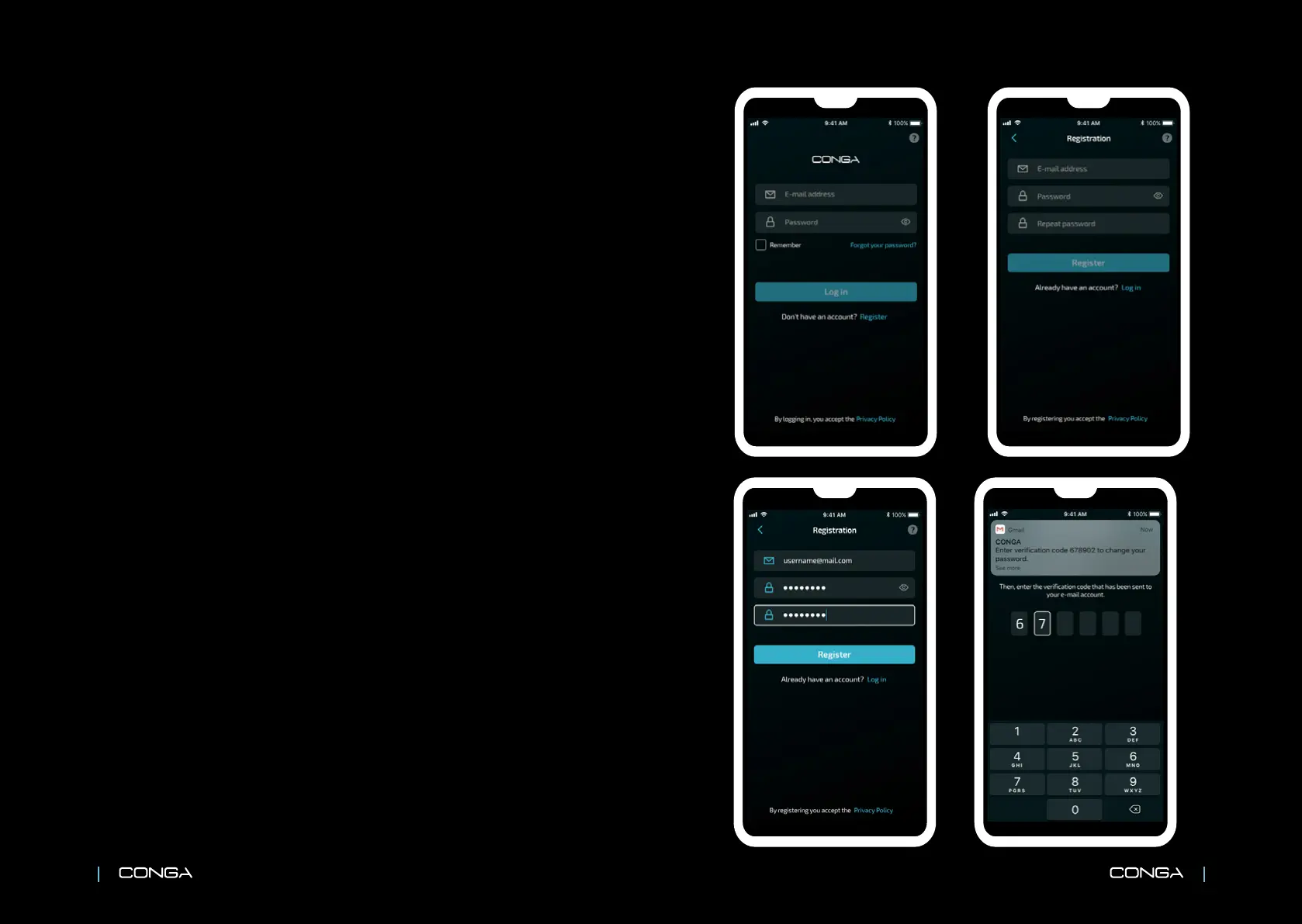
ES REGISTRO EN LA APP
Regístrate en la App pulsando sobre
“Registrar”. En la siguiente pantalla,
introduce un correo electrónico y una
contraseña.
Luego, introduce el código de
vericación que se te ha enviado al
correo registrado.
EN APP REGISTRATION
Tap “Register” to sign up. Enter an
e-mail address and a password.
Then, enter the verication code that
has been sent to the registered e-mail.
FR S’INSCRIRE SUR L’APP
Inscrivez-vous sur l’App en appuyant
sur « S’inscrire ». Ensuite, introduisez un
e-mail et un mot de passe.
Puis introduisez le code de vérication
que nous avons envoyé à l’e-mail
enregistré.
DE APP-REGISTRIERUNG
Registrieren Sie sich in der App, indem
Sie auf “Registrieren” Drücken Geben
Sie auf dem nächsten Bildschirm eine
E-Mail und ein Passwort ein.
Danach, geben Sie dann den
Verizierungscode ein, der an Ihre
registrierte E-Mail gesendet wurde.
IT REGISTRAZIONE ALLA APP
Registrati alla App premendo su
“Registrati”. Sul seguente display,
introduci e-mail e password.
Inserisci il codice di verica che è stato
inviato all’ indirizzo e-mail registrato.
PT REGISTAR-SE NA APP
Registe-se na App pressionando sobre
“Registar”. No seguinte ecrã, introduza
um e-mail e uma senha.
A seguir, introduza o código de
vericação que foi enviado ao seu
e-mail.
NL REGISTREREN IN DE APPLICATIE
Druk op “Registreren” om u te
registreren in de applicatie. Voer in het
volgende scherm uw e-mailadres in en
een wachtwoord.
Voer daarna de bevestigingscode in die
u per e-mail hebt ontvangen.
PL REJESTRACJA W APLIKACJI
Zarejestruj się w aplikacji, klikając
„Zarejestruj się”. Na następnym ekranie
wprowadź adres e-mail i hasło.
Następnie wprowadź kod
werykacyjny, który został wysłany na
zarejestrowany e-mail.
CZ ZAREGISTROVÁNÍ V APLIKACI
Registrujte se v aplikaci stisknutím
“Registrovat”. Na další obrazovce vložte
vaši emailovou adresu a heslo.
Potom vložte kontrolní kód, který vám
byl zaslán na registrovaný email.
7








 To Next Page