FULL MAGMA SINGLE
48
ENGLISH
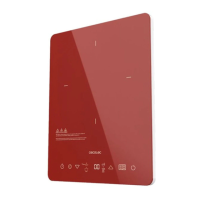
Control panel
Fig. 2
1. Function icon
2. Timer icon
3. Decrease icon
4. Increase icon
5. Child Lock
6. On/O icon
Switch-on
Plug in the AC cord, the hob will beep, and the indicators and display will ash for 1 second. The
display will show C and the induction hob will switch on.
On/O touch icon
- When the hob is connected to the power supply, press the On/O touch icon; the display
will light up and show ON. The hob will enter standby mode.
- In standby mode, the hob will stop operating if no function is selected within 30 seconds.
Function touch icon
- Press the Function touch icon to select temperature or power.
- After selecting the function, you can press the Increase (+) or Decrease (-) touch icons to
adjust the temperature or power.
Increase (+) / Decrease (-) touch icons:
- Both touch icons are used to adjust the temperature or power level. There are 10 power
levels from 200 W to 2000 W, and temperature levels from 60 ℃ to 240 ℃.
- The touch icons are also used to set the time in the timer function.
Timer touch icon
- Press the timer touch icon to select the timer setting (from 1 minute to 4 hours).
- Press the Increase (+) or Decrease (-) icon to adjust the operating time. Briey press +/-
to control the timer in 1-minute intervals, and press and hold +/- to control the timer in
10-minute intervals.
Lock touch icon
- At any time, press the Lock touch icon to lock the induction hob.
- If you press the Lock touch icon for 3 seconds, the induction hob will unlock and maintain
the same status as before.
How to choose the right cookware for induction cooking
- Use only cookware with a base suitable for the induction hob. Look for the induction
symbol on the packaging or at the bottom of the utensil.






 To Next Page