I 11
It is best to always make final adjustments in altitude by
moving the mount against gravity (i.e., using the rear latitude
adjustment screw to raise the mount). To do this you should
loosen both latitude adjustment screws and manually push
the front of the mount down as far as it will go. Tighten the
rear adjustment screw to raise the mount to the desired
latitude.
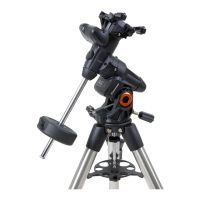
Adjusting the Mount in Azimuth
For rough adjustments in azimuth, simply pick up the
telescope and tripod and move it. For fine adjustments
in azimuth:
Turn the azimuth adjustment knobs located on either side of
the azimuth housing. While standing behind the telescope,
the knobs are on the front of the mount.
s4URNINGTHERIGHTADJUSTMENTKNOBCLOCKWISEMOVESTHE
mount toward the right.
s4URNINGTHELEFTADJUSTMENTKNOBCLOCKWISEMOVESTHE
mount to the left.
"OTHSCREWSPUSHOFFOFTHEALIGNMENTPEGONTHETRIPOD
head, which means you may have to loosen one screw while
tightening the other. The screw that holds the equatorial
mount to the tripod may have to be loosened slightly.
+EEPINMINDTHATADJUSTINGTHEMOUNTISDONEDURINGTHE
polar alignment process only. Once polar aligned, the mount
must NOT be moved. Pointing the telescope is done by
moving the mount in right ascension and declination, as
described earlier in this manual.
Attaching the Declination Cable
The Advanced VX mount comes with a cable that connects
the electronic control panel to the declination motor. To
attach the motor cables:
s,OCATETHE$ECLINATIONCABLEANDPLUGONEENDOFTHECABLE
into the port on the electronics panel labeled DEC Port.
s0LUGTHEOTHERENDOFTHECABLEINTOTHEPORTLOCATEDONTHE
declination motor.
Powering the Telescope
The Advanced VX mount can be powered by the supplied
car battery adapter or optional 12V AC adapter. Use only
adapters supplied by Celestron. Using any other adapter
may damage the electronics and will void your manufacturer’s
warranty.
1. To power the telescope with the car battery adapter
(or 12V AC adapter), simply plug the round post into
the 12V outlet on the electronic panel and plug the other
end into your car’s cigarette lighter outlet or portable
power supply.
2. Turn on the power to the telescope by flipping the switch,
located on the electronics panel, to the “On” position.







 To Next Page