12
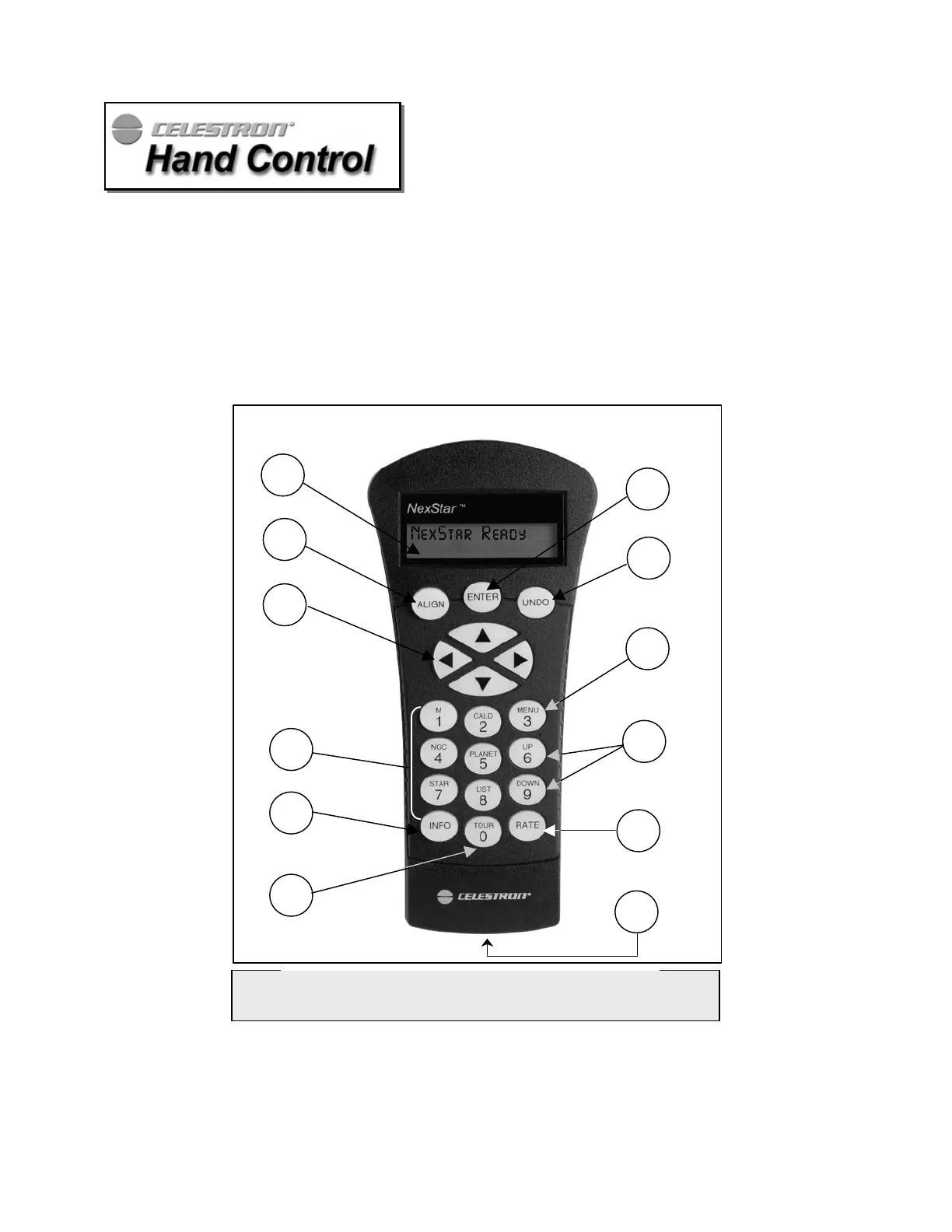
The NexStar 4 has a removable hand controller built into the side of the fork arm designed to give you instant access to all
the functions the NexStar has to offer. With automatic slewing to over 4,000 objects, and common sense menu
descriptions, even a beginner can master its variety of features in just a few observing sessions. Below is a brief description
of the individual components of the NexStar 4 hand controller
:
1. Liquid Crystal Display (LCD) Window: Has a dual-line, 16 character display screen that is backlit for comfortable
viewing of telescope information and scrolling text.
2. Align: Instructs the NexStar to use a selected star or object as an alignment position.
3. Direction Keys: Allows complete control of the NexStar in any direction. Use the direction keys to center objects in
the StarPointer finderscope and eyepiece.
4. Catalog Keys: The NexStar has a key on the hand control to allow direct access to each of the catalogs in its 4,000+
object database. The NexStar contains the following catalogs in its database:
Messier – Complete list of all Messier objects.
NGC – Select list of all the deep-sky objects in the Revised New General Catalog.
Figure 4-1
The NexStar Hand Control
1
2
3
4
5
6
7
8
11
12
9
10







 To Next Page