50
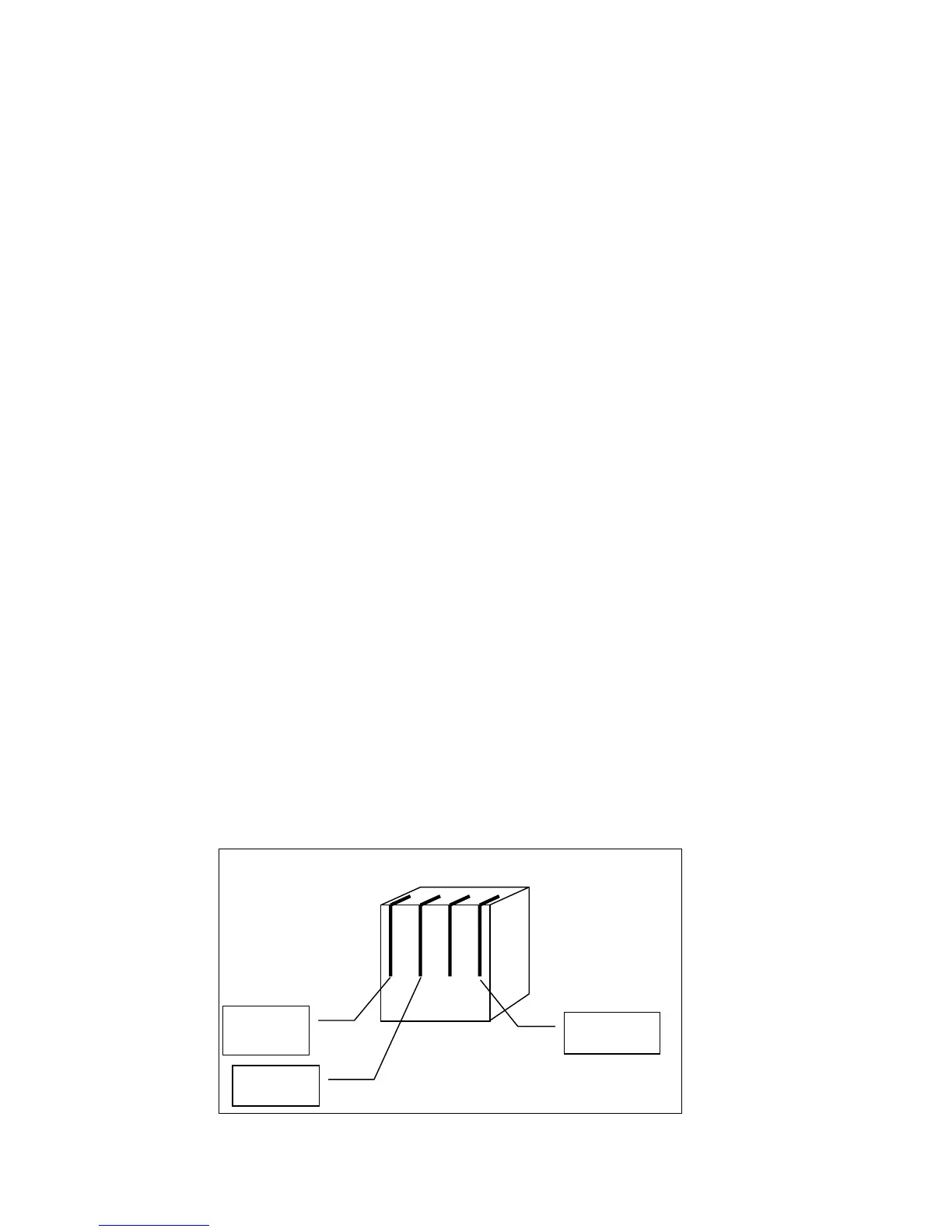
DB9 Pin 5
Ground
DB9 Pin 3
PC Transmit
DB9 Pin 2
PC
Receive
4-4 Modular
Phone Jac
A
A
p
p
p
p
e
e
n
n
d
d
i
i
x
x
D
D
-
-
R
R
S
S
-
-
2
2
3
3
2
2
C
C
o
o
n
n
n
n
e
e
c
c
t
t
i
i
o
o
n
n
To make a RS-232 connection with the NexStar , the hand control must be in RS-232 mode – which can be accessed
through the Menu button. Once in the RS-232 mode, the hand control still has the following abilities
• Direction buttons – Allowing you to move the telescope in both directions
• Rate changes – Allows you to change the telescope's rate of speed when using the direction buttons.
• Und – Use to escape from RS-232 mode.
Protocol:
NexStar5 communicates at 9600 bits/sec, No parity and stop bit.. All angles are communicated with 16 bit numbers
.
Before all commands, the following INITIALIZATION is necessary
• PC sends one byte (63=Ascii “?”) to check that NexStar is ready.
• NexStar responds with one byte (35) when NexStar is ready to respond. After NexStar sends a 35, the
buttons to the hand control do not respond until the command from the PC has been received, then the
direction, rate, and undo buttons are active.
Goto RA-Dec positions
• INITIALIZATION
• PC sends (82=Ascii “R”)
• PC sends the RA high byte, RA low byte, Dec high byte, Dec low byte.
• When the scope is finished slewing, it will send back a “@”.
Goto Alt-Az positions
• INITIALIZATION
• PC sends (65=Ascii “A”)
• PC sends the Azm high byte, Azm low byte, Alt high byte, Alt low byte.
• When the scope is finished slewing, it will send back a “@”.
Get RA-Dec positions:
• INITIALIZATION
• PC sends (69=Ascii “E”)
• NexStar sends the RA high byte, RA low byte, Dec high byte, Dec low byte.
Get Alt-Az positions:
• INITIALIZATION
• PC sends (90=Ascii “Z”)
• NexStar sends the Azm high byte, Azm low byte, Alt high byte, Alt low byte.



 To Next Page