11
V3.15.22
II.InstallationInstructions
TESTTHEUNITBEFOREINSTALLINGIT
1.
Removetheunitfromthebox.SAVETHEBOXANDPACKINGMATERIALS.
2.
Pluginthepower cord and let the unit run on a hard,flatsurface for no morethan5
minutes.
3.
Checktomakesurethatbothfans(oneinthefrontandoneattherearofthecoolingunit)
areblowing.
4.
Checkthatthecoolingunitisdischargingcoldairfromthefront (it should be
approximately10‐12°Fcolderthanthetemperatureonthedigitaldisplay)
5.
Please note: The cooling system is programmed with a 3‐Minute Delay at Startupto
protectitsinternalcomponents
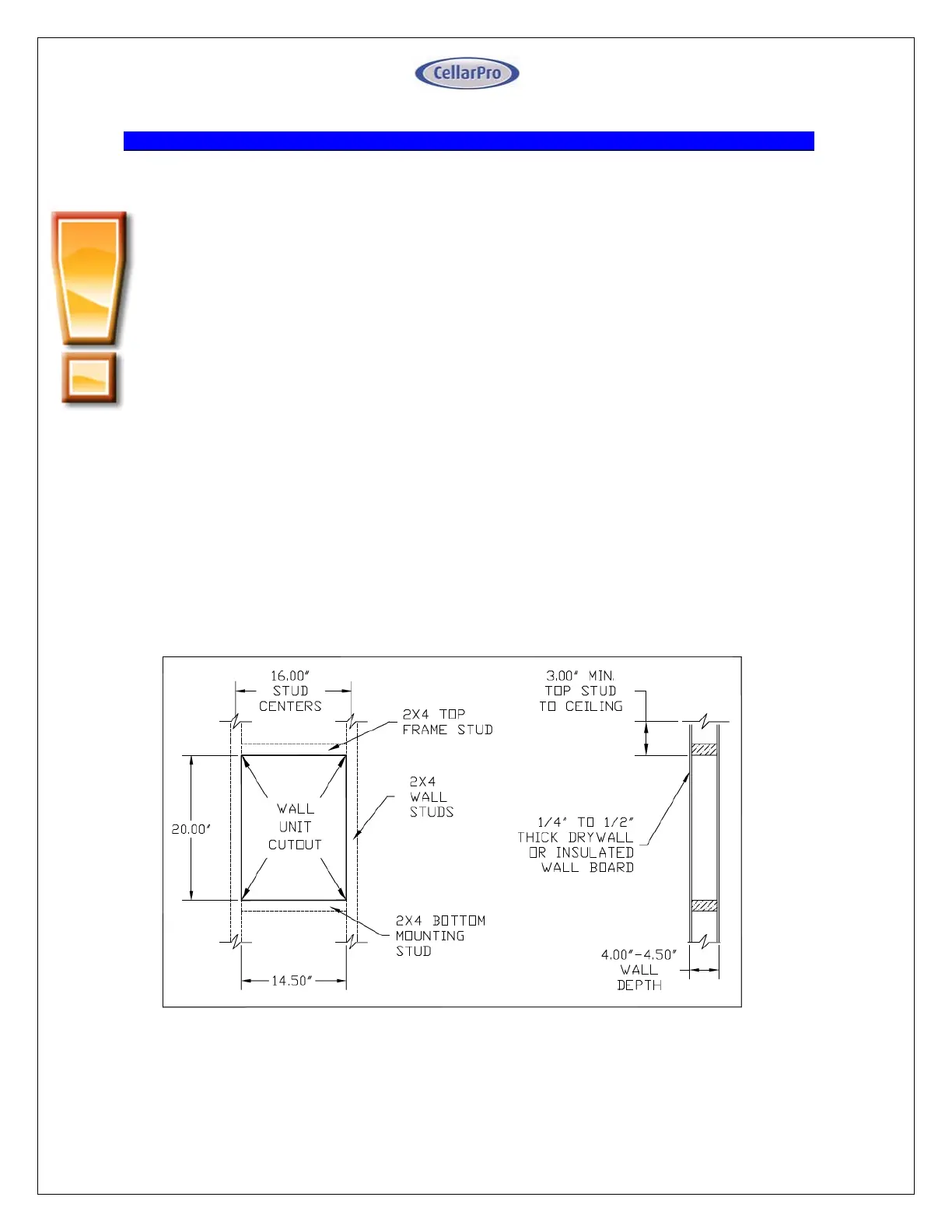
Cutaholeinthewallthatis1/4inchlargerthanthedimensions(WxH)ofthecoolingunit,
andcreateaframetosupporttherearofthecoolingunit.Therearofthecoolingunitshould
besupportedbythewallthroughwhichitisinstalled.Horizontal2x4inchbracesshouldbe
installedbetweenthestudsbelowandabovethecoolingunit.Ifthestudsinthewallmustbe
cuttoaccommodatethewidthofthecoolingunit,verticalbracesalsoshouldbeinstalledon
eithersideofthecoolingunit.
3200VS/4200VSSeriesFrameandCut‐OutDiagram


 To Next Page
 Loading...