Menu Overview
12
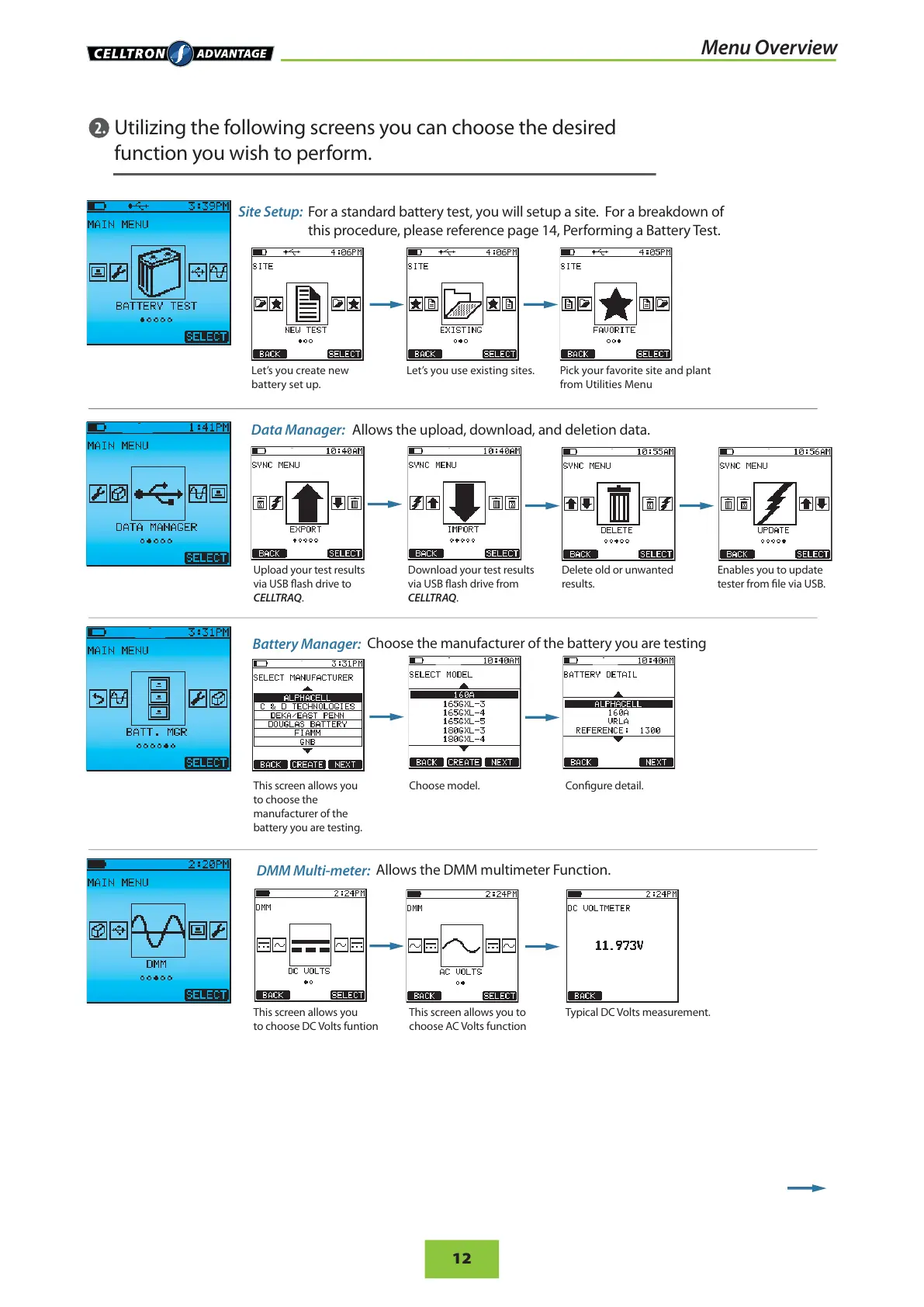
Data Manager:
Utilizing the following screens you can choose the desired
function you wish to perform.
Allows the upload, download, and deletion data.
Upload your test results
via USB ash drive to
CELLTRAQ.
Download your test results
via USB ash drive from
CELLTRAQ.
This screen allows you
to choose the
manufacturer of the
battery you are testing.
Choose model. Congure detail.
This screen allows you
to choose DC Volts funtion
This screen allows you to
choose AC Volts function
Typical DC Volts measurement.
Enables you to update
tester from le via USB.
Delete old or unwanted
results.
Site Setup:
For a standard battery test, you will setup a site. For a breakdown of
this procedure, please reference page 14, Performing a Battery Test.
Battery Manager:
Choose the manufacturer of the battery you are testing
DMM Multi-meter:
Allows the DMM multimeter Function.
2.
Pick your favorite site and plant
from Utilities Menu
Let’s you create new
battery set up.
Let’s you use existing sites.


 To Next Page