10
ENGLISH
B500ND
NR 18AW125
10
29990
3
BATTERY
RESET
SW:S1J96900
Pm = 661 bar
P
= 0 bar
Pm = 9587 psi
LED
ON
LED
OFF
* 1
* 2
* 3
* 4
* 5
* 6
* 7
8
9
10
11
P = 0 psi
Fm = 60.0 kN
F = 0.0 kN
Fm = 6.75 ton
F = 0.00 ton
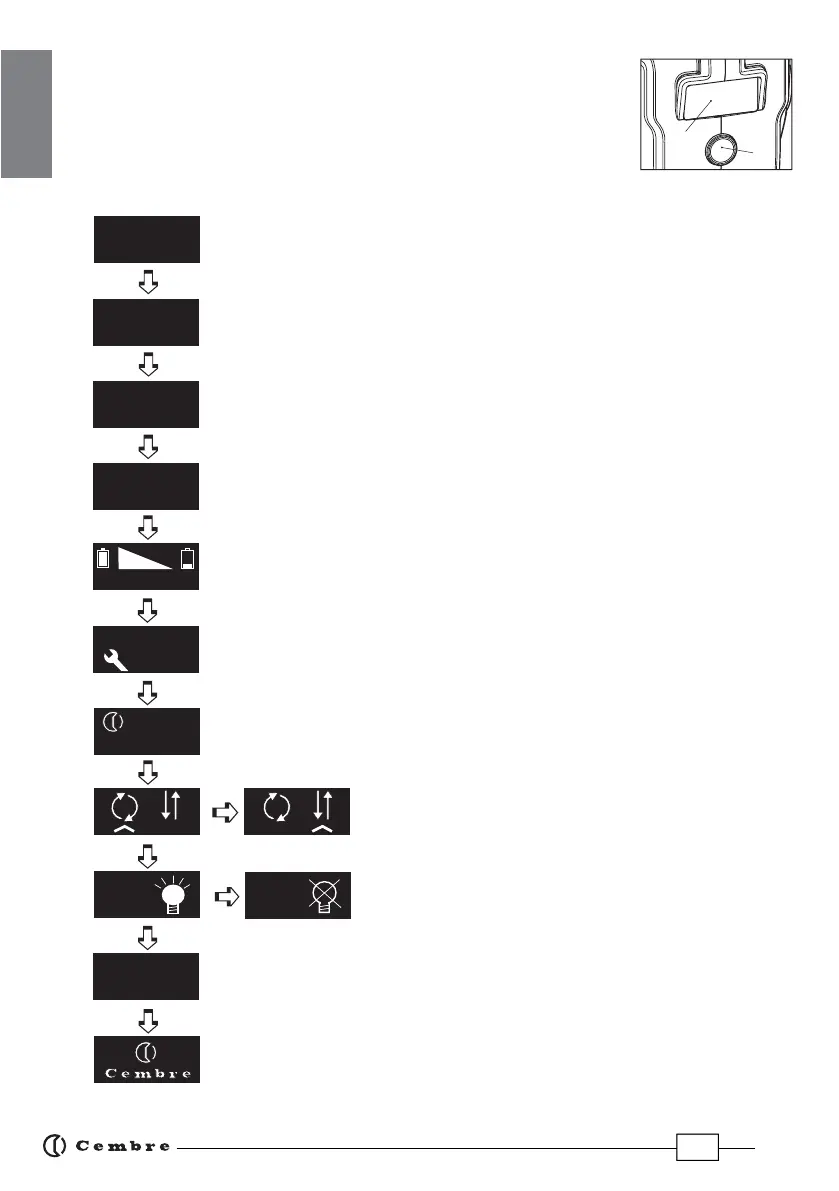
4. NAVIGATION MENU
The navigation menu is shown on the display (5). By touching the
button (7) it is possible to browse the menu via the various screens.
4.1) Structure of the "main menu"
Fm: Operating/minimum set force, expressed in kN.
F: Peak force reached, expressed in kN.
(screen as factory setting)
Fm: Operating/minimum set force, expressed in USA sh. tons.
F: Peak force reached, expressed in USA sh. tons.
Pm: Operating/minimum set pressure, expressed in bar.
P: Peak pressure reached, expressed in bar.
Pm: Operating/minimum set pressure, expressed in psi.
P: Peak pressure reached, expressed in psi.
Battery charge level.
No. of cycles performed.
No. of cycles before scheduled recommended maintenance.
Cembre logo, tool model.
Tool serial number.
Release mode set
(Ref. to section 4.2 for further details).
Enabling/disabling the LED Worklights.
(Ref. to section 4.3 for further details).
Return to original factory settings.
Firmware version (Ref. to section 4.4 for further details).
7
5


 To Next Page