EasyManua.ls Logo

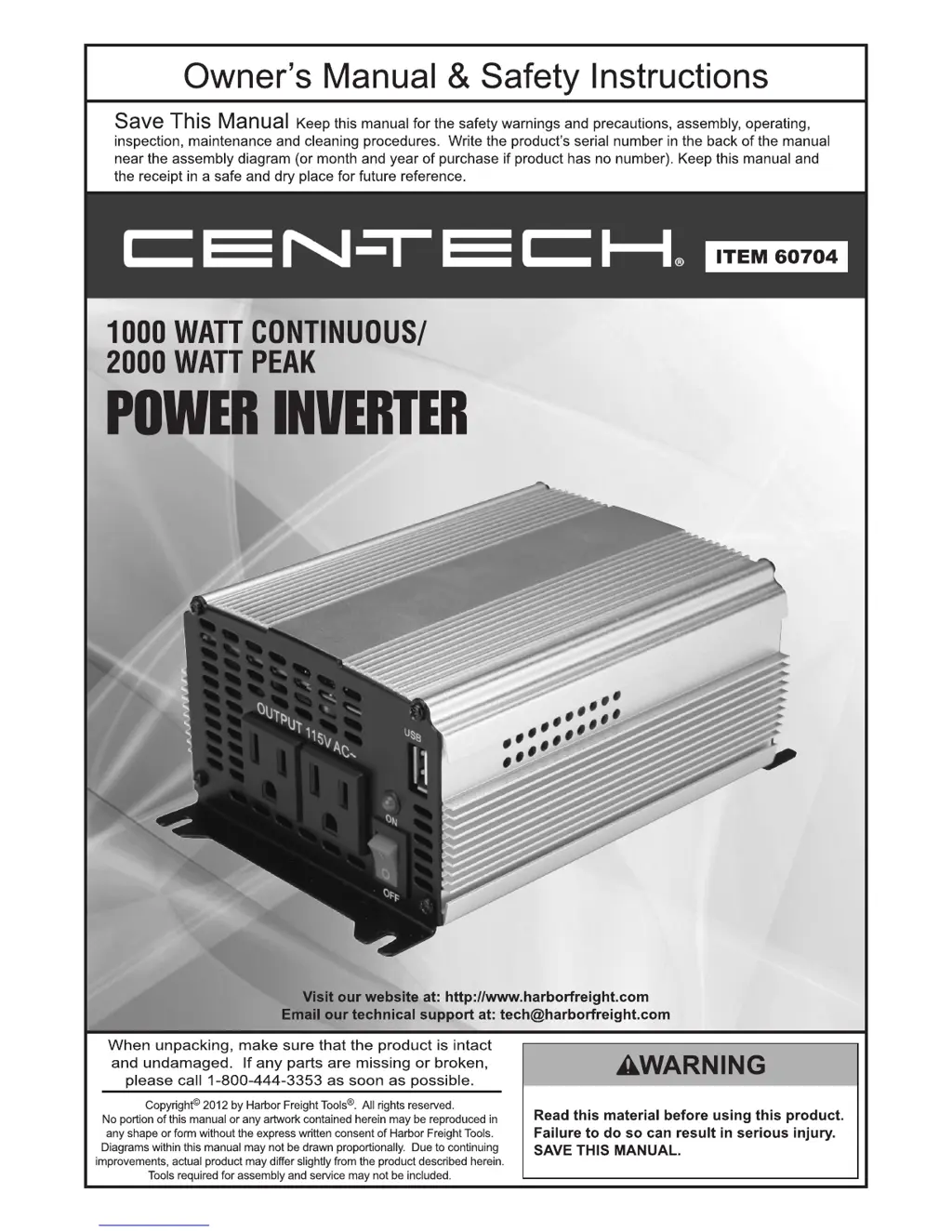
CEN-TECH 60704 - User Manual

CEN-TECH 60704
12 pages
Print Icon
To Next Page IconTo Next Page
Loading...

Questions and Answers

  • Q
    qwilliamsonJul 31, 2025
    Why does my CEN-TECH 60704 Inverter shut off during use?
    • H
      Holly MurphyJul 31, 2025
      If your CEN-TECH Inverter shuts off during use, it could be due to an excessive load. Try reducing the load to ensure it's less than the inverter's rated power. Another reason might be that the internal temperature is too high. In that case, let the inverter cool down for at least 30 minutes, ensure the fan isn't blocked, and that the inverter has sufficient ventilation.
  • W
    William ReedAug 5, 2025
    What to do if my CEN-TECH 60704 has no output voltage?
    • B
      Bryan MartinezAug 5, 2025
      If your CEN-TECH Inverter has no output voltage, begin by checking and securing all connections. Then, inspect the battery bank fuse and replace it if necessary. Also, low input voltage can cause this issue, so recharge or replace the battery. Another potential cause is a loose or corroded connection; clean and tighten any such connections. Finally, high input voltage may be the problem; remove the charging source and verify that the correct battery is being used and connected properly.
  • F
    flemingangelaAug 10, 2025
    Why CEN-TECH Inverter could not drive load?
    • D
      Daniel MurphyAug 10, 2025
      If your CEN-TECH Inverter could not drive load, this may be because the load power is too large. Try lowering the load level. Another reason may be that the AWG of the wire is too low, use appropriately-sized wire connections. Also, the start power of a device can be up to twice the rated power, reduce load, or change devices.
  • J
    Jennifer MorrisAug 15, 2025
    Why is the output voltage incorrect on my CEN-TECH 60704 Inverter?
    • B
      Benjamin RiosAug 15, 2025
      If the output voltage of your CEN-TECH Inverter is incorrect, it's likely because the input voltage is either too high or too low. Ensure that you maintain the input voltage at the required level.
  • C
    Craig AlvarezAug 20, 2025
    How to fix television static or speaker buzz with CEN-TECH Inverter?
    • D
      Diana SmithAug 20, 2025
      If your television picture is full of static or the speakers are buzzing when using a CEN-TECH Inverter, it may be due to television or radio interference. Try moving the Inverter away from the antenna and/or use a shielded antenna cable. Alternatively, the device may be incompatible; contact the device supplier to ensure it can operate on Modified Sine Wave Power.
  • J
    Jessica HerreraAug 25, 2025
    Why does my motor-operated device operate at incorrect speed with CEN-TECH 60704 Inverter?
    • J
      johnfarmerAug 26, 2025
      If a motor-operated device operates at an incorrect speed with your CEN-TECH Inverter, it could be because the load is only inductive. To solve this, operate a lamp or heater simultaneously to provide a more balanced load.

Summary

Owners Manual and Safety Instructions

Save and Reference This Manual

Keep this manual for safety, operating, and maintenance procedures. Record serial number for future reference.

Critical Safety Pre-Use Warning

Essential warning to read safety material before product use to prevent serious injury or death.

Product Specifications

Input and Output Specifications

Details on voltage, wire gauge, fuses, power ratings, receptacles, and waveform for the inverter.

Safety Symbol Definitions

Hazard Alert Symbol Meanings

Explains DANGER, WARNING, CAUTION, and NOTICE symbols to identify potential hazards and safety practices.

Important Safety Instructions

General Safety Precautions

Advises on pacemakers, California Proposition 65 chemicals, and the importance of common sense for safe operation.

Installation Safety Guidelines

Crucial steps for safe inverter installation, covering location, ventilation, wiring, grounding, and avoiding specific environments.

Battery Precautions

Safe Battery Handling and Connection

Safety measures for working near batteries, including protective gear, proper storage, and connection methods.

Operation Precautions

Guidelines for Safe Inverter Operation

Precautions for operating the inverter, including load management, device compatibility, and monitoring during use.

Service Precautions

Maintenance and Servicing Safety

Safety advice for maintenance, emphasizing not opening the housing, using qualified personnel, and replacing fuses correctly.

Symbology Guide

Electrical Symbol Explanations

Defines common electrical symbols used in the manual such as Double Insulated, CSA, UL, Volts AC/DC, and Grounding.

Output Waveform Information

Understanding Modified Sine Wave

Explains the inverter's modified sine wave output and its compatibility with various electronic devices and motors.

Installation Guide

Inverter Placement and Grounding

Instructions on selecting a safe location, proper grounding, and choosing the correct battery types for the inverter.

Battery Capacity and Bank Setup

Battery Bank Assembly Instructions

Guidance on selecting battery capacity, safety rules for battery bank assembly, and parallel connection methods.

Operating the Inverter

Step-by-Step Operating Procedures

A guide on how to safely connect devices, turn on the inverter, manage loads, and monitor performance during operation.

Device Power Consumption

Typical Wattage Requirements

A reference table showing approximate power consumption for common devices to aid in load planning for the inverter.

Maintenance and Servicing Procedures

Pre-Use Inspection and Cleaning

Essential checks for inverter condition before each use and how to clean the exterior surfaces safely.

Critical Servicing Safety Warnings

Emphasizes safety during maintenance, including electrical shock prevention, avoiding housing access, and proper component disposal.

Troubleshooting Common Issues

Problem Diagnosis and Solutions

Lists common inverter problems, their potential causes, and recommended solutions for effective troubleshooting.

Record Product Serial Number

Instruction to record the product's serial number or purchase date for service and warranty purposes.

Limited 90 Day Warranty

Warranty Terms and Claim Process

Outlines the terms of the 90-day warranty, including coverage, exclusions, and how to make a claim.

CEN-TECH 60704 Specifications

General IconGeneral
BrandCEN-TECH
Model60704
CategoryInverter
LanguageEnglish

Related product manuals