This document describes the Centrios™ 6311511 Weather Station, a device designed to provide indoor and outdoor temperature readings, weather forecasts, and an atomic clock function. The weather station comes with a main unit and a remote sensor, with the capability to support up to three sensors in total (additional sensors sold separately). A notable feature of the remote sensor is its ability to withstand deep freeze temperatures down to -40°C (-40°F), making it suitable for a wide range of climates.
Function Description:
The primary function of the Centrios™ Weather Station is to monitor and display environmental data. It provides:
- Indoor and Outdoor Temperature: The main unit displays the indoor temperature, while the remote sensor transmits the outdoor temperature. Both current, maximum, and minimum temperatures can be viewed.
- Weather Forecast: The station offers a 12 to 24-hour weather forecast based on barometric pressure trend readings. This forecast is represented by icons such as Clear, Partially Cloudy, Cloudy, and Rainy.
- Atomic Clock: The clock is designed to synchronize automatically with the WWVB-60 radio signal generated from the atomic clock in Fort Collins, Colorado. This ensures accurate timekeeping. The clock receives radio signals whenever it is within 3200 km (2000 miles) of a signal. Users can set their local time zone, and the clock will adjust itself accordingly.
- Alarm Function: The device includes an alarm with a snooze feature. The alarm can be set, toggled ON/OFF, and silenced for 8 minutes using the snooze button or turned off for 24 hours by pressing any other key.
- Moon Phase Display: The weather station can display the moon phase for the current, next, or previous day, and allows scanning through years from 2001 to 2099.
Usage Features:
The main unit features a clear LCD display and several control buttons for easy operation:
- SNOOZE Button: Used to silence the alarm for 8 minutes.
- MODE Button: Allows users to change settings and toggle through different display modes. Holding it for 2 seconds enables setting the time zone, hour, minute, year, month, day, and language. It can also be used to switch between viewing the clock with seconds or with weekday display modes.
- MEM Button: Used to view current, maximum, and minimum temperature records for both indoor and outdoor temperatures. Holding it for 2 seconds clears these records.
- CHANNEL Button: Allows switching between remote sensor displays if multiple sensors are connected. It can also be used to manually select a sensor or activate/deactivate auto-scan between sensors. Holding it for 2 seconds activates auto-scan, displaying each sensor's data in sequence.
- RESET Button (Back View): Resets the unit to its default settings.
- Alarm Buttons (Back View): Three buttons for alarm control: one to view alarm status and set the alarm, and another to toggle the alarm ON/OFF.
- e / d Buttons (Back View): Used to increase or decrease settings, activate/deactivate clock reception signals, and scan moon phases.
The remote sensor is designed for outdoor placement and includes:
- LED Status Indicator: Flashes when data is being transmitted.
- Channel Switch: Allows selecting a different channel for each sensor, supporting up to three sensors.
- RESET Button: Resets the sensor.
- Battery Compartment: Houses the batteries.
- Wall Mount Hole: For easy installation.
Getting Started and Setup:
- Main Unit Battery Installation: Open the battery compartment, insert 4 x AA 1.5V batteries, matching the polarity, and close the compartment. An icon on the LCD indicates low main unit battery.
- Remote Sensor Setup: Slide open the battery compartment, insert 2 x AA 1.5V batteries, set the channel switch (1-3), place the sensor near the main unit, press RESET on the sensor, slide shut the battery compartment, and then place the sensor in the desired outdoor location using its table stand or wall mount.
- Sensor Placement Recommendations: For optimal performance, place the sensor out of direct sunlight and moisture, within 30 meters (98 feet) of the main unit, facing the main unit to minimize obstructions, with a clear view to the sky, and away from metallic or electronic objects. During cold winter months, positioning the sensor closer to the main unit is advised as below-freezing temperatures can affect battery performance and signal transmission.
- Battery Type: Alkaline batteries are recommended for longer performance. However, for temperatures between -20°C (-4°F) and -40°C (-40°F), lithium batteries are recommended as alkaline batteries may freeze.
Clock Reception and Time Zone:
- Atomic Clock Synchronization: The clock automatically synchronizes with the WWVB-60 radio signal.
- Toggle Clock Reception: Press and hold the 'e' button for 2 seconds to turn ON clock reception (reception signal icon displayed). Press and hold the 'd' button for 2 seconds to turn OFF clock reception (reception signal icon disappears).
- Time Zone Setting: After holding MODE for 2 seconds, users can select their time zone (Alaskan, Pacific, Mountain, Central, Eastern, Atlantic, Newfoundland). Note that Alaskan, Newfoundland, and Atlantic time zones cannot be set automatically; for these, clock reception must be turned OFF, and the clock set manually.
Sensor Data and Wireless Range:
- Data Transmission: The sensor sends data every 40 seconds, indicated by its flashing LED.
- Reception Status Icons: The main unit displays icons to indicate sensor reception status: searching for sensors, at least one channel found, Channel 1 selected, or no signal received.
- Wireless Range: Wireless ranges can be affected by extreme cold temperatures, which may temporarily reduce the effective range. The unit will resume proper functioning once the temperature returns to the normal range, with no permanent damage occurring due to low temperatures.
Maintenance Features:
- Battery Replacement: The device indicates when main unit batteries are low, prompting replacement.
- Reset Functionality: The RESET button on both the main unit and the remote sensor allows users to return the units to their default settings, which can be useful for troubleshooting or re-initialization.
- Troubleshooting Sensor Connection: If the sensor is not found, users are advised to check batteries, obstructions, and the remote unit's location.
- Cleaning: The manual advises against immersing the unit in water or cleaning it with abrasive or corrosive materials. If liquid spills, it should be dried immediately with a soft, lint-free cloth.
- Internal Components: Users are warned not to tamper with the unit's internal components, as this will invalidate the warranty and may cause damage. The unit contains no user-serviceable parts.
- Battery Usage: Only fresh batteries as specified should be used, and new and old batteries should not be mixed.
- Placement Precautions: Avoid subjecting the unit to excessive force, shock, dust, temperature, or humidity. Be cautious when placing the product on wood surfaces with certain finishes, as damage may occur.
This Centrios™ Weather Station is designed for reliable and user-friendly operation, providing essential weather and time information with advanced features like atomic clock synchronization and robust sensor performance in varying temperatures.

 Need help?
 General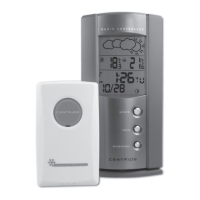

 To Next Page