Tehničke upute REGULACIJA Cm Pelet-set
7
Adjusting the parameters
Technical instructions REGULATION Cm Pelet-set
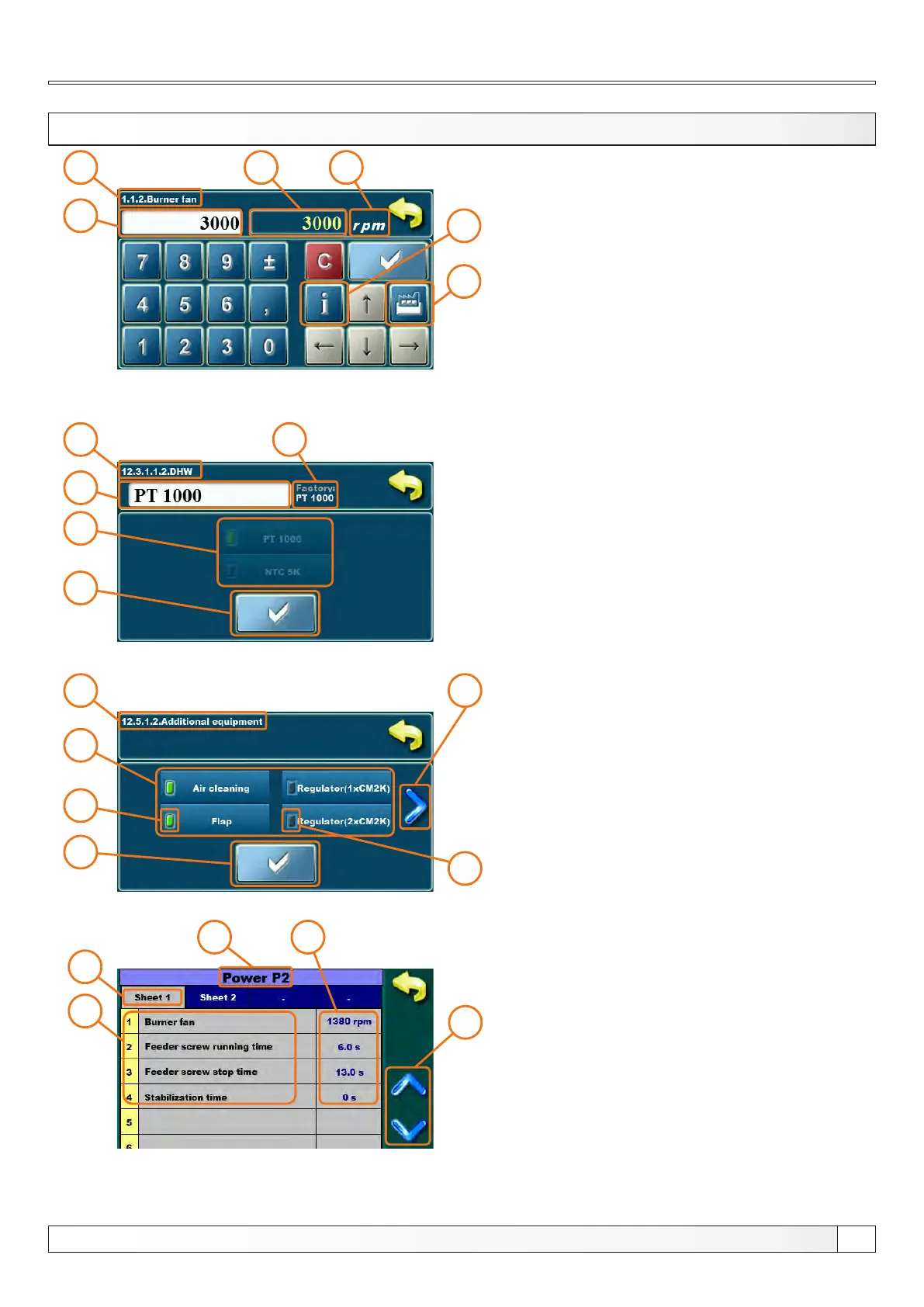
1 -parameter you are adjusting
2 - value adjustment box
3 - set value
4 - value type
5 - info button (displays factory, min. and max. values)
6 - resets the current value to the factory value
1
2
3
4
5
6
1 - parameter you are adjusting
2 - value adjustment box
3 - selected option (only one option can be selected)
4 - confirm button
5 - factory value
1
2
4
3
5
1
5
3
2
4
6
1 - parameter you are adjusting
2 - items that can be enabled
3 - next page button
4 - confirm button
5 - selected (enabled) item
6 - deselected (disabled) item
1
2
3
4
5
1 - parameter you are adjusting
2 - switch between sheets (only for parameters which
have multiple sheets)
3 - parameter description
4 - parameter current value (press 2 times to enter
adjusting mode)
5 - up/down scroll buttons
ADJUSTING PARAMETERS METHODS (examples)
NOTE: after parameter changing press the "CONFIRM" button to store new value. If you don't want to save the set
value, press "BACK" button.


 To Next Page