Supply voltage
Standby current
Maximum current
Operating temperature
Operating humidity
Output relay rating
Open collector rating
Housing material
Degree of protection
Code length
Memory capacity
Memory retention
Output pulse range
Token codes
1. All outputs active, SmartSwitches on Ch2 & Ch3 2. Non-condensing
3. Non-inductive load
12V - 24V AC/DC
32mA
180mA1
-15C to +55C
0-90%2
1 x 3A @ 50V3
2 x 50mA @ 24V
Polycarbonate
IP55
one to ten digits
1000 unique non-volatile codes
>200 years
1 - 255s adjustable, or latched
1 - 254 activations
5. Technical specifications
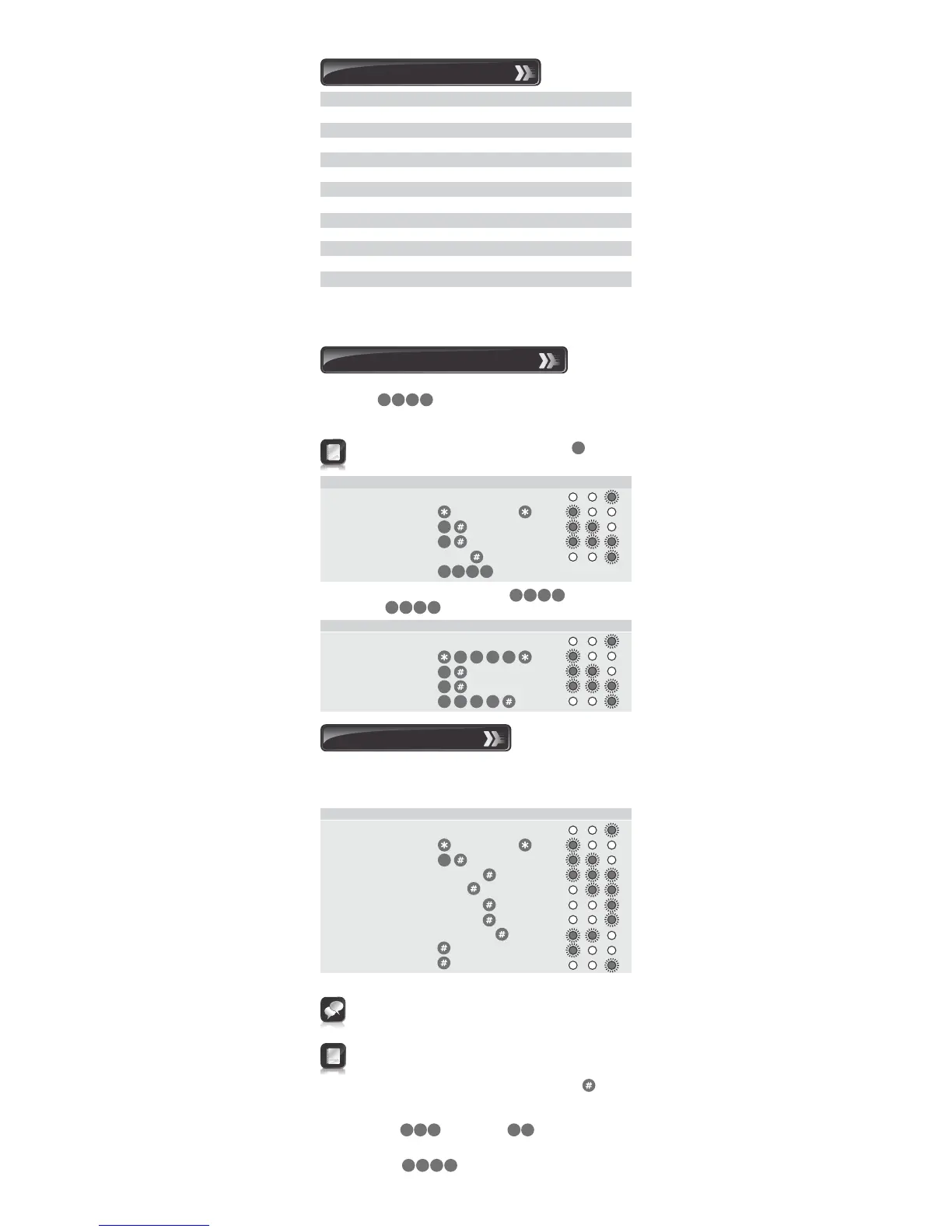
The following procedure will enable the user to change the default
Master Code or the currently stored Master Code to a new
Master Code. The Master Code may also be learned into the system by
following the procedure in Section 8 ‘Adding a New User’.
Example: Replace the default Master Code with a new
Master Code =
6. Changing the Master Code
The Master Code must always be stored at address
The Master Code can be used as a normal access code
Indicator LEDs
Indicator LEDs
0
3 41 2
1. Enter Program Mode
2. Select KwikLearn
3. Enter address
4. Enter access code
Enter the following keystrokes:
0
0
3 7 8 1
3 4
1
1. Enter Program Mode Master Code
2. Select KwikLearn
3. Enter address
4. Enter new code Code
1
Default Master Code=
Enter the following keystrokes:
0
0
1 2
3 41 2
3 41 2
8 13 7
If no channel is specified, Channel 1 is selected
If the number of accesses is not specified in Step 6, unlimited
access is set. Care must be taken to ensure the desired access
limit is correctly applied
If unlimited accesses are required, only enter at
Step 6.
The following procedure will add a new access code at a specified
address, assign which channel the code must activate and how many
accesses are allowed before the code becomes invalid.
Indicator LEDs
7. Adding a new user
1. Enter Program Mode Master Code
2. Select Add Menu
3. Enter user address Address
4. Enter access code Code
5. Select channel Channel
6. Assign channel Channel
6. Enter access limit [Accesses]
7. Exit Add Menu
8. Exit Program Mode
Enter the following keystrokes:
1
Repeat steps 3 - 6 for additional users
[ ] denotes optional features
Example:
Add access code into address
The code must operate Channel 2
Code is valid forever
Master Code=
75 12 0
3 41 2


 To Next Page