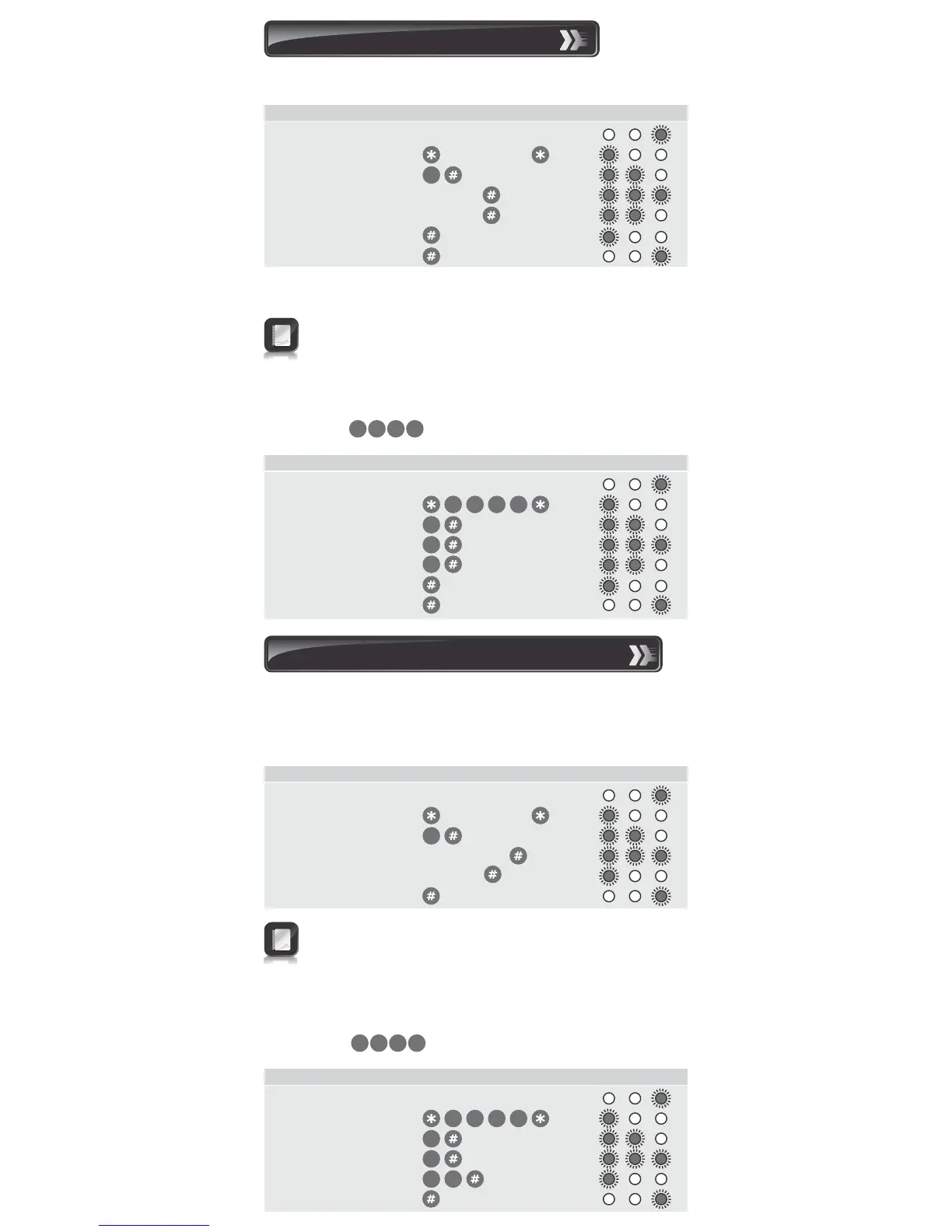
Sets the output pulse time of the output channels. Default setting is
one second pulse.
9. Setting the output timers
Once transmission has ended, repeat Steps 3 and 4 for additional
channels.
Indicator LEDs
1. Enter Program Mode Master Code
2. Select Output Menu
3. Enter channel Channel
4. Enter pulse time Seconds
5. Exit Output Menu
6. Exit Program Mode
Enter the following keystrokes:
3
A pulse time of zero seconds will give latched output
Maximum pulse time is 255 seconds
Example:
Pair Channel 1 with a NOVA receiver, allowing for a transmission
duration of ten seconds.
Master Code=
Indicator LEDs
1. Enter Program Mode
2. Select Output Menu
3. Enter Output channel
4. Enter pulse time
5. Exit Output Menu
6. Exit Program Mode
Enter the following keystrokes:
3
1
1
3
2
4
3 41 2
The following procedure sets the number of wrong access codes that
the SMARTGUARD will accept before becoming inactive, as well as
the time for which it will remain inactive. The factory default for wrong
access codes is three, while the default reset time is 60 seconds.
Indicator LEDs
10. Setting the anti-hack parameters
1. Enter Program Mode Master Code
2. Select Lockout Menu
3. Enter number of codes Wrong codes
4. Enter Reset Time Seconds
5. Exit Program Mode
Enter the following keystrokes:
4
Indicator LEDs
Example:
Set wrong code alarm to activate after five incorrect codes have
been entered. The unit must reactivate after 30 seconds.
Master Code=
1. Enter Program Mode
2. Select Lockout Menu
3. Enter number of codes
4. Enter Reset Time
5. Exit Program Mode
Enter the following keystrokes:
4
5
3 0
1
3
2
4
3 41 2
If the Number of wrong codes is set to zero, the unit will
accept an unlimited number of wrong codes.
If the Reset time is set to zero, the unit can only be reset by
removing the power.
1


 To Next Page