VOR Navigation
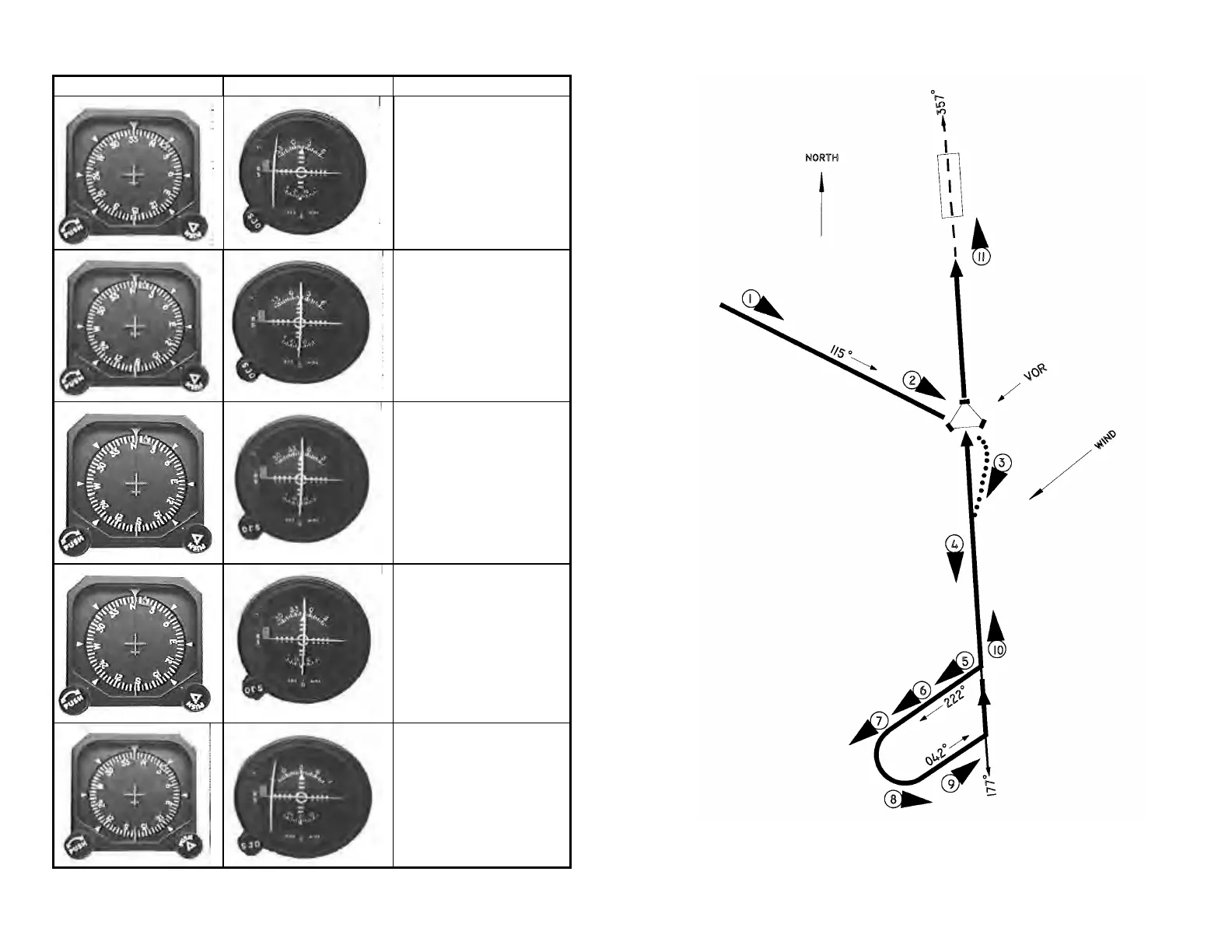
Directional Gyro OBS Remarks
Step 1. NAV/ATT or ALT.
A 45° intercept to a selected
radial is accomplished by
setting the OBS to the desired
radial and turning the heading
bug to that same degree and
then pressing the NAV mode
on the autopilot.
Step 2. NAV/ATT or ALT.
After intercept, the autopilot will
correct for crosswind and
adjust its internal radio
authority and limit bank angles.
Step 3. NAV/ATT or ALT.
After station passage, the OBS
indicates a FROM flag. If a
course change is required at
the VOR, turn the OBS and
heading bug to new course. If
a course change of more than
45° is required, the autopilot
will re-cycle for a standard
intercept.
Step 4. NAV/ATT or ALT.
Station switching is
accomplished by tuning the
receiver to the new station.
Step 5. HDG/ATT or ALT.
For smooth station passage, it
might be desirable to cycle the
autopilot to the HDG mode
before passage. Then after
passage occurs turn the OBS
and heading bug to the new
radial and press NAV on the
autopilot.
VOR APPROACH
56
57


 To Next Page