Operating Instructions
Initial Setup
Please according to the Text Tip to First Time Setup.
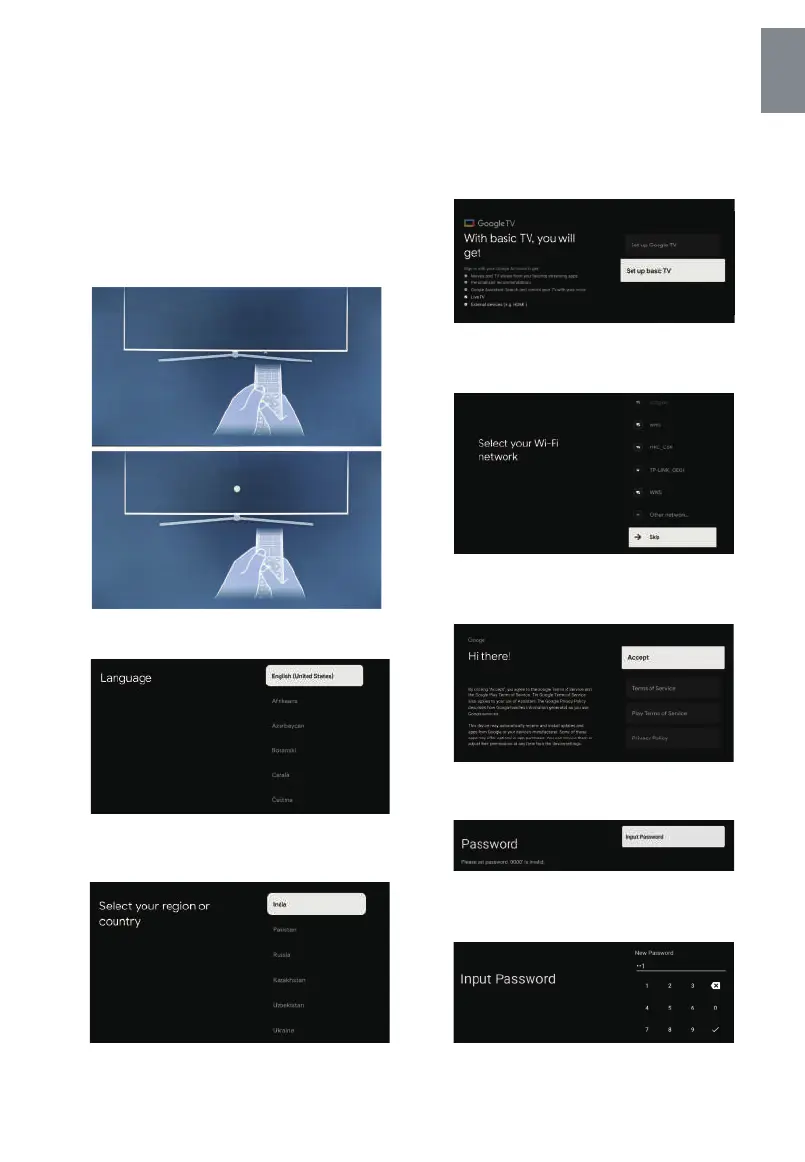
This function is used for the remote control pair code.
After the code is successful, you can use the Bluetooth
remote control to operate the TV. press and hold “HOME”
button and “Left” button Simultaneously for 5 seconds.
Then press “OK” button When the “TV_BLE_Remote”
displays in the upper right corner of the screen.
GB - 8
English
Still pairing, point the remote all the way to
the bottom of the TV.
The remote control is paired.
Press ▲/▼ to select the system language and press
OK to confirm the language.
Press ▲/▼ to select the region/country of your device
and press OK to confirm.
Press ▲/▼ to select the “Set up basic TV” of your
device and press OK to complete the setup.
Press ▲/▼ to select the wifi to connect, press OK
and enter the password to confirm the Connection
is successful.
By accepting the Google Terms of Service to improve
the product experience, select "Accept" to accept this
condition.
Used to set your device's password to ensure security
and privacy.
Press OK to pop up the soft keyboard, and use the
remote control to enter the 4-digit password auto-
matically jump to the next interface.



 To Next Page