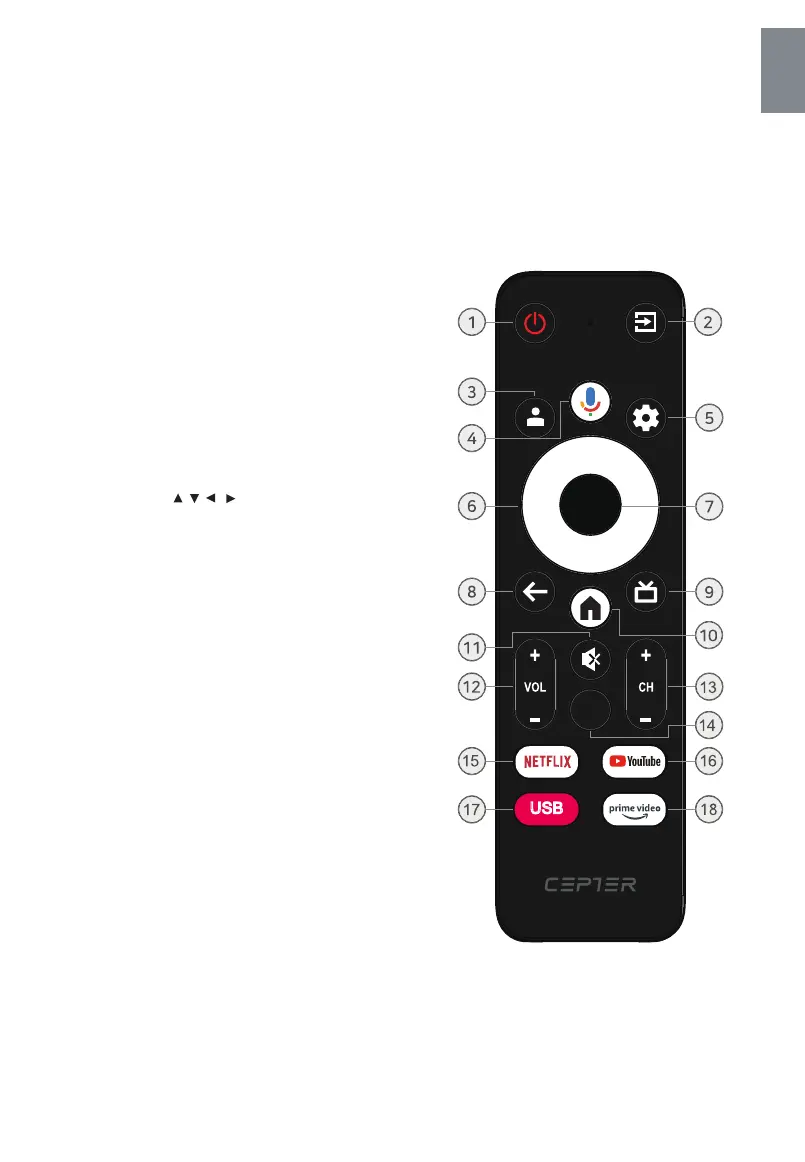
1. The power button
2. External inputs
Use it to turn the TV on or off.
Use to select the external input you want.
TV, AV, HDMI etc.
Display the Settings/Dashboard menu.
Use to return to the previous menu or Settings.
Go to the Google Home screen.
Turn the sound off or on.
Use the + or - button to adjust the volume.
Adjust the channel with the + or - buttons.
7. Press the OK button to select or confirm.
Press the , , , button while selecting the
menu.
GB - 7
Remote Control
*The remote controller cannot be used unless it is within the receivable range(5 meters). Before you use the remote
control, please make sure there's no obstacle between the remote control and the receiver.
4. Press to open the google assistant or start
a voice search.
3. Google account login.
5. Settings button
6. Orientation, ok button
8. Previous button
9. Press to open the Live TV
10. Home screen button
11. Mute button
12. Volume button
13. Channel button
14. Menu.
15. Netflix shortcut button
16. YouTube shortcut button
17. USB shortcut button
18. Prime video shortcut button
English
MENU
USB



 To Next Page