EasyManua.ls Logo

CeraGem PAUSE M2 - Remote Controller Operation; Automatic Massage Modes; Manual Massage Selection; Thermomassage and Volume Control

CeraGem PAUSE M2
24 pages
Print Icon
To Next Page IconTo Next Page
To Previous Page IconTo Previous Page
Loading...
1110
04 How
to
use
the
remote
controller
(
Body
Concentration
,
Neck
&
Shoulder
,
Waist
&
Pelvis
,
Back
&
Waist
,
Upper
Body
Concentration
,
Deep
Massage
)
(
Levels
1
,
2
,
3
)
(
Levels
1
,
2
,
3
)
(
Levels
1
,
2
,)
*
Do
not
apply
excessive
force
to
the
remote
control
or
operate
it
with
wet
hands
.
If
you
operate
the
remote
control
with
a
pointed
,
hard
object
,
the
remote
control
may
be
damaged
.
The
power
indicator
light
turns
on
upon
pressing
the
power
button
.
After
15
minutes
,
the
massage
ends
automatically
and
the
massage
ball
returns
to
its
position
.
After
use
the
product
,
turn
o
the
power
and
disconnect
the
power
plug
from
the
outlet
to
prevent
malfunction
.
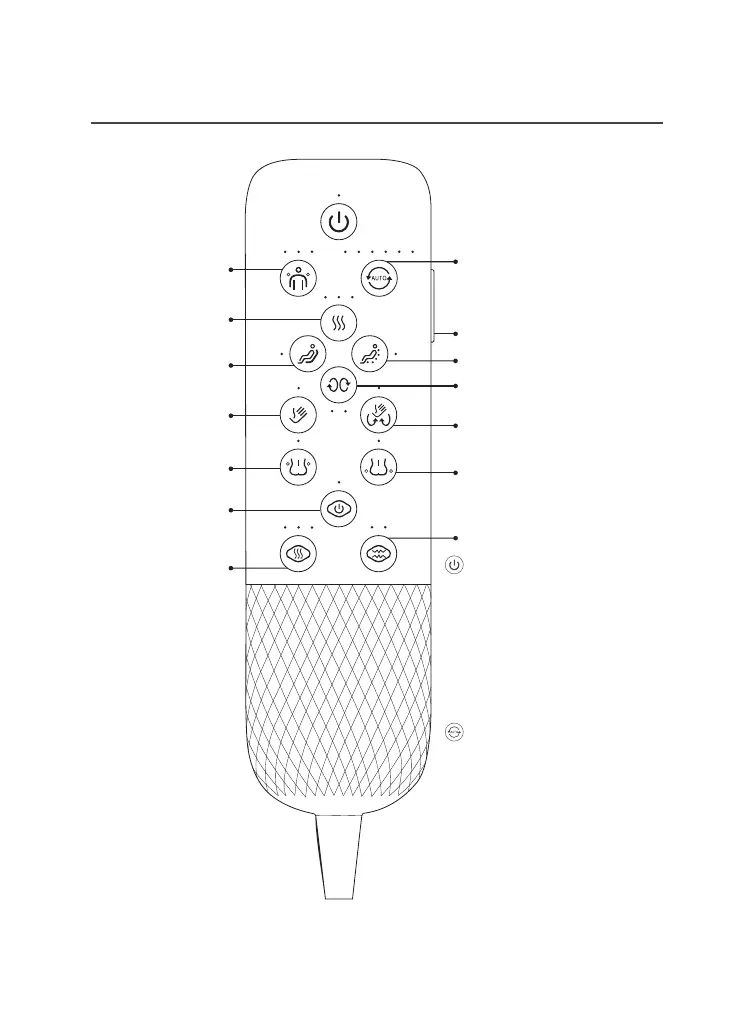
Each
automatic
mode
lasts
for
15
minutes
,
and
after
'
adjusting
the
shoulder
position
',
press
'
auto
mode
'
to
use
it
.
1
click
:
Full
-
body
concentrating
massage
2
click
:
Neck
&
Shoulder
concentrating
mode
3
click
:
Waist
&
Pelvic
concentrating
mode
4
click
:
Back
&
Waist
mode
5
click
:
Upper
body
concentrating
mode
6
click
:
deep
massage
mode
Volume
control
6
-
step
automatic
mode
3
-
level
thermomassage
mode
Pelvis
air
massage
abdominal
power
(
weak
,
strong
)
Complex
massage
(
kneading
&
tapping
)
Forward
/
backward
rubbing
massage
Partial
movement
massage
Shoulder
position
adjustment
Full
-
body
moving
massage
Tapping
massage
Waist
air
massage
abdominal
power
&
automatic
mode
abdominal
thermomassage
mode
6
-
step
automatic
mode
Power

Related product manuals