EasyManua.ls Logo

Cessna 150 Series - BATTERY; DESCRIPTION; REMOVAL AND INSTALLATION; CLEANING THE BATTERY

Cessna 150 Series
284 pages
Print Icon
To Next Page IconTo Next Page
To Previous Page IconTo Previous Page
Loading...
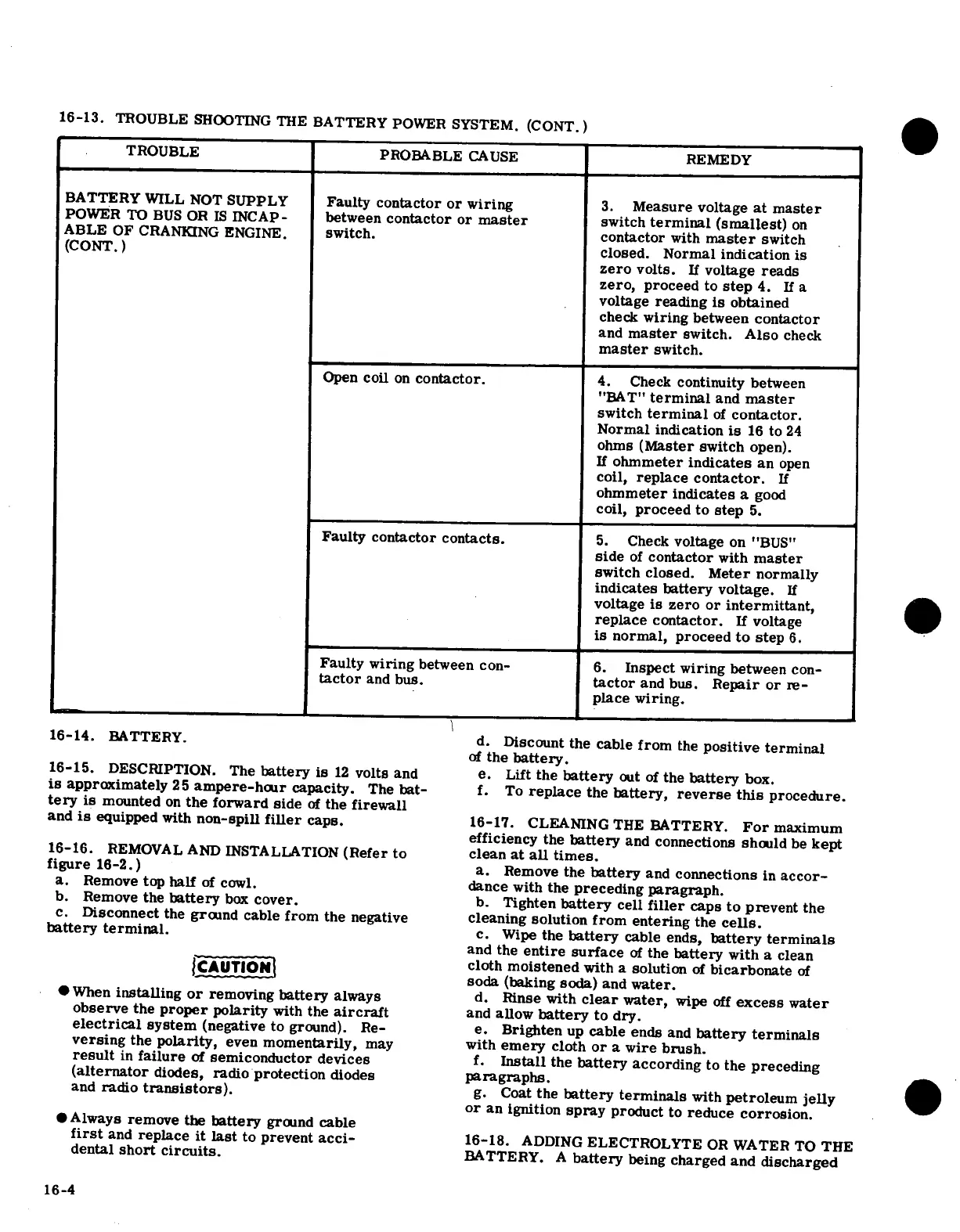
16-13.
TROUBLE
SHOOTING
THE
BATTERY
POWER
SYSTEM.
(CONT.)
TROUBLE
PROBABLE
CAUSE
REMEDY
BATTERY
WILL
NOT
SUPPLY
Faulty
contactor
or
wiring
3.
Measure
voltage
at
master
POWER
TO
BUS
OR
IS
INCAP-
between
contactor
or
master
switch
terminal
(smallest)
on
ABLE
OF
CRANKING
ENGINE.
switch.
contactor
with
master
switch
(CONT.)
closed.
Normal
indication
is
zero
volts.
If
voltage
reads
zero,
proceed
to
step
4.
If
a
voltage
reading
is
obtained
check
wiring
between
contactor
and
master
switch.
Also
check
master
switch.
Open
coil
on
contactor.
4.
Check
continuity
between
"BAT"
terminal
and
master
switch
terminal
of
contactor.
Normal indication
is
16
to
24
ohms
(Master
switch
open).
If
ohmmeter
indicates
an
open
coil,
replace
contactor.
If
ohmmeter
indicates
a
good
coil,
proceed
to
step
5.
Faulty
contactor
contacts.
5.
Check
voltage
on
"BUS"
side
of
contactor
with
master
switch closed.
Meter
normally
indicates
battery
voltage.
If
voltage
is
zero
or
intermittant,
replace
contactor.
If
voltage
is
normal,
proceed
to
step
6.
Faulty
wiring
between
con-
6.
Inspect
wiring
between
con-
tactor
and
bus.
tactor
and
bus.
Repair
or
re-
place
wiring.
16-14.
BATTERY.
d.
Discount
the
cable
from
the
positive terminal
of
the
battery.
16-15.
DESCRIPTION.
The
battery
is
12
volts
and
e.
Lift
the
battery
out
of
the
battery
box.
is
approximately
25
ampere-hour
capacity.
The
bat-
f.
To
replace
the
battery,
reverse this
procedure.
tery
is
mounted
on
the forward
side
of
the
firewall
and
is
equipped
with
non-spill
filler
caps.
16-17.
CLEANING
THE
BATTERY.
For
maximum
efficiency the
battery
and
connections
should
be
kept
16-16.
REMOVAL
AND INSTALLATION
(Refer
to
clean
at
all
times.
figure
16-2.)
a.
Remove
the
battery
and
connections
in
accor-
a.
Remove
top
half
of
cowl.
dance
with
the
preceding
paragraph.
b.
Remove
the
battery
box
cover.
b.
Tighten
battery
cell
filler
caps
to prevent
the
c.
Disconnect
the
ground
cable
from the
negative
cleaning
solution
from
entering
the
cells.
battery terminal.
c.
Wipe
the
battery
cable ends,
battery
terminals
and
the
entire surface
of
the
battery
with
a
clean
cloth
moistened
with
a
solution
of
bicarbonate
of
soda
(baking
soda)
and
water.
*
When
installing
or
removing
battery
always
d.
Rinse
with
clear
water,
wipe
off
excess
water
observe
the
proper
polarity
with
the
aircraft
and
allow
battery
to dry.
electrical
system
(negative
to
ground).
Re-
e.
Brighten
up
cable
ends
and
battery
terminals
versing
the
polarity,
even
momentarily,
may
with
emery
cloth
or
a
wire
brush.
result
in
failure
of
semiconductor
devices
f.
Install
the
battery
according
to
the
preceding
(alternator
diodes,
radio
protection
diodes
paragraphs.
and
radio
transistors).
g.
Coat
the
battery
terminals
with
petroleum
jelly
or
an
ignition
spray
product
to
reduce
corrosion.
*Always
remove
the
battery
ground
cable
first
and
replace
it
last
to
prevent
acci-
16-18.
ADDING
ELECTROLYTE
OR
WATER
TO
THE
dental
short
circuits.
BATTERY.
A
battery
being
charged
and
discharged
16-4

Table of Contents

Other manuals for Cessna 150 Series

Related product manuals