13
FinalSteps
12.RecordAnEEG
After you have acceptable impedance levels, click Record
under the Device tab to begin your recording. To end the
recording, under the same tab, click StopRecording.
13.EndTheSession
Close out the current le in the software if one is active and
exit the program. Press the power button once to turn o
the device.
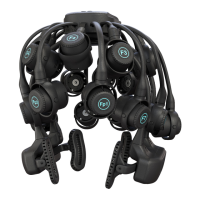
The headset should be placed either upside down, with the
top of the headset resting on a table top, or back into the
carrying case.
PositionOfTheSubject
DuringEEG
Use the Quick-20r headset
for subjects in an upright
position. Do not let the
subject lie or sleep on the
headset. It may damage the
headset.
CleaningAndMaintenance
To avoid cross-subject contamination, follow the cleaning
instructions to clean sensors and headset after each use.
This device is not intended to be sterilized in an autoclave.
CleaningSensors
• Use hand sanitizer or alcohol wipes to clean all sensors.
CleaningTheSensorPodsAndLegs
• Use alcohol wipes to clean sensor pods and legs.
BatteryStorage
Remove the batteries when headset is not in use.
DisposalInstructions
To protect the environment, always follow local law, rules,
and policies regarding electronic and battery disposal. You
may also return the headset to CGX for proper disposal.
Use the supplied carrying
case when transporting the
headset.
It is not recommended to
leave the Quick-20r in the
carrying case for long term
storage since the legs may
become compressed. This
will not aect functionality,
but may cause the headset to
be excessively tight on larger
heads.
To restore the shape of
your headset, place on a
mannequin head for several
hours until the legs relax.
• Gently pull down on the handles until the Cz position
reports adequate contact.
It is important the headset is seated properly in the
correct position and all legs and pods are aligned with
the subject’s head before pulling down. Failure to do
so may result in poor contact at the Cz position.
• Lift the pod slightly to move hair aside.
• Lower the pod back in place, keeping the sensor aligned
to the subject’s head.
• Gently twist the sensor adjustment back and forth to help
move the sensor through the subject’s hair.
• Lightly press down on the pod, holding for 5 seconds,
then gently release the pod.


 To Next Page
 Loading...