7
4.AssembleTheA1Earclip
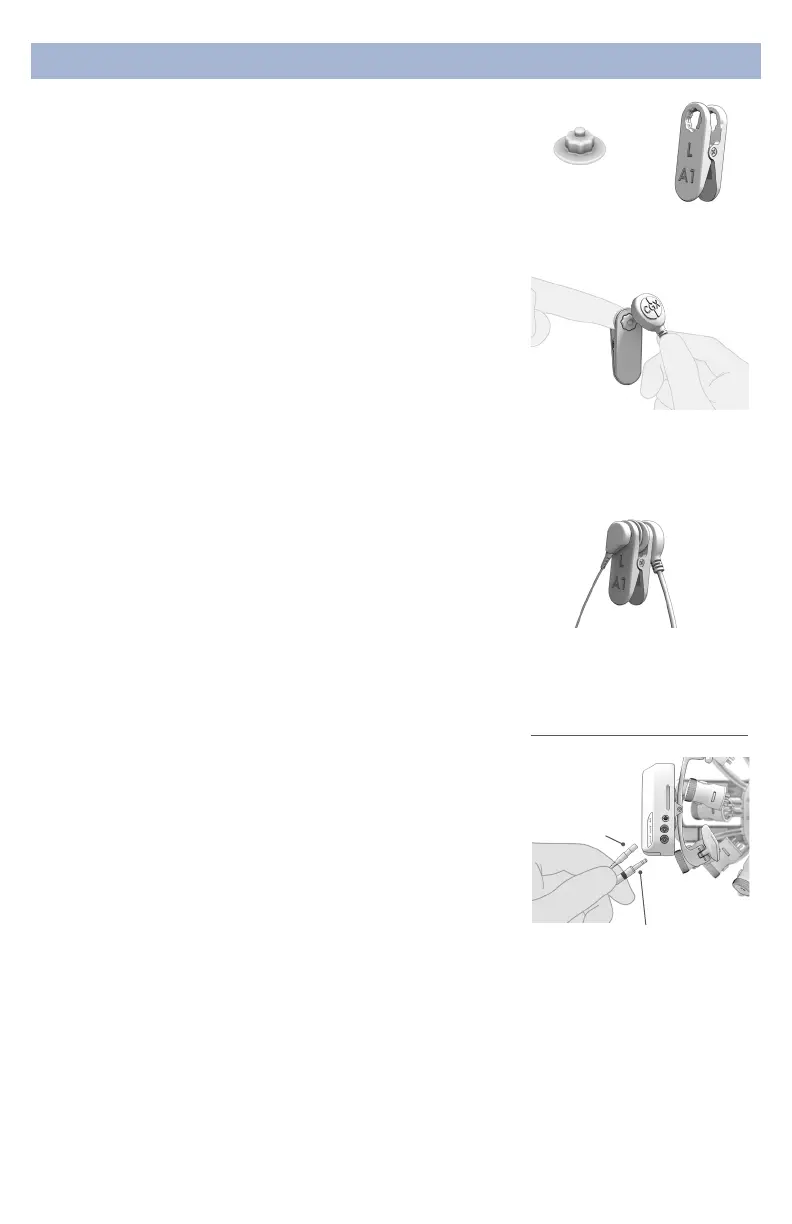
1. Pinch the earclip to opne.
2. Insert a Drypad Ear Sensor into each hole.
3. Attach the Passive and Active Lead Wires to either snap
on the earclip.
4. Attach the Passive Lead Wire to the touchproof
connector on the A1 handle.
5. Attach the Active Lead Wire to the 3.5mm connector on
the A1 handle.
4a.(Optional)AssembleTheA2Earclip
Use the A2 Earclip for recordings requiring both ears.
6. Pinch the earclip to expose the single snap connector
and attach a Drypad Ear Sensor.
7. Attach the Active Lead Wire (3.5mm connector) to the
snap on the earclip.
8. Attach the Active Lead Wire to the 3.5mm connector on
the A2 handle.
4b.(Optional)AttachTheExGLead
For additional biometric data acquisition, attach a passive
lead wire to the touchproof connector on the A2 handle.
Preparation
Plug Passive Lead Wire
(touchproof connector) and
Active Lead Wire (3.5mm
connector) into headset,
matching orientation as shown
Active Lead Wire
Passive
Lead Wire
A1 EarclipDrypad Ear
Sensor
A1 uses a touchproof lead
wire for Ground and the
3.5mm audio jack lead wire
for Reference
Insert the Drypad Ear Sensor
into the Earclip with snap
facing out. Attach lead wire to
snap as shown.


 To Next Page
 Loading...