Hardware Setup
9
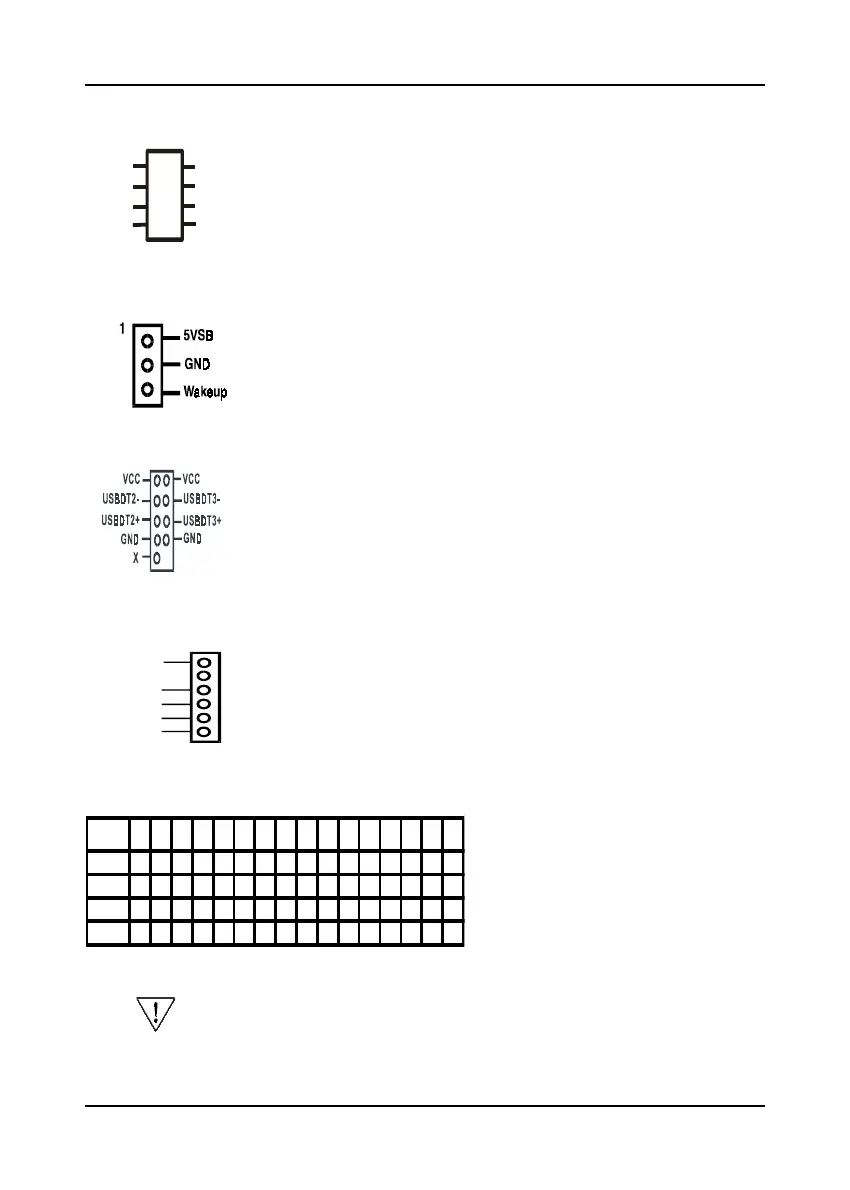
Bass/Center and RearL/R Speaker Connector (CN4B)
This connector is for Center+Bass speaker output ext. Plug in
the optional AC3 Surround Center/Bass and Rear left/right jack
extension into this connector. The black colored jack is for
surround speaker output and the orange colored jack is for
center+bass speaker output.
WOL (Wake-on-LAN) Connector (CN5)
Enable the Wake Up On LAN selection in BIOS's Power
Management Menu to use this function. This header is used
to connect an add-in NIC (Network Interface Card) which gives
WOL capability to the mainboard.
USB 1/2 Ports and USB 3/4 Connector (USB1/CN6)
If you want to use a USB Keyboard, you must enable the USB
keyboard support function in BIOS's Integrated Peripherals menu
(See Section 3-4). This board contains a USB Host controller and
includes a root hub with two USB 0/1 ports a connector for
optional USB Adaptor (USB 2/3).
IR Connector (IR1)
Select a UART Mode in BIOS's Integrated Peripherals menu the
UART port to support IR/CIR functions. (See section 3-4)
Frequency Ratio Setting (SW1)
This feature allows you to set a CPU
at a higher frequency clock ratio than
it's specification allows. it may or may
not run at that ratio, depending on
the quality of your CPU and the ex-
tent to which the ratio has been
overset
Bass
GND
Mute
Center
Rear-R
Rear-L
O
O
O
O
O
O
O
O
Key
GND
This option will not work with frequency lock CPU.
ON:short
OFF:open
5 5.5 6 6.5 7 7.5 8 8.5 9 9.5 10 AUTO 11 11.5 12 12.5
1 ON OFF ON OFF ON OFF ON OFF ON OFF ON OFF ON OFF ON OFF
2 ON ON OFF OFF ON ON OFF OFF ON ON OFF OFF ON ON OFF OFF
3 OFF OFF OFF OFF ON ON ON ON OFF OFF OFF OFF ON ON ON ON
4 ON ON ON ON OFF OFF OFF OFF OFF OFF OFF OFF ON ON ON ON
Vcc
Vcc
Ir-Rx
GND
Ir-Tx



 To Next Page