Hardware Setup
9
L
1
R
GND
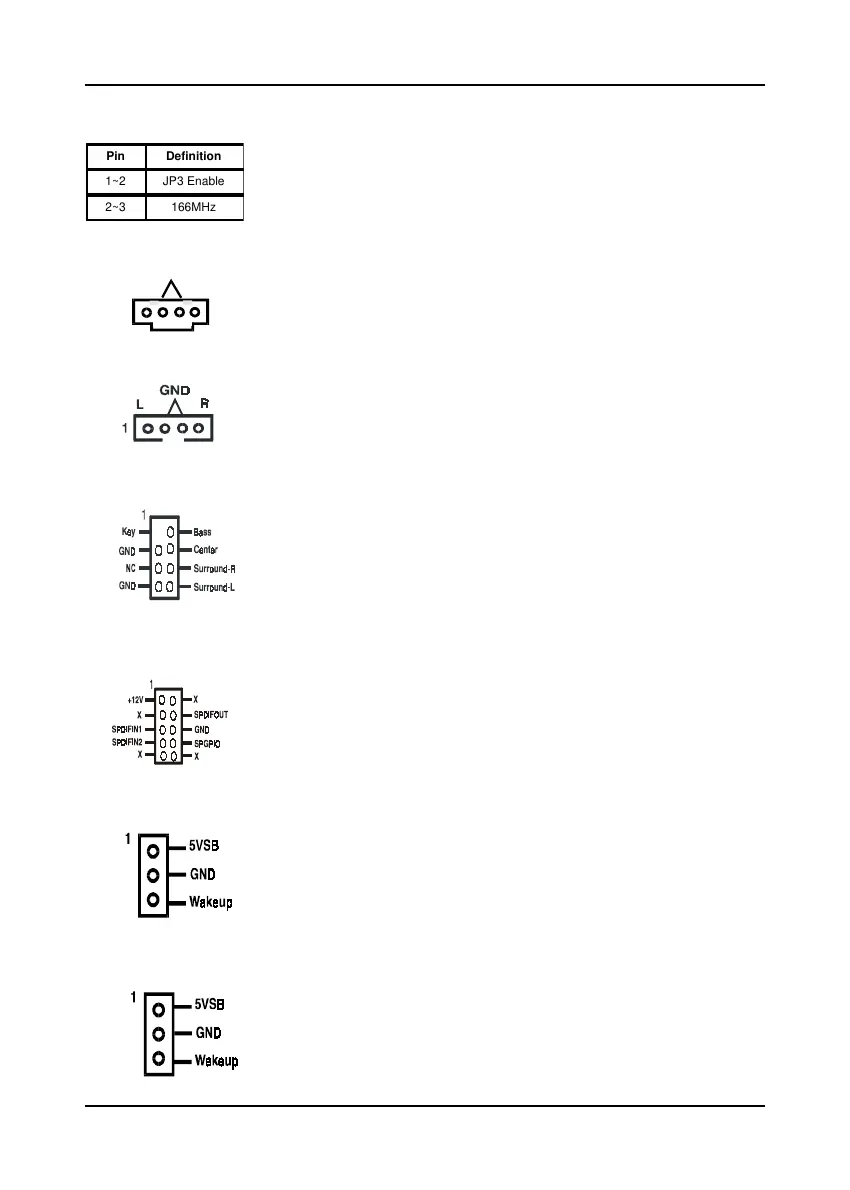
166MHz CPU Clock (JP31)
This jumper allows user to configure the CPU clock speed at
166MHz. by setting the jumper cup to pin 2-3. The External Clock
Frequency (JP3) will automatically disable. To enable JP3 function,
set the jumper cup to pin 1-2.
CD-ROM Audio-in Connector (CN2/CN2A)
Use the audio cable enclosed with your CD-ROM disk drive to
connect the CD-ROM to your mainboard. This will enable your
CD-ROM's audio function.
Auxiliary Audio-in Connector (CN3)
This connector is for use with a secondary CD-ROM, DVD-ROM
or CDR/CDRW disk drive.
AC3 Surround/Center + Bass Connector (CN4B)
This connector is for Surround and Center+Bass speaker output
ext. Plug in the optional AC3 Surround/Center+Bass jack extension
into this connector. The black colored jack is for surround
speaker output and the orange colored jack is for center+bass
speaker output.
Optional S/PDIF-in/out Connector (CN4C)
The S/PDIF-in/out connector supports the digital audio. This
connector must be connected to the cable from an external device
(i.e.2-channel decoded AC-3 from DVD decoders).
WOL (Wake-on-LAN) Connector (CN5)
Enable the Wake Up On LAN selection in BIOS's Power
Management Menu to use this function. This header is used
to connect an add-in NIC (Network Interface Card) which gives
WOL capability to the mainboard.
WOM (Wake-on-Modem) Connector (CN5A)
Enable the Wake Up On Modem selection in BIOS's Power
Management Menu to use this function. This header is used
to connect an add-in modem card which gives WOM capability
to the mainboard.
Pin Definition
1~2 JP3 Enable
2~3 166MHz



 To Next Page