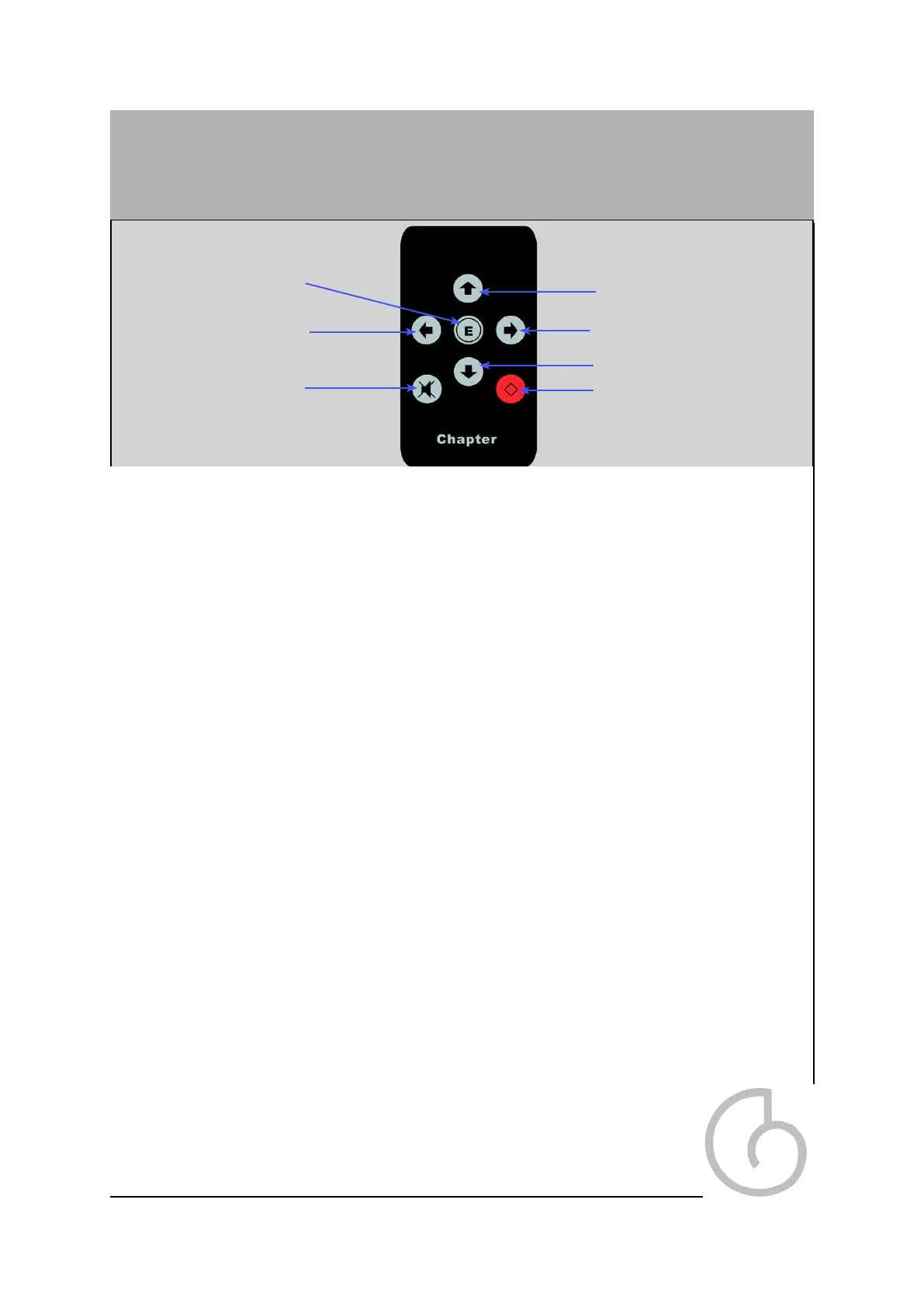
Remote Control
Volume Up
Pressing this button on the handset, increases the volume on the pre amplifier.
Volume down
Pressing this button decreases the volume on the pre amplifier.
Power On / Off
This activates the unit from standby or returns the unit to standby mode.
Mute - On / Off
This mutes the outputs. Press this button again to un-mute the pre amplifier. The
Preface can also be un-muted by pressing the volume up or down keys on the
handset.
Option Select left /Right
This allows you to cycle between the individual inputs.
Enter
This button mimics the left hand knob. When pressing this button you can cycle
through the entire left knob menu structure (see page 11 for details), adjusting your
chosen parameters with the option select left or right keys.
Note: Battery Life on the handset is around 6 months. The unit takes 2 x AA batteries
and these can be replaced by unscrewing the bottom plate. When replacing the
batteries always ensure correct polarity is observed, and that the batteries
are both new.
Volume up
Option Select -Right
Power On / Off
Volume Down
Mute - On / Off
Option select - left
Enter Button
14


 To Next Page