InstallationmanualChargestormConnected page2
ChargestormAB
ü Pole mount kit for two boxes, enabling up to four EV connectors from one pole. Article number 922-
00018.
4 Precondition
4.1 Tools
Before the installation make sure that following tools are available:
ü
Screwdriver ü
Drilling machine
ü
Multi meter ü
Computer (for network configuration)
ü
Peeler ü
Mini USB cable (to connect computer and controller board)
ü
Spirit level ü
Mifare Classic/ IEC 14443 Type A, compatible RFID-tag.
ü
Computer/Laptop (OS: Linux or OSX preferred, Windows10 requires USB-driver installation)
4.2 Cableinstallation
Before the installation of the charging station, control the following:
ü The cable installation is dimensioned for the charging station. (at least 2,5 mm
2
cable area for
16A copper cable and at least 6mm
2
for 32A copper cable). For wall mounting shall 50 cm cable
be available for use inside of charging station.
ü Make sure that power is off during installation
4.3 Networkconnection
In case the charging station shall be connected to a portal or a local controller, check the following
depending on network access medium:
ü 3G: Activated SIM-card must be mounted in the unit with PIN disabled. The subscription shall
allow at least 2GB/month.
ü Ethernet: Network cable of type Cat5 or better shall be connected to the charging station.
In case the charging station is behind a firewall and shall be connected to a backend system must DNS
(port 53), https/wss (port 443) be opened in the firewall. If remote firmware
upgrade shall be possible must also ftp be opened in the firewall.
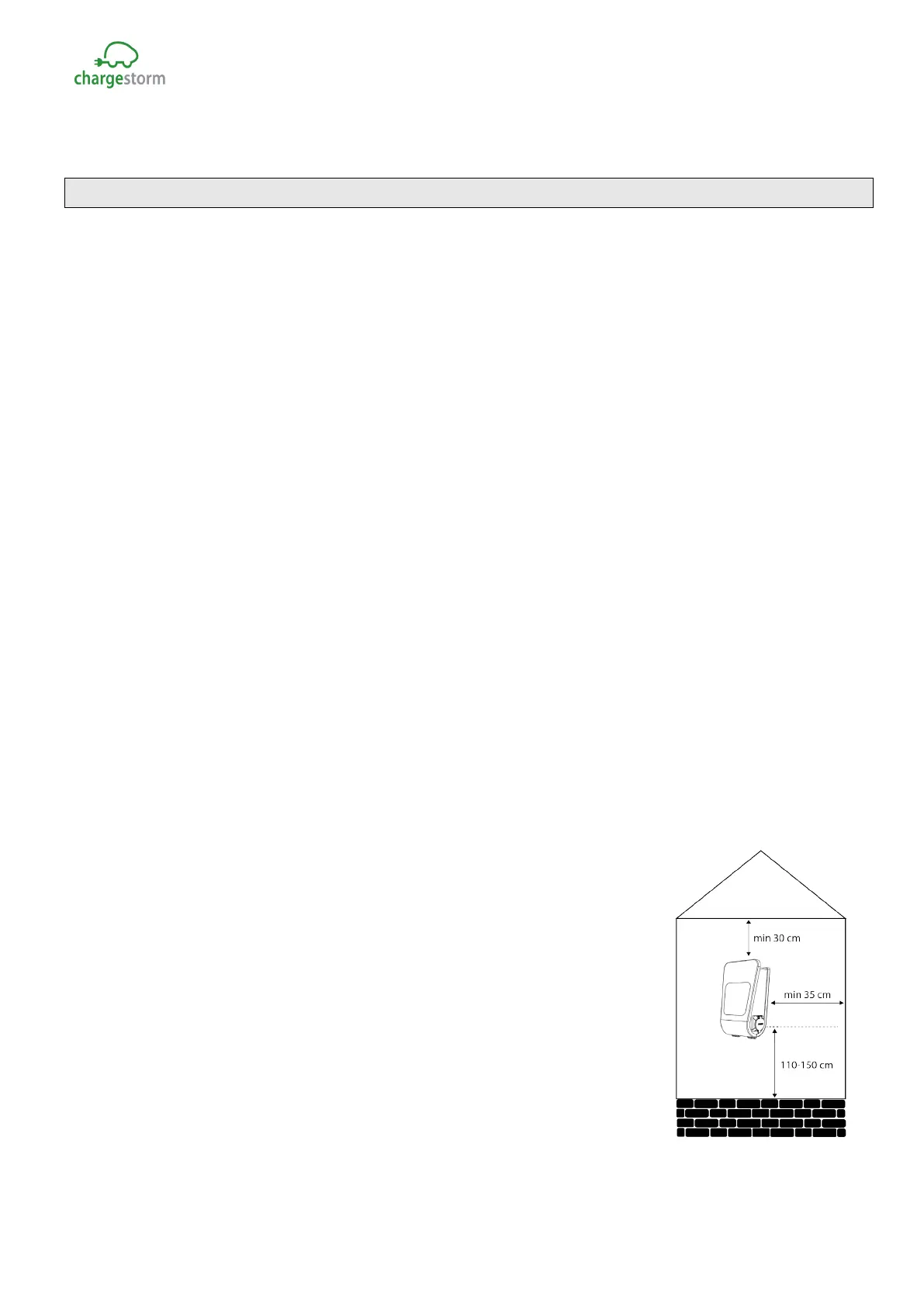
4.4 Installationlocation
Control the following at the location where the box will be mounted:
ü That there is enough space available for normal usage.
ü That the wall material is suitable for mounting of the box. The wall
must withstand the charging station weight (8,5kg)
ü Avoid installing the unit in direct light sunlight. Symbol visibility is
limited and heat in the unit is increasing. Chargestorm Connected has
a temperature sensor in the unit that adjust charging current in case
of high temperature.
ü Always follow local regulation
Figure 2 Mounting distances
GACELL A/S - Sletten 17 - DK 7500 Holstebro - 961 02 961



 To Next Page
 Loading...