InstallationmanualChargestormConnected page7
ChargestormAB
Ethernet
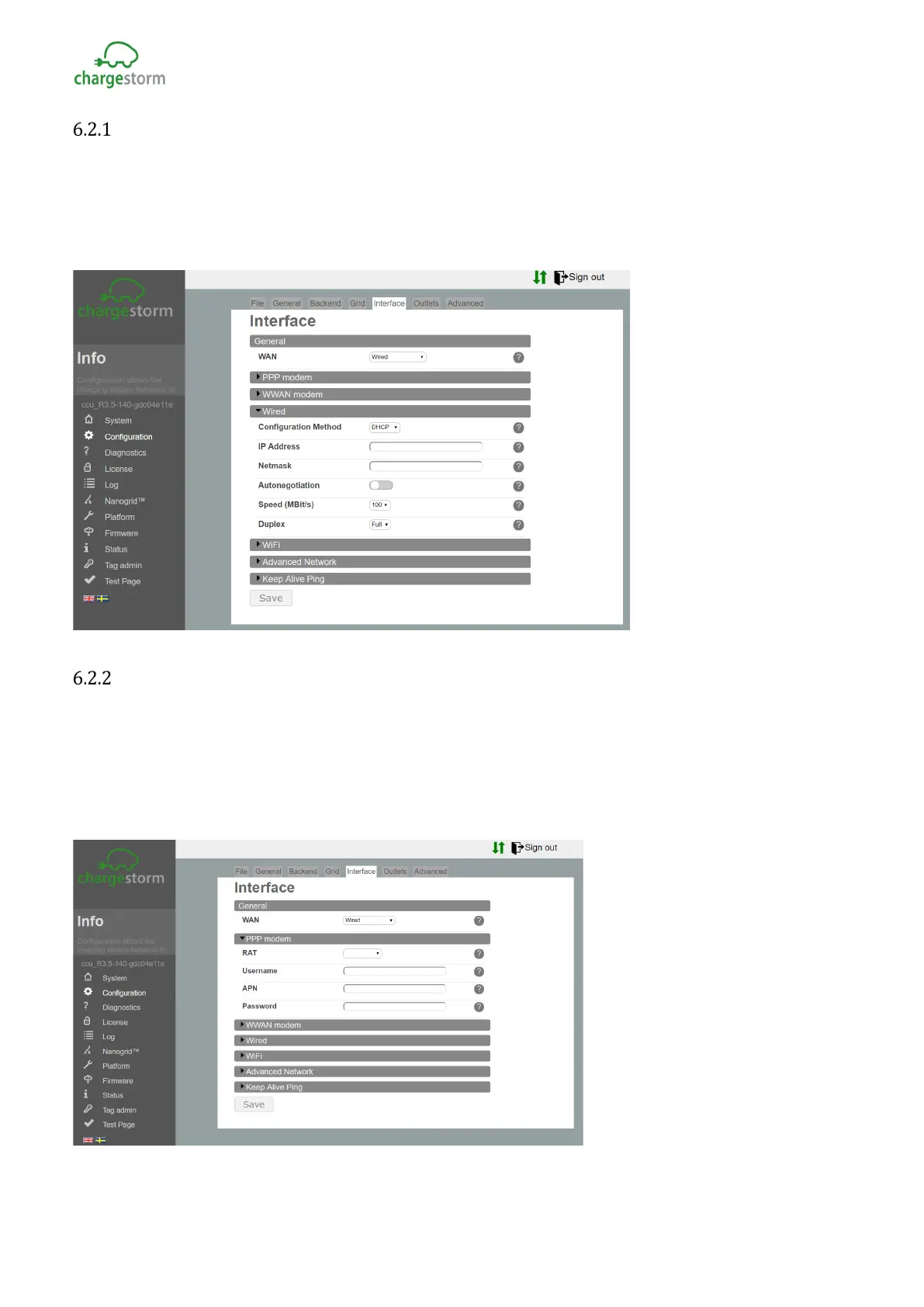
To set the IP settings for Ethernet follow the instruction below.
¥ Under “Configuration®Interface®General”, select WAN=”Wire”.
¥ Under “Configuration®Interface®Wire”, select “DHCP” or “Static” (for Static enter IP address,
netmask and gateway). For “DHCP” is IP address assigned automatically.
¥ Push the “Save” button on the bottom of the page.
Figure 11 Ethernet configuration
PPPmodem
Follow the step by step instruction below to configure PPP over 3G
¥ Under “Configuration®Interface®General”, select WAN=”Wireless”
¥ Under “Configuration®Interface®PPP modem”, enter “APN” applicable for the selected 3G
operator. Remaining fields can usually be left empty.
¥ Push the “save” button (at the bottom of the page).
Figure 12 3G Configuration
GACELL A/S - Sletten 17 - DK 7500 Holstebro - 961 02 961



 To Next Page