12
C www.chariotcarriers.com 51100456
4.8 Install a cts™ conversIon kIt
A. Select a CTS™ conversion kit from the following:
• CTSStrollingKit
• CTSJoggingKit
• CTSBicycleTrailerKit
• CTSHikingKit
B. Install and use the selected kit according to the
instructions included with the CTS™ Conversion Kits.
GETTING STARTED
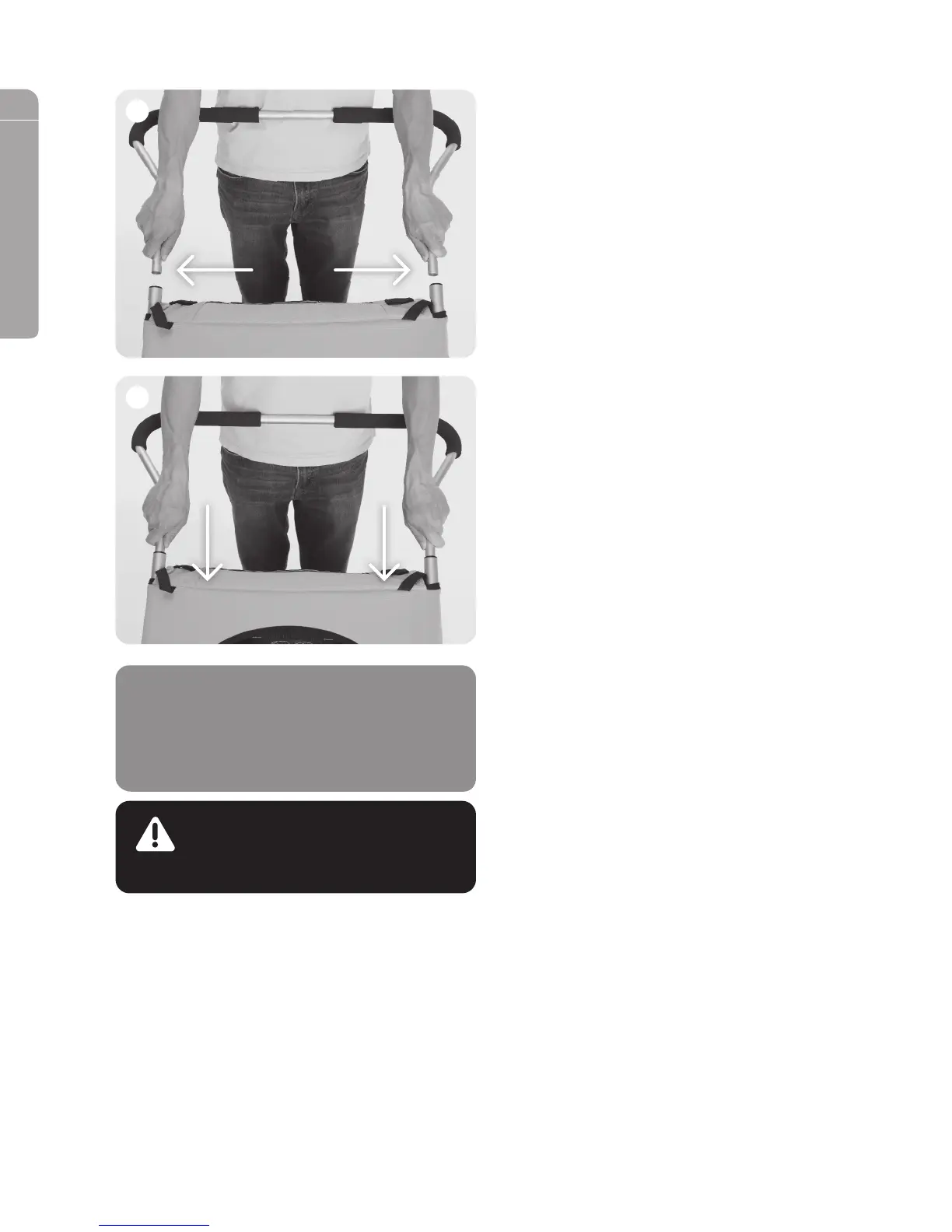
4.7 InstallInG the handleBar
A. Position the handlebar behind the carrier with the
handles pointing rearwards.
B. With both hands press and hold the spring pins in on
both ends of the handlebar. (See image 1)
C. Slide both ends of the handlebar into the upper frame of
the carrier. Allow the spring pins to pass inside the
upper frame. (See image 2)
D. Slide the handlebar into the upper frame until the spring
pins engage.
E. Verify that the handlebar is securely attached to the
carrier by giving it a sharp pull - it should not pull out.
F. To remove the handlebar; press both of the spring pins
through the upper frame and pull the handlebar out.
Repeat this process to remove the brake handle from the
handlebar.
2
1
WARNING
Any load attached to the handle affects the
stability of the child carrier.
NOTICE
The HeightRight™ adjustable handlebar has
two positions; high and low. Remove the
handlebar and turn it over to change between
these two positions.
Cabriolet_Manual_English_100212.indd 12 12-10-31 2:35 PM


 To Next Page