7.
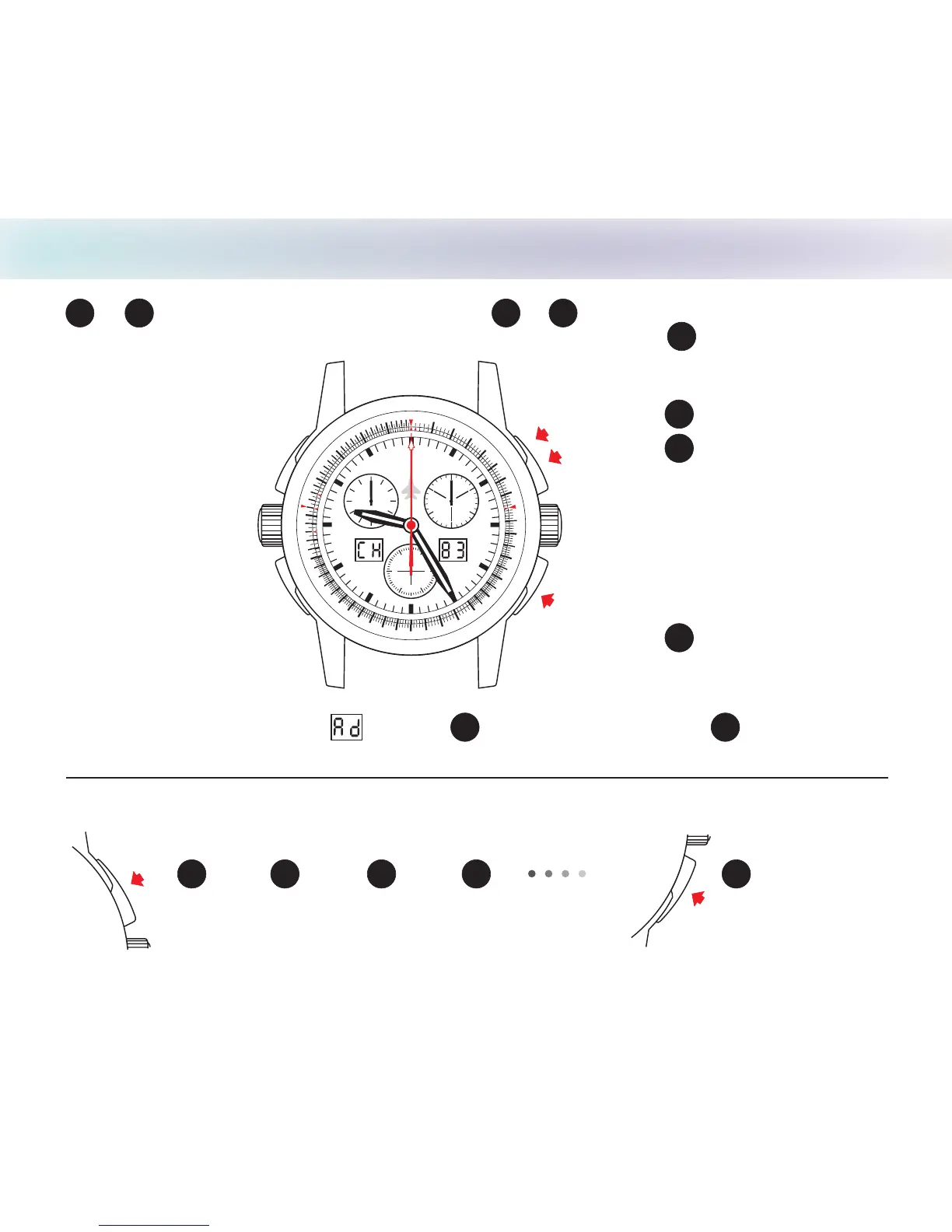
Timing Mode • Simple Chronograph Function
ADD FUNCTION:
Order in which pushbuttons should be pressed.
Reset to zero
B
START STOP
Read
START STOP
Read
1
2
3
4
X
A
Setting crown in
position 1
A
B
START
STOP
Reset to
Zero
1
2
10
1
1
1
2
1
3
1
4
15
1
6
17
1
8
19
2
0
2
1
2
2
2
3
2
4
25
3
0
35
4
0
4
5
50
55
70
8
0
9
0
6
0
65
7
5
8
5
95
5
3
.
T
U
A
N
0
4
.
T
A
T
S
1
0
11
12
1
3
14
15
16
1
7
18
19
20
21
2
2
23
2
4
25
30
45
5
0
5
5
7
8
9
M
PH
C H A S E - D U R E R
30
2
0
1
0
8 4
12
6
2
10
60
4
0
20
1
0
30
5
0
2
Note - The left LCD will display after step (STOP) until Reset to zero ( ) .
The right LCD will display hundredths of a second until Reset to zero.
X
X
Note* Step (or ) may be repeated as many
as necessary; Step before is the final reading.
times
2
3
to
order of functions
1
X
X


 To Next Page