Home
Chase
Payment Terminal
DX8000
Page 11 (Security Settings and User Creation)
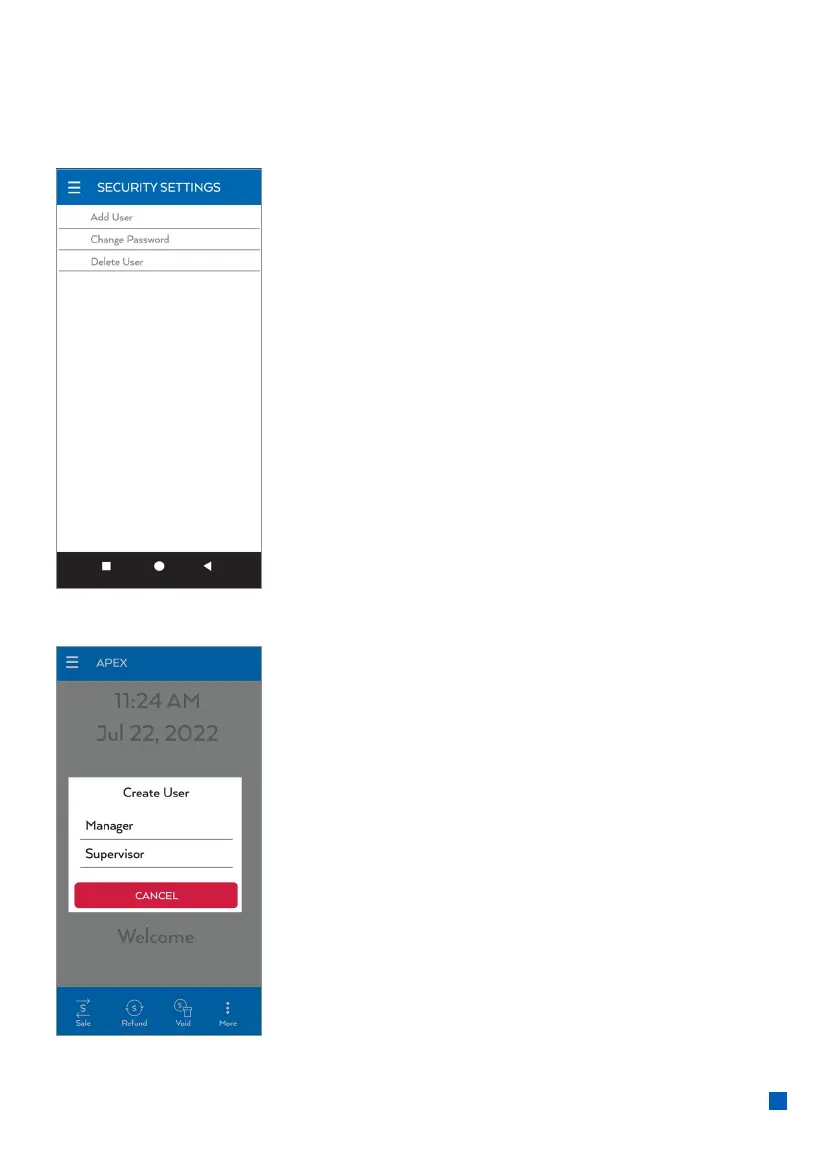
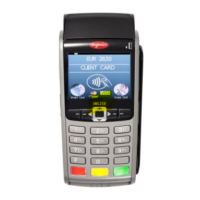
Chase DX8000 - Security Settings and User Creation
16 pages
Manual
Save Page as PDF
To Next Page
To Next Page
To Previous Page
To Previous Page
Loading...
11
In th
e Se
cur
it
y S
et
t
ing
s you m
ay Ad
d
User
, C
hange Pa
ss
wo
rd or De
lete Us
er
.
Pres
s the d
esire
d fun
c
ti
on and f
ollo
w
the prompts.
Wh
en creat
ing a us
er yo
u will
be pro
mpte
d to sele
c
t th
e lev
el
of pa
ss
wo
rd you ma
y create.
10
12
Related product manuals
Chase Ingenico ict220
10 pages
Chase VeriFone Omni
16 pages
Chase iCT250
10 pages
Chase INGENICO iCT 250
18 pages



 To Next Page