Clean is an exploration of just how far compression can go, bringing
the adventurous energy of distortion circuits to the clean performer.
Your playing dynamics are rewarded, creating a more interactive and
lively version of your instrument that moves and shifts as you play.
From tube-like sag to drifting equalization to softening swells.
It's also a 100% analog, true stereo, studio-grade compressor.
Sets the dynamic threshold. The higher the
knob is turned up, the more sensitive Clean
becomes.
SENSITIVITY (RAMP)
B
Controls the loudness of the processed
signal. Able to apply a healthy boost.
WET
F
Manipulates the physical behavior of
Clean’s dynamic response, producing
instability and fluctuations.
LEFT - Subtle, wobbly movement
MIDDLE - Normal, stable movement
RIGHT - Twitchy, unstable movement
PHYSICS
I
Tap to turn Clean on and off. Hold to max
out Clean's sag effect.
BYPASS
E
A one-knob EQ with three modes set by
the MODE toggle. The counter-clockwise
side of the sweep removes highs, while
the clockwise side removes lows.
LEFT - Shifts when you play
MIDDLE - Classic, fixed EQ
RIGHT - Modulates when you play
DYNAMIC EQ
H
Sets the amount of compression, going
from compression, to limiting, to sag.
DYNAMICS
A
B
A
D
E
C
H
F
G
I
Controls how quickly the compression will
fade in. The ATTACK knob also controls the
speed of the motion-related EQ modes and
MOTION mode.
RELEASE controls how quickly the compres-
sion fades out.
ATTACK and RELEASE
C
Controls the loudness of the unprocessed
signal. Able to apply a healthy boost.
DRY
G
Engages the swell effects.
AUX
D

 Need help?
 General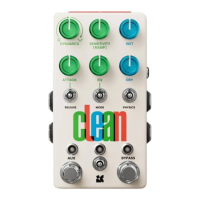

 To Next Page