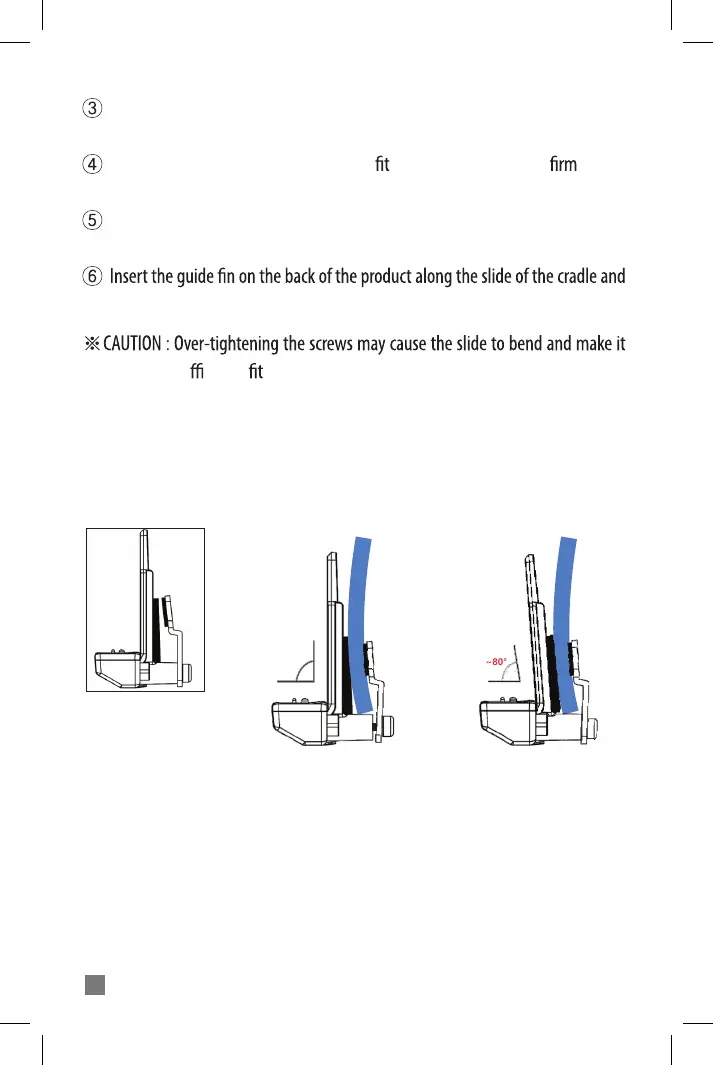
BiT-2 Cradle Mounting Method
*
If you tighten the bolts with proper force, the cradle does not fall o the helmet,
since rubber is attached to the cradle and xing bracket.
*
When tting the cradle to the helmet, if the cradle is bent due to excessive tight-
ening of the bolt (hexagon), it may cause product defects.
(The fork pin of the cradle may have poor contact with the main body, so the
microphone or speaker may not work.)
(O) Correct Mounting (X) Incorrect Mounting
7
°~80
Helmet
Cradle
90°
Helmet
Cradle
Slide the bracket iron plate into the gap between the helmet shell and the inner
pad.
Now tighten the screws on the bracket to the cradle to the helmet ly using
the L wrench.
Connect the microphone and speakers to the cradle. Be careful to match the
arrow on the connecting plug and jack.
push it down until you hear the ‘click’ sound.
di cult to the product.



 To Next Page