(Figure 3)
ON.
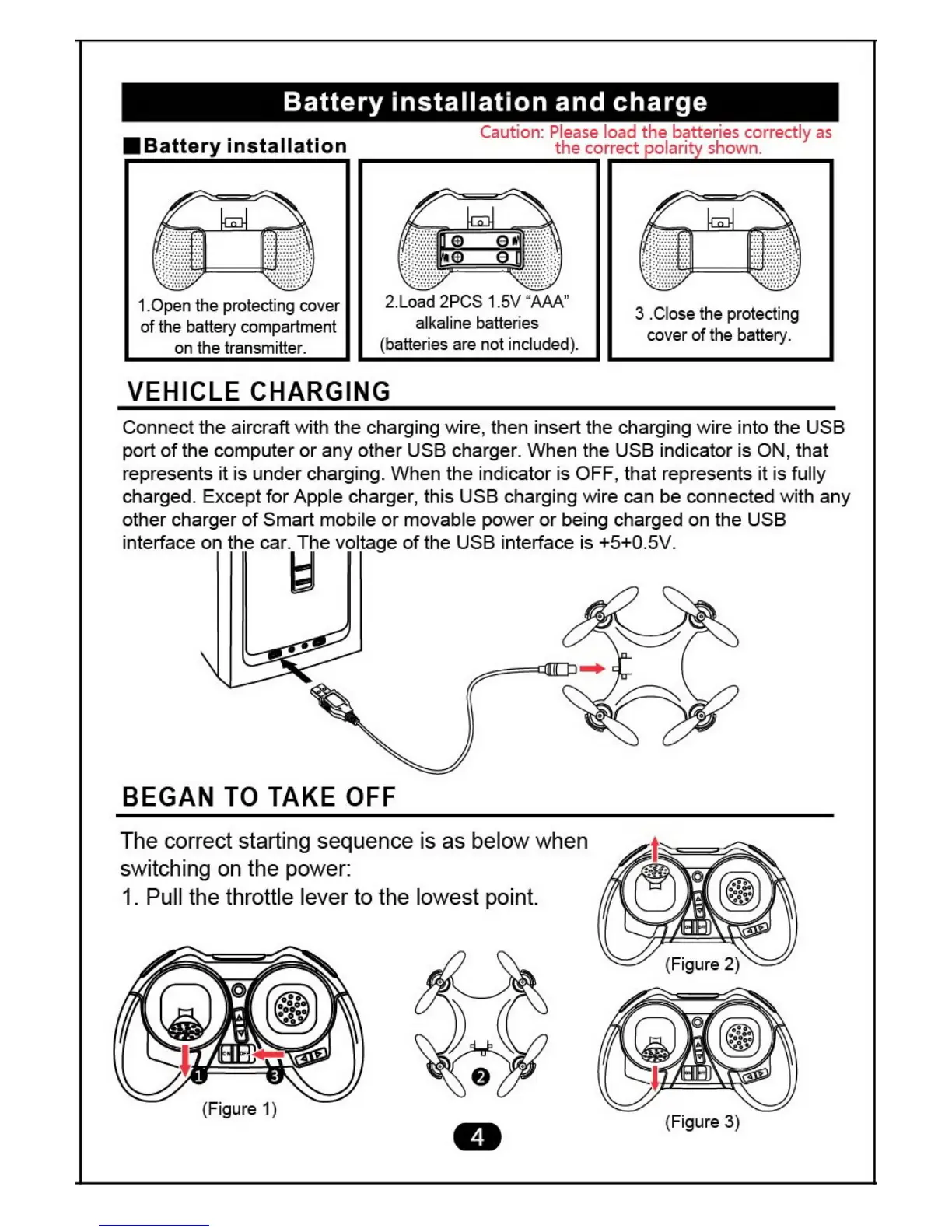
tOpen the protecting cover
of the battery compartment
on the transmitter.
3 .Close the protecting
cover of the battery.
Battery installation and charge
•
Battery installation
Caution: Please load the batteries correctly as
the correct •olan shown.
2.Load 2PCS 1.5V AAA"
alkaline batteries
(batteries are not included).
VEHICLE CHARGING
Connect the aircraft with the charging wire, then insert the charging wire into the USB
port of the computer or any other USB charger. When the USB indicator is
ON,
that
represents it is under charging. When the indicator is OFF, that represents it is fully
charged. Except for Apple charger, this USB charging wire can be connected with any
other charger of Smart mobile or movable power or being charged on the USB
interface on the car. The voltage of the USB interface is +5+0.5V.
BEGAN TO TAKE OFF
The correct starting sequence is as below when
switching on the power:
1. Pull the throttle lever to the lowest point.


 To Next Page