9
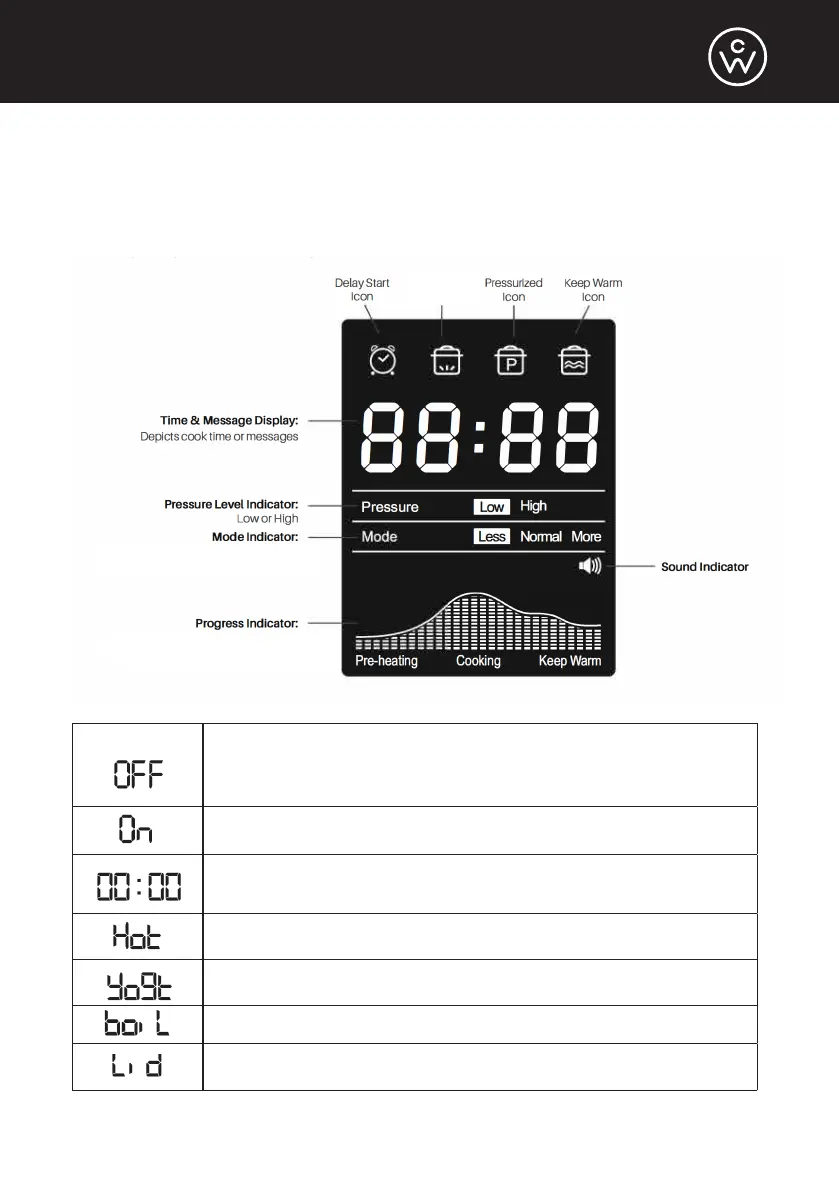
Control Panel LCD Display
The LCD display uses icons, words, and numbers to depict time, pressure levels,
modes, cooking progress, and messages.
LCD Display Messages
The cooker is plugged in, but no programs are selected.
Ready to use, and you can choose a program.
Your cooker is ready to use, and it is preheating.
Timer indicating how much time is still left. Used for Cook
Time, Delay Start, or Keep Warm functions.
Preheating Sauté is over.
Yogurt program is complete and ready for pasteurizing.
Pasteurizing
Lid is not locked in place.
Preheating
Icon
(Preheating, Cooking, or Keep Warm)
Less, Normal, or More


 To Next Page