7
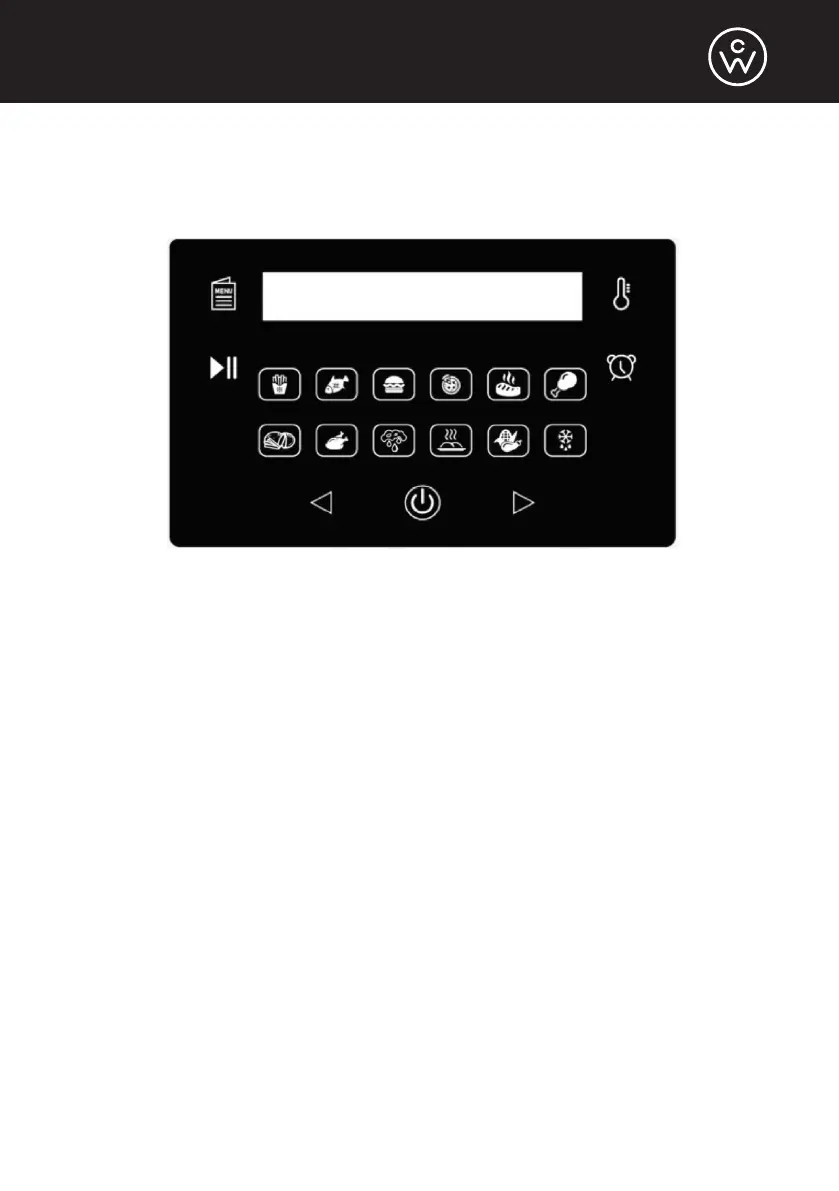
AIR FRYER DIGITAL CONTROL PANEL
• The air fryer control panel features 12 presets: Chips, Fish, Hamburger,
Pizza, Beef Steak, Chicken Leg, Bake, Chicken, Dehydrate, Broil, Corn, and
Defrost.
• When the air fryer lid is attached, the blue lights of the LCD panel will flash.
Then, the On/Off button at the bottom of the panel will continue flashing.
Press that button to begin using the air fryer. The On/Off button can also be
used to turn off the machine, canceling the cooking process.
• Use the Menu button to cycle through the 12 presets.
• If desired, use the Temperature button (thermometer icon on the top right
corner) to manually set the temperature. Then, use the Left and Right
arrows to change the temperature.
• If desired, use the Timer button (clock icon on the right) to manually set the
cooking time. Then, use the Left and Right arrows to change the time.
• After selecting a preset or manually setting the time and temperature, use
the Start button (play/pause icon on the left) to begin the cooking process
or pause it once begun.


 To Next Page