8
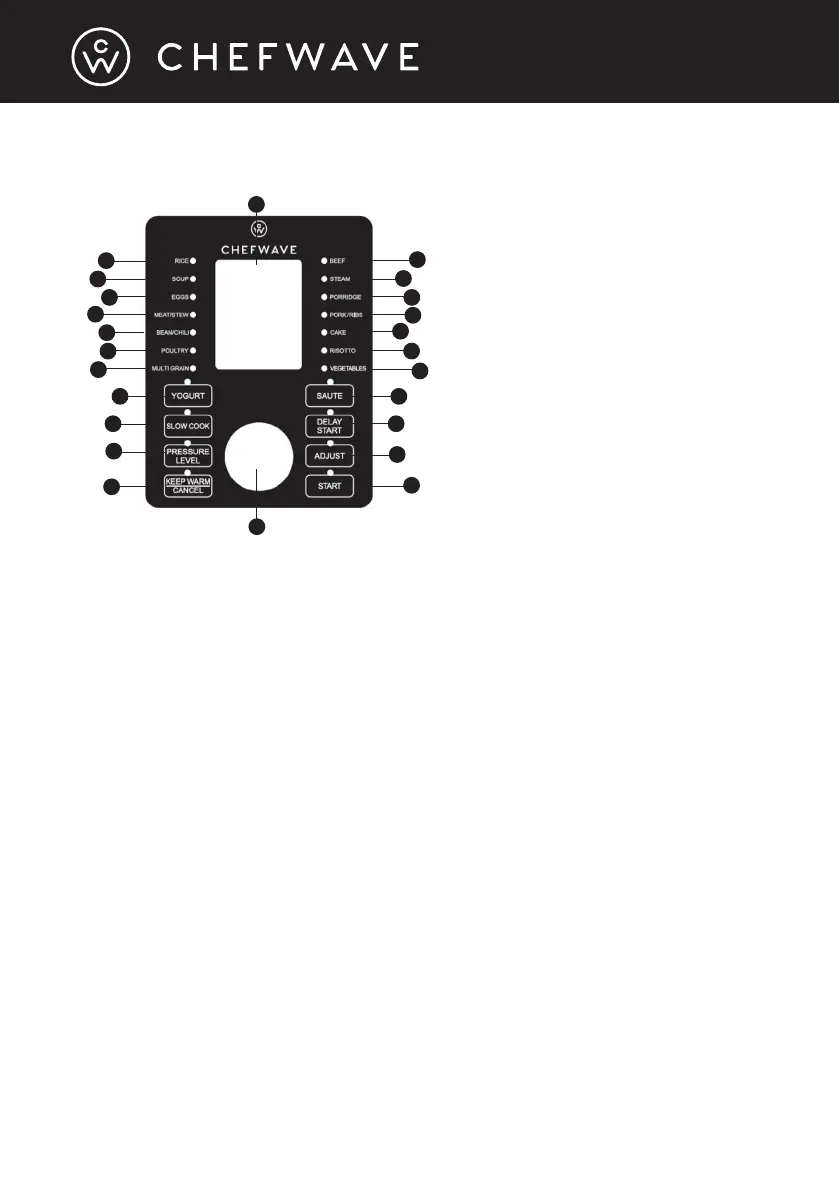
PRESSURE COOKER DIGITAL CONTROL PANEL
When the pressure cooker lid is attached, the Swap Pot will default to Standby
Mode. Turning the Function knob will exit standby.
• Use the Function knob to select the desired cooking function. After you
have selected a function, press the Start button to begin cooking.
• Use the Pressure Level button to set the pressure level to either “low” or
“high.”
• Use the Adjust button to set the timer. Use the Function knob to manually
adjust the time. See the “Pressure Cooking Settings” section on page 15 for
instructions.
• Use the Delay Start button to start cooking at a designated time in the future.
Turning the Function knob sets the Delay Start time. See the “Instructions
for Pressure Cooking” section on page 14 for instructions.
• Use the Keep Warm/Cancel button to end the selected cooking function
or to keep your food warm after cooking. Pressing the Keep Warm/Cancel
button before or after cooking (when the Swap Pot is in Standby Mode) will
toggle Keep Warm on and off. Press it during cooking to cancel the cooking.
Keep Warm/Cancel also controls the beeping sounds. Press and hold down
the button for 3 seconds to turn it off or back on again.
NOTE: Always double-check that you have pressed the correct button
when making your selections.
NOTE: You cannot turn off safety alert sounds.
1
2
3
4
5
6
7
8
9
10
11
12
13
14
15
16
17
18
19
20
21
22
23
1-17. Cooking functions
18. Delay Start button
19. Pressure Level button
20. Adjust button
21. Keep Warm/Cancel button
22. Start button
23. Function knob
24. LCD display
24


 To Next Page