
 Need help?
Do you have a question about the Cherry STREAM KEYBOARD and is the answer not in the manual?
Connect the keyboard to the USB port of your PC or laptop. No software installation is required.
Clean the keyboard with a damp cloth and mild cleaning agent. Avoid liquids and harsh chemicals.
Prevent Repetitive Strain Injury by setting up an ergonomic workspace and taking regular breaks.
Guidance on diagnosing and resolving potential issues with the keyboard.
Dispose of the used device at an official collection point for electronic waste or your local dealer.
Device compliance with FCC Rules Part 15 for radio frequency interference.
Statement regarding UL certification for use with listed personal computers.
 General
| Numeric keypad | Yes |
|---|---|
| Keyboard layout | QWERTZ |
| Pointing device | No |
| Device interface | USB |
| Keyboard language | Czech, Slovakian |
| Recommended usage | Office |
| Number of hot keys | 10 |
| Keyboard key switch | Mechanical |
| Keyboard form factor | Full-size (100%) |
| Keyboard number of keys | 105 |
| Keyboard keys operating life | 20 million characters |
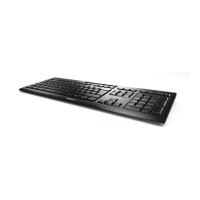
| Product color | Black |
| Keyboard style | Straight |
| Surface coloration | Monochromatic |
| Protection features | Splash proof |
| Cable length | 1.8 m |
| Power consumption | 20 mA |
| Storage temperature (T-T) | -20 - 60 °C |
| Operating temperature (T-T) | 0 - 40 °C |
| Number of products included | 1 pc(s) |
| Package type | Box |
| Package depth | 210 mm |
| Package width | 480 mm |
| Package height | 24 mm |
| Package weight | 1100 g |
| Quantity per pallet | 36 pc(s) |
| Harmonized System (HS) code | 84716060 |
 Weight and Dimensions
| Keyboard weight | 910 g |
|---|---|
| Keyboard dimensions (WxDxH) | 463 x 163 x 18 mm |



 To Next Page