40
Procedure 1
To execute the ADD FROM function
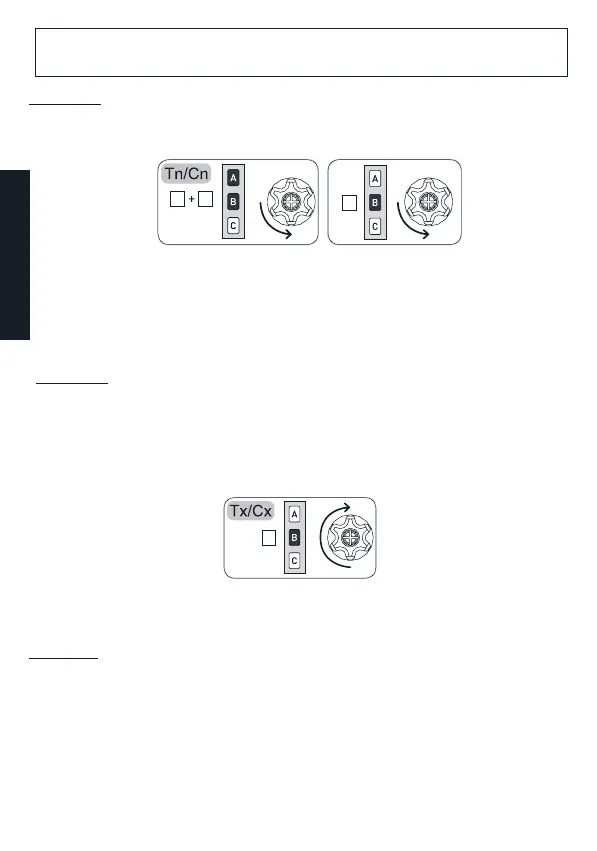
1- Already stored remote control:
a. Position yourself on the desired channel and carry out the following sequence:
Before proceeding
make sure that the motor/receiver is powered.
b. After storing, check if the motor operates correctly using the UP / DOWN / STOP keys.
3- After checking, press END PROCEDURE on an LCD remote control.
Procedure 3
To execute the functions ADD TO / FROM on two LCD remote controls
1- Already stored LCD remote control:
a.
Main menu / Programming / Device / Add to + STORE.
b. Wait for the movements of the motor, which will conrm that it is working correctly.
2- LCD remote control to be stored:
a.
Main menu / Programming / Device / Add from + STORE
b. After storing, check if the motor operates correctly using the UP / DOWN / STOP keys.
3- After checking, press END PROCEDURE on both remote controls.
A B
B
2sec
B
ENGLISH
2- LCD remote control to be stored:
a.
Main menu / Programming / Device / Add from + STORE
b. After storing, check if the motor operates correctly using the UP / DOWN / STOP
keys.
3- After checking, press END PROCEDURE on an LCD remote control.
Procedure 2
To execute the ADD TO function
1- Already stored LCD remote control:
a.
Main menu / Programming / Device / Add to + STORE
b. Wait for the movements of the motor, which will conrm that it is working correctly.
2- Remote control to be stored:
a. Position yourself on the desired channel and carry out the following sequence:



 To Next Page