41
How to Proceed for tHe cHerubini motors of tHe garda rX series and for tHe a510015
– a510017 – a510022 receivers:
Programming notes
The programming of the remote controls for the above mentioned products requires a
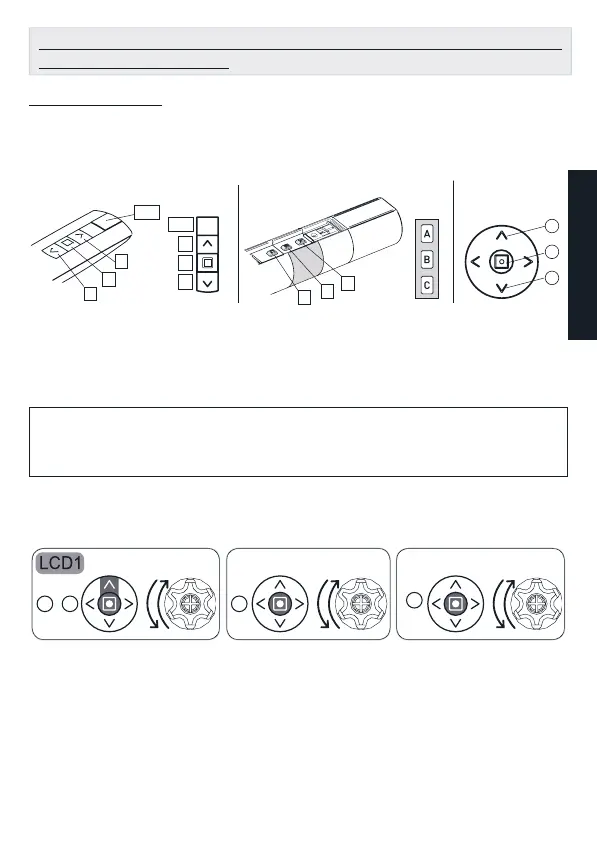
certain sequence in the use of the keys. Please keep the following functions of the keys
in mind:
A
B
C
SEL
A
B
C
SEL
Skipper Series
(not-LCD)
Giro Series LCD remote control
On Skipper Senso: perform the button sequencing from the “System Status” screen.
On Skipper LCD: select the device on which you wish to proceed.
STORING OF THE FIRST REMOTE CONTROL
ATTENTION! This Programming is only necessary when the motor or receiver is installed
for the rst time, that is to say, when it is not yet connected to any remote control.
Otherwise, see: “Storing of other remote controls”.
1- Make sure that the motor or receiver is supplied with energy
2- Use the keys in the following sequence:
3- After storing, use the UP / DOWN / STOP keys to check whether the motor is working
correctly.
4- After checking, press BACK or forward.
B
2sec
B
+
A
B
LCD1= First device to be stored on an LCD remote control
A
B
C
ENGLISH


 To Next Page