EasyManua.ls Logo

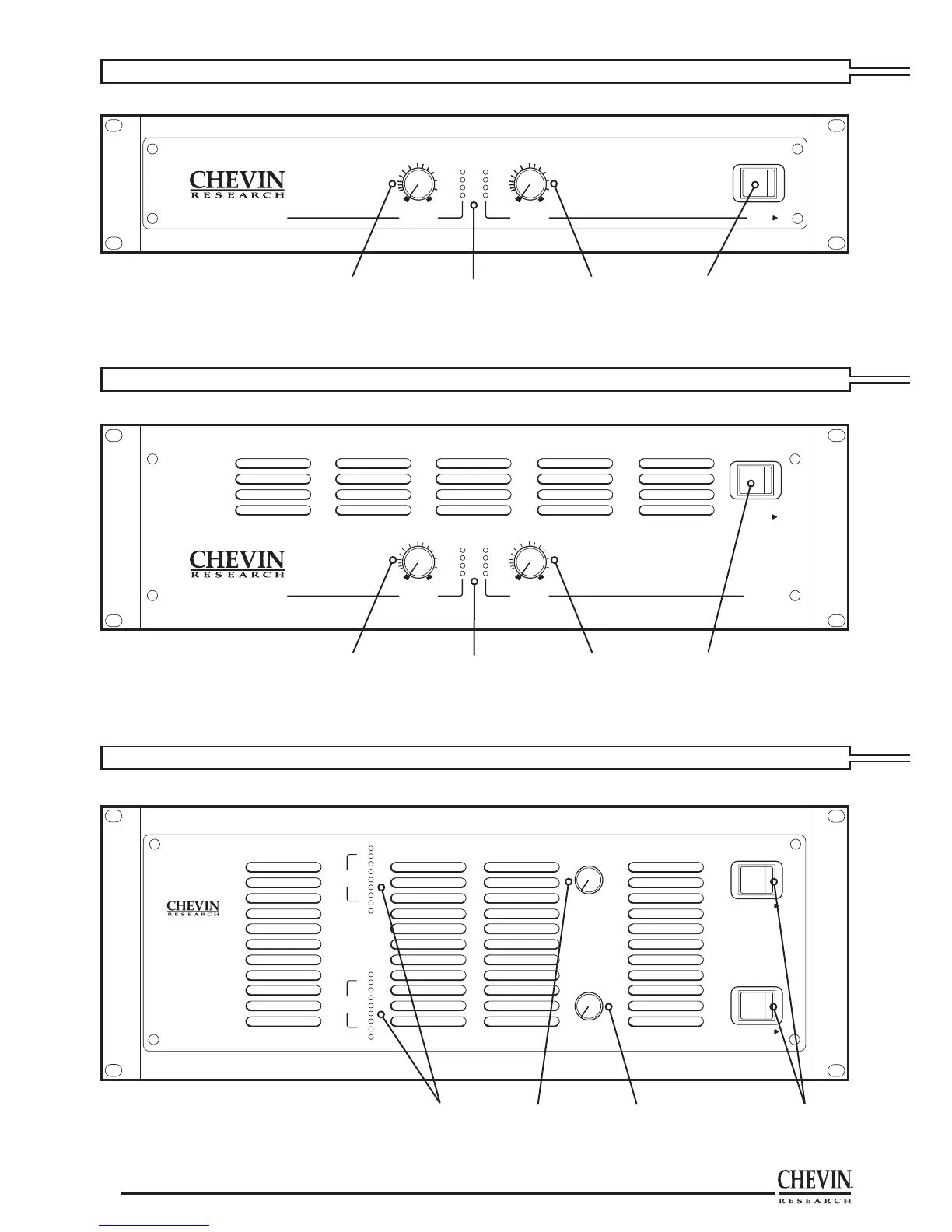
Chevin Research A2000 - Front Panel Overview (Models A750-A6000)

Default Icon
16 pages
Print Icon
To Next Page IconTo Next Page
To Previous Page IconTo Previous Page
Loading...
10
11
A5000 • A6000
SEE PAGE 6 FOR OPERATION DETAILS • FRONT PANEL
A750 • A1000 • A1004 • A1500 • A2000 • A3000
SEE PAGE 6 • FRONT PANEL
A4000 • A5003
SEE PAGE 6 FOR OPERATION DETAILS • FRONT PANEL
CHANNEL A CHANNEL B
POWER
LINEAR AMPLIFIER
Axxxx
ATTENUATION dB ATTENUATION dB
POWER
CLIP
SIGNAL
INF INF
20 20
10 10
6 6
3 3
1 1
0 0
CHANNEL A CHANNEL B
POWER
LINEAR AMPLIFIER
Axxxx
ATTENUATION dB
POWER
CLIP
SIGNAL
INF
20
10
6
3
1
0
ATTENUATION dB
INF
20
10
6
3
1
0
CHANNEL A
CHANNEL
B
POWER
POWER
LINEAR
POWER
AMPLIFIER
A6000
POWER ON
POWER ON
LIMITER
LIMITER
RMS
OUTPUT
VOLT
S
RMS
OUTPUT
VOLTS
12
12
24
24
36
36
48
48
60
60
72
72
84
84
Power switchChannel B
gain
control
Power, Clip
and Signal
indicators
Channel A
gain
control
Power switchChannel B
gain
control
Power, Clip
and Signal
indicators
Channel A
gain
control
Channel A and B
Power switches
Channel B
gain
control
Power, Signal
& Limiter
indicators
Channel A
gain
control
The Limiter indicator lights when amp is being
driven into clip and shows SoftClip system is active.
If clip threshold is exceeded, the intensity of this LED
gives an indication of the degree of overdrive.
Model shown is A6000. Signal indicator values are different for A5000.

Related product manuals