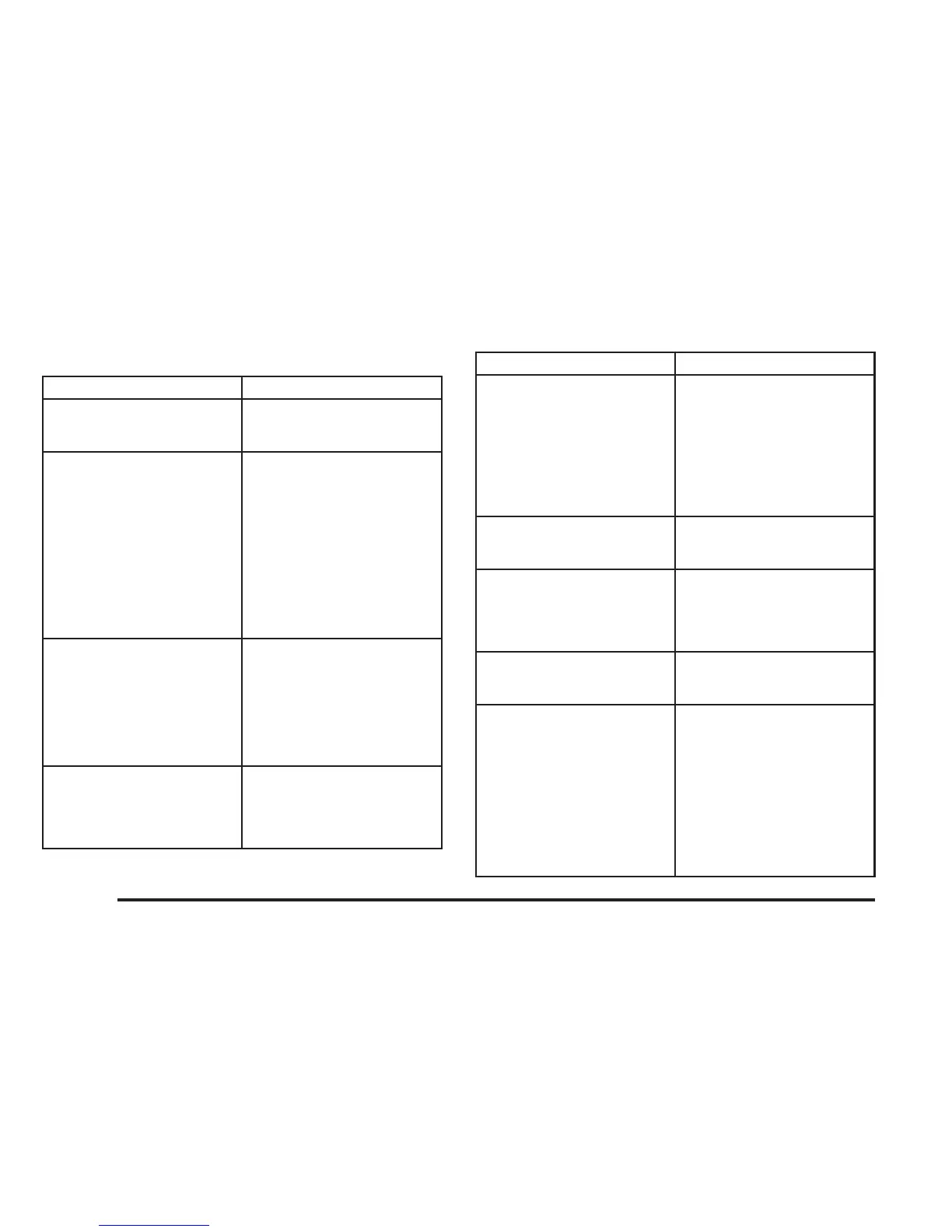
Tips and Troubleshooting Chart
Problem Recommended Action
No power. The ignition may not be in
ACCESSORY, RUN,
or RAP.
Disc will not play. The system might be off.
The parental control button
might have been pressed.
The power indicator lights
will flash. The system
might be in auxiliary
source mode. Press the
AUX button to switch
between the DVD player
and the auxiliary source.
The disc is upside down or
is not compatible.
No sound — Wireless
Headphones
Turn the headphones on.
Make sure the correct
channel is selected on the
wireless headphones.
Check the batteries. The
volume on the
headphones could be too
low, adjust the volume.
No sound — Wired
Headphones
Make sure the wired
headphones are plugged
in. Adjust the volume. If
RSA is on, DVD audio will
not be heard.
Problem Recommended Action
No sound — Vehicle
Speakers
If the DVD system is
being heard through the
vehicle speakers, adjust
the volume on the radio.
Press the CD AUX button
on the radio to make sure
that RSE is enabled. The
rear speakers will mute
when RSA is on.
The picture is distorted
during fast forward or
reverse.
This is normal for this
operation.
The picture does not fill the
screen. There are black
borders on the top and
bottom or on both sides or
it looks stretched out.
Video mode may not be
correctly set. See “RSE
OSD” earlier in this
section.
I ejected the disc and tried
to take it out, but it was
pulled back into the slot.
Press the eject button
once.
The language in the audio
or on the screen is wrong.
Press the main menu
button on the remote
control and change the
audio or language
selection on the DVD
menu. To change the
language preference,
press the display button to
access the RSE OSD
menu. See “RSE OSD”
earlier in this section.
3-108





 To Next Page