Chevrolet Express Owner Manual - 2012 - crc - 11/11/11
Lighting 6-5
The lever returns to its starting
position when released.
If after signaling a turn or lane
change the arrow flashes rapidly or
does not come on, a signal bulb
may be burned out.
Have any burned out bulbs
replaced. If the bulb is not burned
out, check the fuse. See Fuses and
Circuit Breakers on page 10‑40.
Turn Signal On Chime
If the turn signal is left on for more
than 1.2 km (0.75 mi), a chime
sounds at each flash of the turn
signal and the message TURN
SIGNAL ON also appears in the
Driver Information Center (DIC). See
Lamp Messages on page 5‑36. To
turn off the chime and message,
move the turn signal lever to the off
position.
Interior Lighting
Instrument Panel
Illumination Control
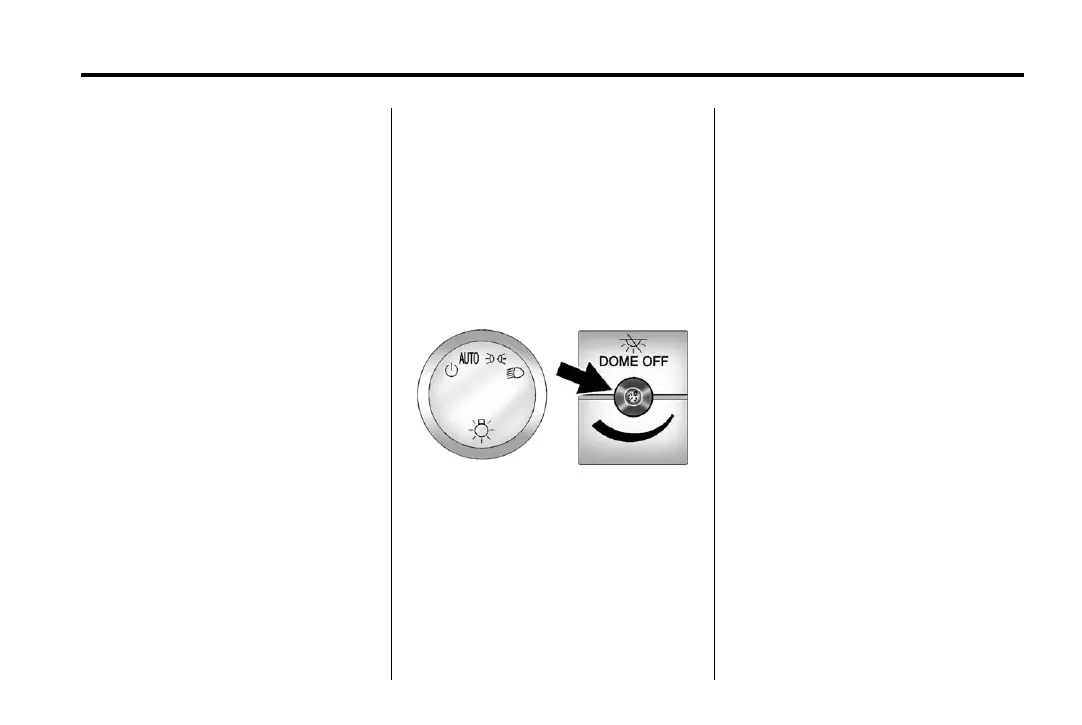
The knob for this feature is located
to the left of the steering column.
D (Instrument Panel Lights):
Push the knob to extend and then
turn clockwise or counterclockwise
to brighten or dim the instrument
panel lights and the radio display.
This only works if the headlamps or
parking lamps are on.
Dome Lamps
The dome lamps come on when any
door is opened. They turn off after
all the doors are closed.
The instrument panel brightness
knob extends when
D is pressed.
To manually turn on the dome
lamps, press
D then turn the knob
clockwise to the farthest position. In
this position, the dome lamps
remain on whether a door is opened
or closed.













 To Next Page