Chevrolet Spark Owner Manual - 2013 - 1st - 5/2/12
4-2 Storage
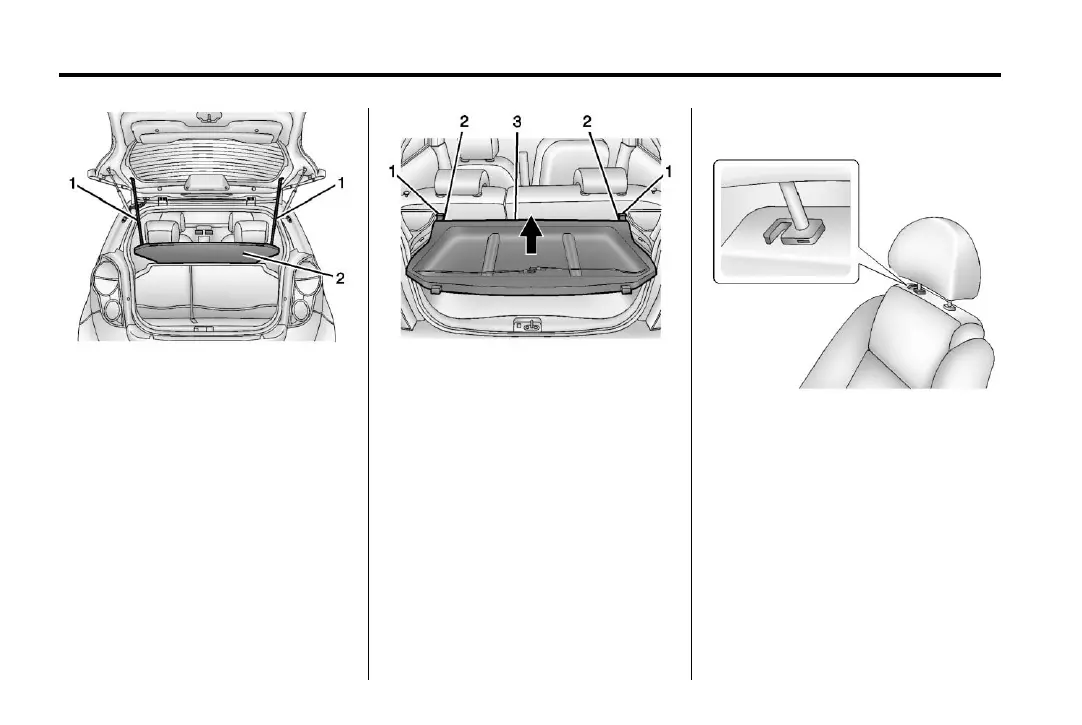
To remove the cargo cover:
1. Remove both of the cords (1)
from the hooks at the top of the
liftgate.
2. Pull the cargo cover (2) rearward
to release the cargo cover.
To install the cargo cover:
1. Align the cargo cover (3) on the
trim panel edge (2) on both sides
and push it forward, locking the
cargo cover into the hooks (1).
2. Reconnect both of the cords to
the hooks at the top of the
liftgate.
Shopping Bag Hooks
The vehicle has a shopping bag
hook under the front seat headrests.
Lift the headrests to access
the hook.
Cargo Net
The cargo net is located in the trunk
and used to store small loads. The
net should not be used to store
heavy loads.



 To Next Page
 Loading...