6 Infotainment System
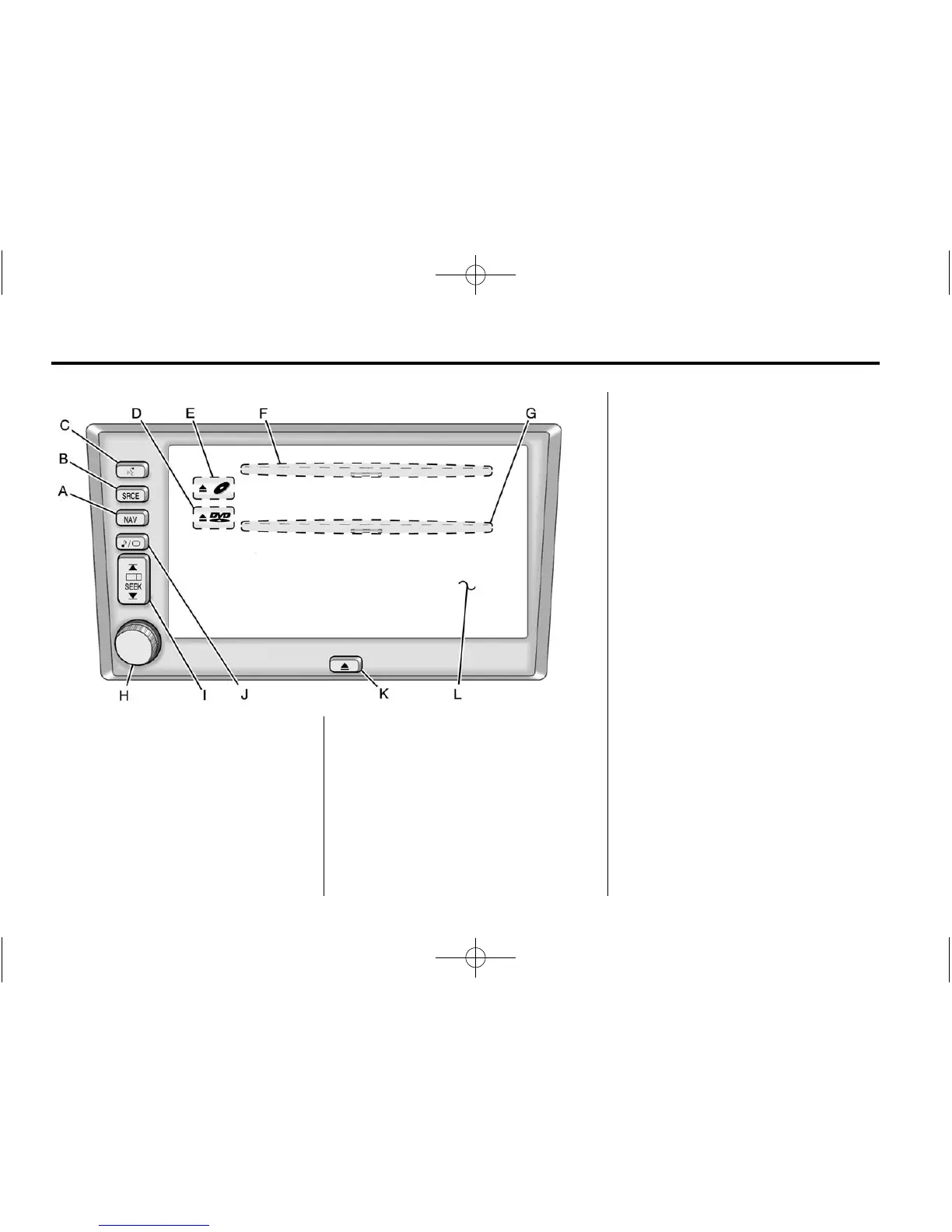
A. NAV (Navigation) Key
B. SRCE (Source) Key
C.
g (Voice Recognition)
D.
X DVD (DVD Map Database
Eject)
E.
X B (CD Eject)
F. CD Slot
G. DVD Map Database Slot
H. Power/Volume Knob
I.
r O SEEK q (Seek/Tune)
J.
e / z (Audio/Adjust) Key
K.
X (Open/Close Faceplate)
L. Navigation System Screen
Language
To change the language of the
prompts that appear on the
navigation screens, see “Driver
Information Center (DIC)” in the
Index of the vehicle's owner manual.
Deleting Personal Information
This navigation system can record
and store destinations. You may
want to delete stored destinations
when the vehicle is sold or the lease
has expired. Refer to the following
sections to delete the destination
information that has been stored.
See “Memory Points,” “Home,”
“Previous Destination,” and “Preset
Destination” under Stored Locations
on page 49 for deleting stored
destinations.















 To Next Page