112 Infotainment system
If the iPod® device to be played is
already connected, repeatedly press
CD/AUX button to select the iPod®
player.
■ It will automatically play from the
previously played point.
■ The playback functions and the
information display items of the
iPod® player used with this product
may be different from the iPod® in
terms of play order, method, and
the information displayed.
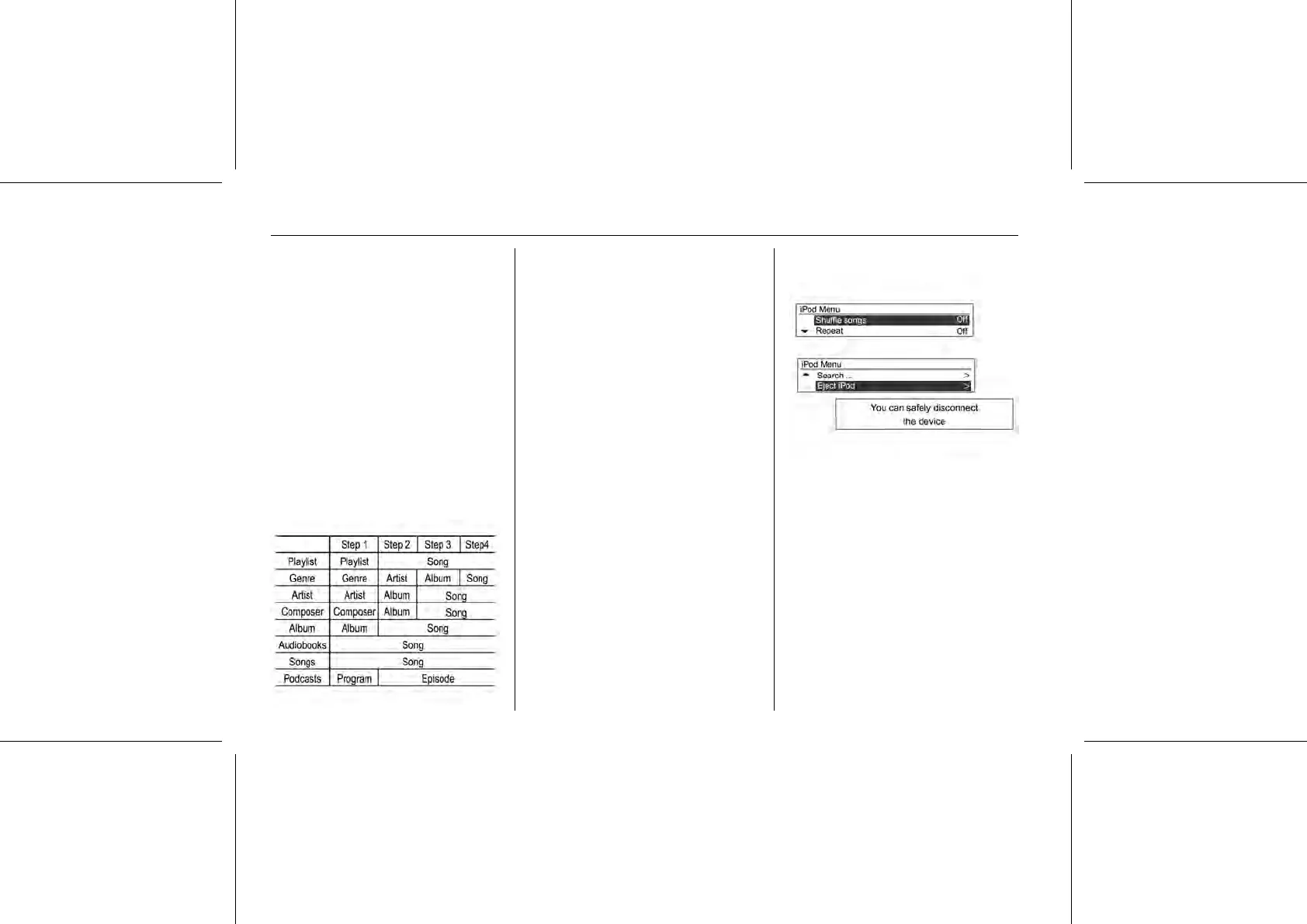
■ Refer to the following table for the
classification items related to the
search function provided by the
iPod® product.
The functions to play the iPod® are
operated similarly to CD/MP3
playback.
Log-off iPod® playback
To end playback, press the RADIO
BAND or CD/AUX button to select
other functions.
Using the iPod® menu
From the iPod® menu, the
instructions for "Shuffle songs/
Repeat/Search... (including Audio
books and Composers)" are similar to
CD/MP3 player's CD menu, only the
"iPod® removal item" has been
added. Refer to each item of CD/MP3
for use.
iPod® menu → Eject iPod®
Press the MENU-TUNE button from
play mode to display the iPod® menu.
Turn the MENU-TUNE control knob to
move to the Eject iPod® function, and
then press the MENU-TUNE button to
display the message notifying you
that it is safe to remove the device.
Separate the iPod® device from the
USB connection terminal.
Return to the previously used
function.















 To Next Page