15
LIGHTING
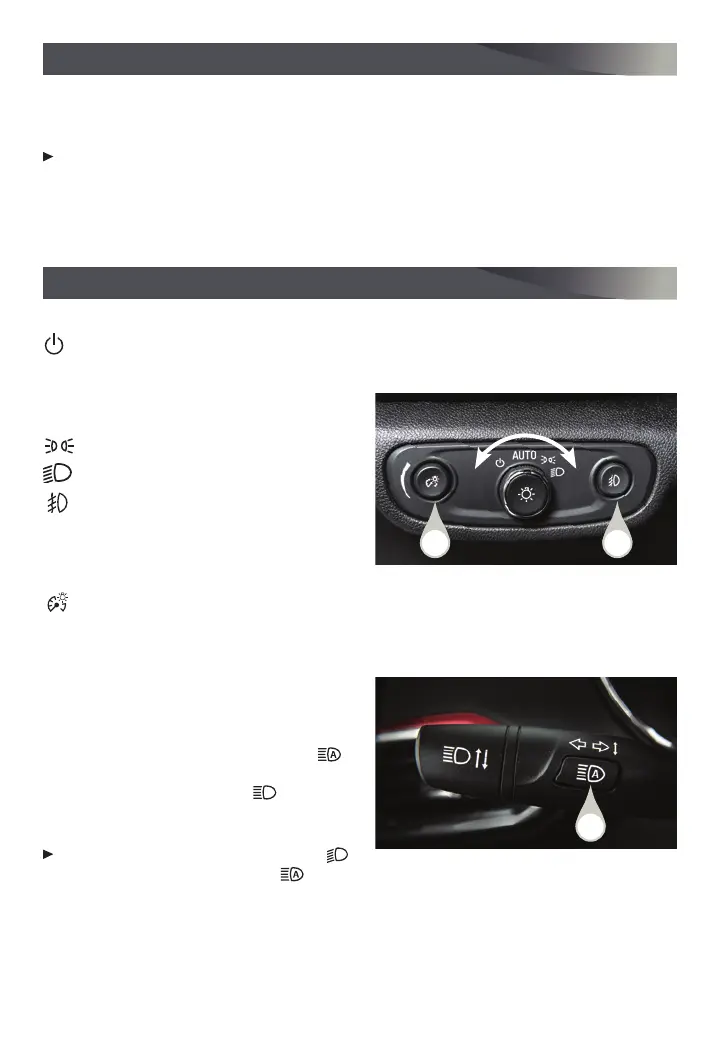
EXTERIOR LAMP CONTROLS
Off/On
AUTO
Automatically activates the exterior lamps
depending on outside lighting conditions.
Parking Lamps
Headlamps
Fog Lamps
F
Press the button (A) to turn the fog lamps
on or off.
INSTRUMENT PANEL LIGHTING
Instrument Panel Illumination
Press and release the knob (B) to extend it.
Turn the knob to adjust the instrument panel lighting.
INTELLIBEAM SYSTEM
The IntelliBeam system automatically turns
the high-beam headlamps on/off based
on traffic conditions to provide enhanced
visibility while driving at night. A green
indicator displays on the instrument cluster
when the system is on; a blue
indicator
displays when the high-beam headlamps
areon.
With the lamp control in the AUTO or
Headlamps position, press the
button (C) on the turn signal lever to turn the
IntelliBeam system on or off.
Note: IntelliBeam activates the high-beam headlamps only when driving over 25 mph.
See Lighting in your Owner’s Manual.
With the vehicle’s available 4G LTE Wi-Fi hotspot, up to 7 devices (smartphones, tablets
and laptops) can be connected to high-speed internet. For more information on use and
system limitations, visit my.chevrolet.com/how-to-support.
To retrieve the name and password for the hotspot, select the Wi-Fi Hotspot icon on
the infotainment screen or go to Settings > System > Wi-Fi Hotspot.
See Infotainment System in your Owner’s Manual.
ONSTAR® 4G LTE WI-FI® HOTSPOT
F
Optional equipment
A
C
B







 To Next Page