6
POWER FRONT SEATS
F
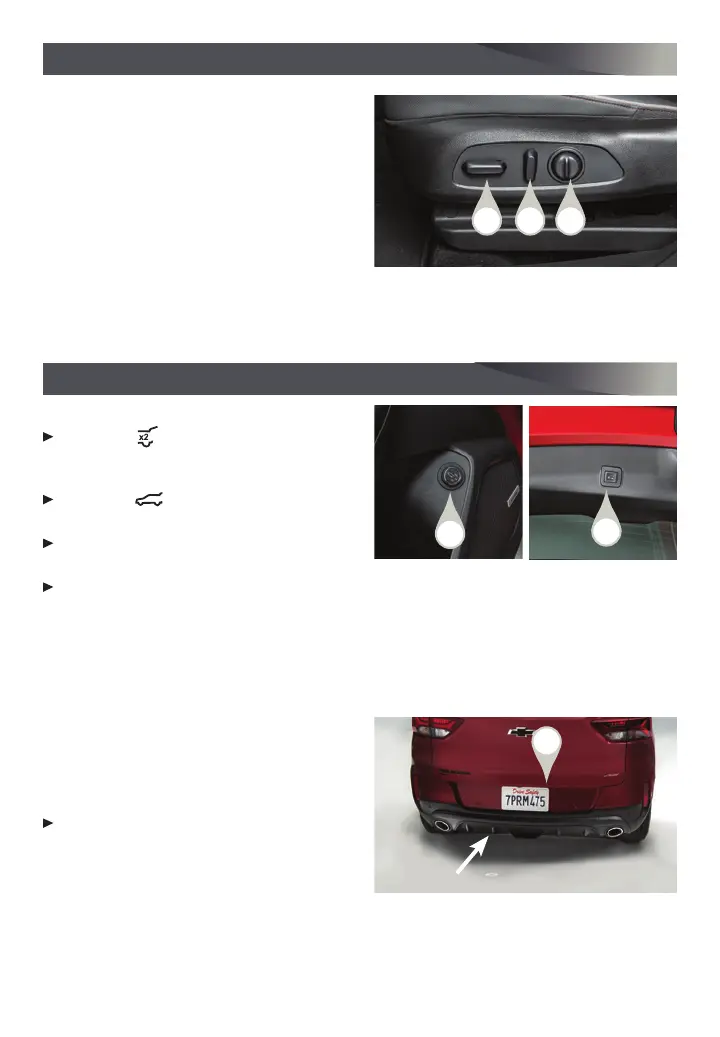
POWER SEAT ADJUSTMENTS
A. Seat Adjustment
Move the horizontal control to move the
seat forward or rearward and to tilt, raise or
lower the seat.
B. Seatback Recline Adjustment
Move the vertical control to recline or raise
the seatback.
C. Lumbar Support Adjustment
Press and hold the round control to adjust the lumbar support.
See Seats and Restraints in your Owner’s Manual.
POWER LIFTGATE
F
OPEN/CLOSE THE POWER LIFTGATE
Press the
Power Liftgate button on
the Remote Keyless Entry (RKE) trans-
mitter twice.
Press the Power Liftgate knob (A)
on the driver’s door.
Press the touchpad (B) above the license
plate to open the liftgate.
Press the button (C) on the bottom edge of the liftgate to close the liftgate.
PROGRAMMING THE LIFTGATE HEIGHT
1. Turn the Power Liftgate knob to the 3/4 mode position.
2. Open the liftgate.
3. Adjust the liftgate manually to the desired height.
4. To save the setting, press and hold the
button (C) on the bottom edge of the
liftgate until the turn signals flash and a
beep sounds.
HANDS-FREE OPERATION
To open or close the liftgate hands-free,
kick your foot straight under the driver’s
side of the rear bumper, left of center.
The RKE transmitter must be within 3
feet of the liftgate. The Chevrolet logo is
projected on the ground near the rear bumper, indicating the kicking motion location
for hands-free operation. The logo is shown for 1 minute, depending on operating
conditions.
See Keys, Doors and Windows in your Owner’s Manual.
F
Optional equipment
A B C
C
B
A








 To Next Page