EasyManua.ls Logo

Chicago Electric 98199 - User Manual

Chicago Electric 98199
23 pages
Print Icon
To Next Page IconTo Next Page
Loading...
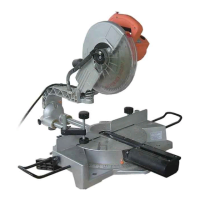
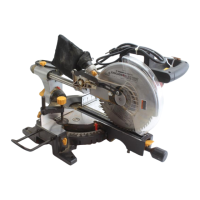
10” COMPOUND SLIDE
MITER SAW
Model
98199
SET UP AND OPERATING INSTRUCTIONS
Distributed exclusively by Harbor Freight Tools
®
.
3491 Mission Oaks Blvd., Camarillo, CA 93011
Visit our website at: http://www.harborfreight.com
Read this material before using this product.
Failure to do so can result in serious injury.
SAVE THIS MANUAL.
Copyright
©
2008 by Harbor Freight Tools
®
. All rights reserved. No portion of this manual or any
artwork contained herein may be reproduced in any shape or form without the express written
consent of Harbor Freight Tools. Diagrams within this manual may not be drawn proportionally. Due
to continuing improvements, actual product may differ slightly from the product described herein.
For technical questions or replacement parts, please call 1-800-444-3353.
MANUAL REV 08h, 09b

Other manuals for Chicago Electric 98199

Questions and Answers

  • K
    kmaxwellAug 12, 2025
    What to do if my Chicago Electric 98199 will not start?
    • L
      Laurie CampbellAug 12, 2025
      If your Chicago Electric Saw won't start, there are a couple of things to check: * First, make sure there is power at the outlet. * Second, verify that the cord is properly plugged in.
  • S
    Sharon AndersonAug 16, 2025
    What to do if the blade binds, slowing or stopping my Chicago Electric 98199 Saw?
    • J
      jclarkAug 16, 2025
      If the blade of your Chicago Electric Saw binds, slowing it down or stopping it, consider the following: * Ensure the material is correctly aligned on the saw and that both ends are supported. The material must be flat on the table, flush against the fence, and supported on both ends. * Check the condition of the material and verify that the blade is compatible with the material being cut. The material may be wet or contaminated, or an inappropriate blade may be in use.
  • M
    Michael MirandaAug 20, 2025
    How to prevent wood from burning at the ends when cut with a Chicago Electric 98199?
    • A
      Angela TerryAug 20, 2025
      To prevent wood from burning at the ends when cut with your Chicago Electric Saw: * Clean the blade using blade cleaner or mineral spirits, as a dirty blade can cause burning. * Check the position of the work material on the table. The material must be flat, flush against the fence, and supported on the ends to prevent binding.
  • C
    christinehensleyAug 25, 2025
    What to do if material frays or chips out when using my Chicago Electric 98199?
    • B
      banksmatthewAug 25, 2025
      If the material frays or chips out when using your Chicago Electric Saw, consider these points: * Ensure the finished side of the material is facing up. The bottom and back side are prone to chip out. * Check the blade for damaged teeth and sharpen or replace the blade if necessary. A dull or chipped blade can cause fraying. * Verify that the blade is appropriate for the material being cut. For cross-cutting hardwood and precision cuts, use a thin kerf blade with 60 or more teeth. * Use a thin piece of scrap material, such as 1/4” plywood, underneath or behind the material to support the edges during cutting.
  • J
    Jacqueline WilliamsAug 27, 2025
    How to prevent wood burning when cutting with Chicago Electric Saw?
    • J
      Jordan FowlerAug 27, 2025
      If wood burns at the ends when cut with your Chicago Electric Saw, it could be due to a dirty blade. Clean the blade using blade cleaner or mineral spirits. Another cause could be that the material is binding. Check the position of the work material on the table, ensuring it is flat, flush against the fence, and supported on the ends.
  • E
    eric83Aug 31, 2025
    Why does my Chicago Electric Saw operate sporadically?
    • C
      Christian GriffithAug 31, 2025
      If your Chicago Electric Saw operates sporadically or at low power, it could be due to: * A low power supply or improper extension cords. Check your power supply and power cords. * Worn or cracked carbon brushes. Inspect the carbon brushes and replace them if they are damaged or worn.
  • H
    hardingkarenSep 3, 2025
    What to do if material frays when using Chicago Electric 98199 Saw?
    • T
      Tyler BoydSep 4, 2025
      If the material frays or chips out when using your Chicago Electric Saw, consider these points: * Ensure the finished side of the material is facing up. * Inspect the blade for damage or dullness; sharpen or replace if needed. * Verify that the blade is appropriate for the material you're cutting. * Support the material, using a thin piece of scrap material underneath or behind it.
  • C
    Craig BraunSep 7, 2025
    Why does the blade bind on my Chicago Electric Saw?
    • N
      Nancy EdwardsSep 8, 2025
      If the blade binds, slowing or stopping your Chicago Electric Saw, first, ensure the material is flat on the table, flush against the fence, and supported on both ends. Second, check the condition of the material and ensure the blade is compatible with it.

Summary

Important Safety Information

Tool Use and Maintenance Safety

Miter Saw Specific Safety Warnings

Miter Saw Specific Safety Warnings

Details critical safety instructions specific to operating a miter saw.

Grounding Instructions

Grounding Safety and Procedures

Outlines essential steps for proper grounding to prevent electric shock.

Vibration Safety

Specifications

Initial Set Up Instructions

Operating Instructions

Adjusting Miter Angle

Detailed steps for setting and locking the miter angle.

Adjusting Bevel Angle

Detailed steps for setting and locking the bevel angle.

Making a Cut

Step-by-step guide on performing cuts with the miter saw.

Maintenance and Servicing

Replacing the Blade

Step-by-step instructions for safely replacing the saw blade.

Adjusting the Fence

How to adjust the fence for precise 90-degree cuts.

Troubleshooting

Chicago Electric 98199 Specifications

General IconGeneral
Motor Power15 Amp
Amperage15 Amp
Voltage120V
Arbor Size5/8 inch
Blade Diameter10 inches

Related product manuals