12
Playing lullabies
(Music mode only)
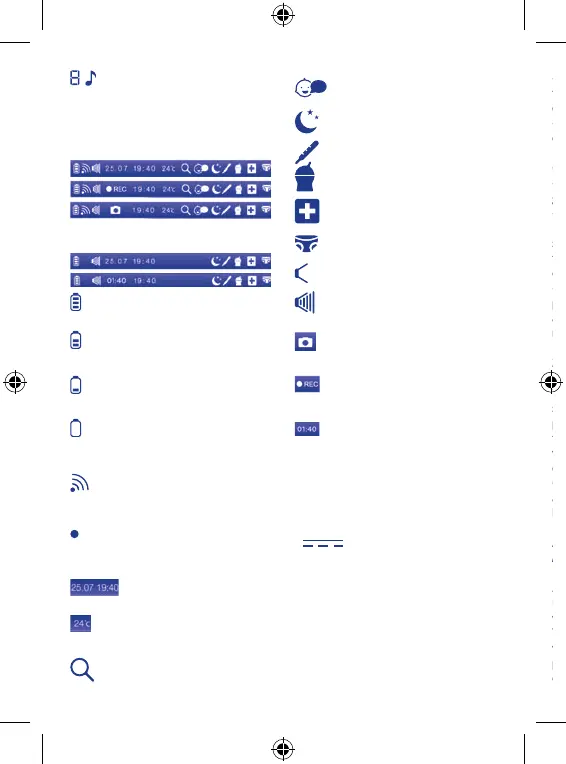
1.5 Operating icons shown on the
display (parent unit toolbar)
Baby Monitor Mode
Gallery Mode
Rechargeable battery charged
Medium charging level on
rechargeable battery
Low charging level on recharge-
able battery
Rechargeable battery flat: the
parent unit will switch off within
a few minutes
Correct connection between
units (only in Baby Monitor mode)
Loss or lack of connection be-
tween units (only in Baby Moni-
tor mode)
Date and time
temperature (only in Baby Moni-
tor mode)
2x zoom set (only in Baby Moni-
tor mode)
Voice activated operation set
(only in Baby Monitor mode)
Sleep reminder set
Measure fever reminder set
Meal reminder set
Medicine reminder set
Nappy change reminder set
volume muted
Maximum volume level
Photo capture in progress (only
in Baby Monitor mode)
Video recording in progress
(only in Baby Monitor mode)
Video duration
(only in Gallery mode)
2. Description of features
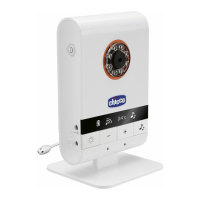
2.1 Child unit (primarily in image and
sound transmitter mode)
2.1.1 Power:
Power via 100-240 V~ 50/60 Hz /6.5
V
550 mA switching mains
adapter (1) or via four 1.5V AAA/LR6
alkaline batteries (not included)
When power is supplied with mains
adapter (1):
- check that the mains voltage cor-
responds to that shown on the rat-
ing plate of the adapters referred to
above;
- insert the mains adapter jack (1) in
the power connector (11) on the side
of the unit.
- insert the mains adapter plug in an
easily accessible power socket.
CAUTION:
- The adapter cord could cause stran-
gulation. Keep out of reach of children.
- Periodically inspect mains adapters
(1). If the power cord or plastic parts
show signs of damage, do not use
them and contact a qualified techni-
cian.
- Do not leave mains adapters (1)
plugged into the outlet when appli-
ances are not in use and/or not con-
nected to the mains adapters (1).
2.1.2 Modes of use - Switching on and
adjustment.
The child unit (primarily in image and
sound transmitter mode) must be
positioned about 1 - 1.5 metres from
the child, on a flat, stable surface and
with the microphone (6) and the video
camera (5) directed toward the child.
Caution: the child unit, the mains
adapter (1) and its power cord must be
kept out of reach of children.
Switching on/off the child unit in
Baby Monitor mode
Press the on/off button (2) for about
2 seconds. The child unit (primarily in
image and sound transmitter mode)
will switch on.
The power and link indicator light (9)
will begin to flash green and the dis-
play (17) will show the icon
to indi-
cate that the parent unit is attempt-


 To Next Page
 Loading...