23
CAUTION: do not leave the parent
unit hanging while the lithium-ion
batteries (13) are charging.
3. Managing menus on the parent unit
in Baby Monitor mode:
3.1 Accessing the main menu
When the units work in Baby Monitor
mode, the display (4) on the parent
unit shows the image filmed by the
video camera (5) on the child unit.
Touching the touchscreen display (4)
at any point brings up the
and icons.
Touching the icon goes back to
displaying the full screen image filmed
by the video camera (5) on the child
unit. Touching the
icon ac-
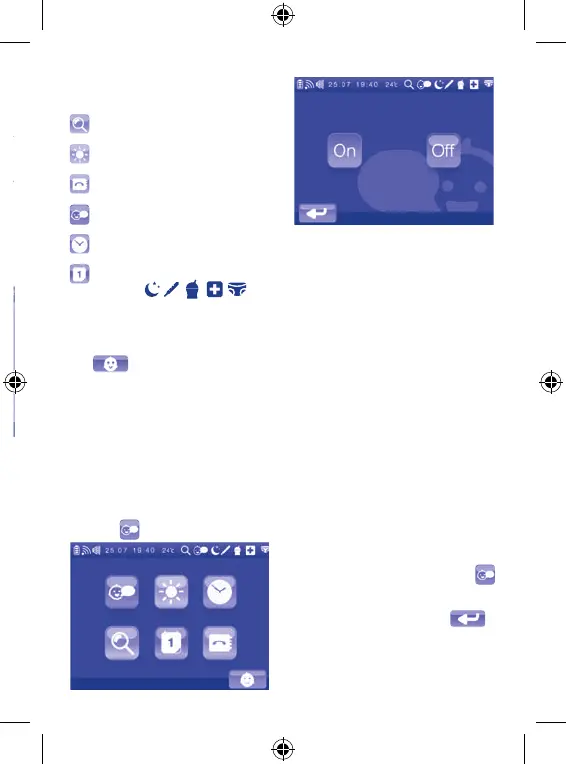
cesses the main menu, from which it
is possible to manage all the available
functions.
The functions included in the main
menu in Baby Monitor mode are:
2 x zoom
Adjusting the display brightness
Contact list management
Voice activation function
Date and time setting
Setting and activating the 5 re-
minders (
)
To exit the main menu and go back to
displaying the image filmed by the vid-
eo camera (5) on the child unit, touch
the
icon.
Note: if, while navigating in the
main menu, no point of the display is
touched for 10 seconds, the display
(4) will automatically go back to dis-
playing the image filmed by the video
camera (5) on the child unit.
3.2 Sub-menus
3.2.1 Setting the Voice Activation
function
The parent unit (primarily in image
and sound receiver mode) can func-
tion in continuous mode (voice activa-
tion OFF) or in voice activation mode
(voice activation ON). See paragraph
2.2.2.
To access the sub-menu of the Voice
Activation function, touch the corre-
sponding icon on the main menu.
On the display, you will be able to
choose between “ON” and “OFF”.
The green icon indicates the current
function setting (“ON” is green if the
function was activated previously,
“OFF” is green if the function was not
activated previously). Touch the blue
“ON” or “OFF” icon to change the set-
ting of the Voice Activation function.
After selection, the display will au-
tomatically switch to displaying the
image filmed by the video camera (5)
on the child unit. When the Voice Ac-
tivation function is set to ON, the
icon is shown on the toolbar (17).
To go back to the main menu without
changing any settings, touch
.
Note: if, while navigating in the
sub-menu, no point of the display is
touched for 10 seconds, the display
(4) will automatically go back to dis-


 To Next Page