pg.13
SET‐UPCONTINUED
ToCool:
PresstheCOOLERbuttontoselectyourdesiredtemperature.
Thedigitalreadingonthedisplaywillblink3timestoindicatethesettingwasaccepted.
TheCubewillstarttoworkanddisplaytheactualtemperature.
ToWarm:
PresstheWARMERbuttontoselectyourdesiredtemperature.
Thedigitalreadingonthedisplaywillblink3timestoindicatethesettingwasaccepted.
TheCubewillstarttoworkanddisplaytheactualtemperature.
Note:Thetemperatureadjustmentstepscanbecompletedwiththeremotecontroloron
theCubedisplaypanel.
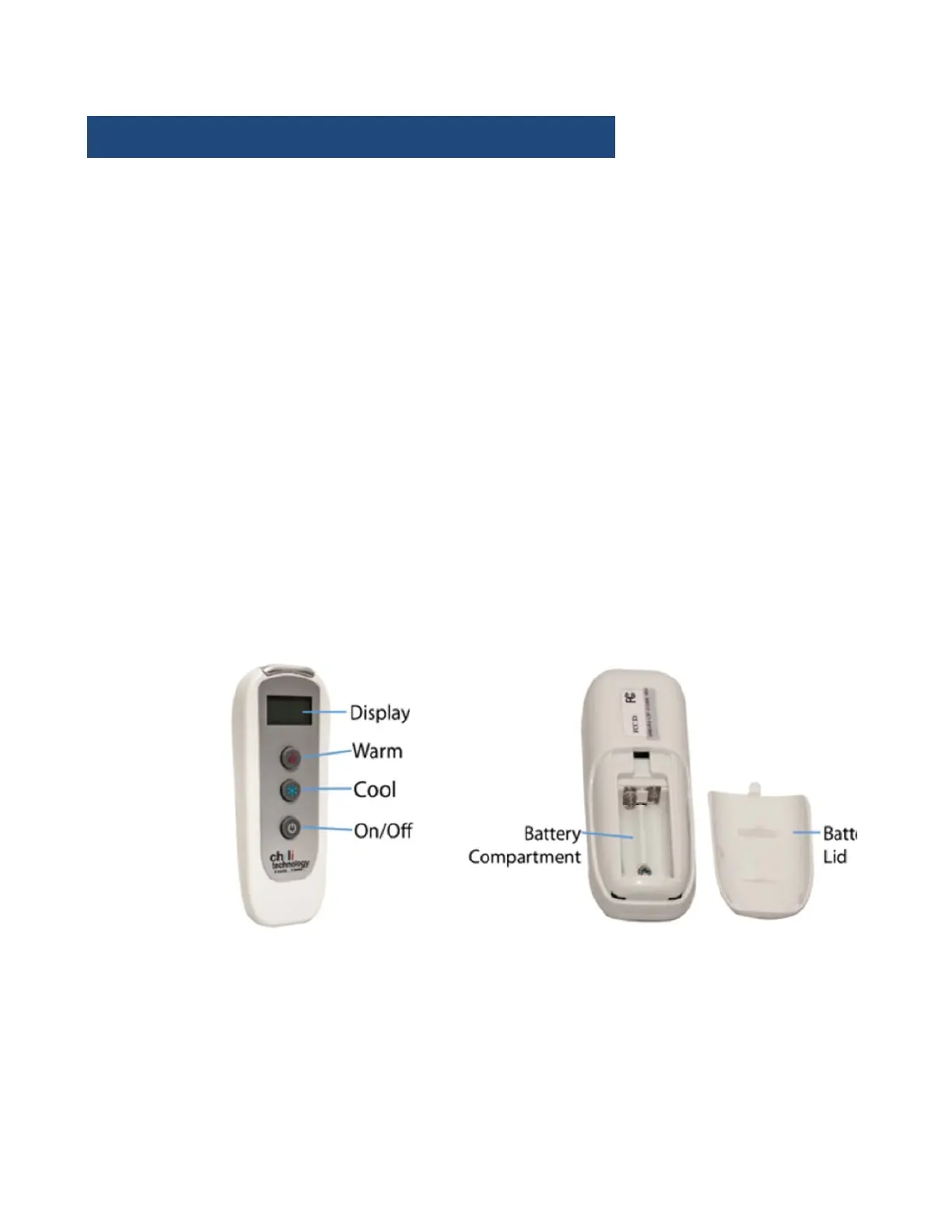
UsingtheRemote.
RemotePairing:
PlugintheCube.
Touchthe“ON/OFF”buttonontheCubedisplaypanelandholdfor5seconds.The
Cubewillsoundalongbeepandthedisplaywillshowablinking“888”.
TurntheremotecontrolON.TheCubewillsoundashort“beep”anddisplaythe
actualtemperature.
SwitchingBetweenºFandºC:
TurnOFFtheremotecontrol.
TurnONtheCubeonthedisplaypanel.
Pressthe“ON/OFF”buttontheremotecontrolandholdfor2seconds.


 To Next Page