EasyManua.ls Logo

ChiQ WFL8T48W2 - User Manual

ChiQ WFL8T48W2
28 pages
Print Icon
To Next Page IconTo Next Page
Loading...
MODEL
USER MANUAL
WFL8T48W2

Questions and Answers

  • S
    Samantha BaldwinAug 18, 2025
    What to do if my ChiQ Washer machine does not drain or spin and shows “E03” in the display?
    • J
      Jeffrey ShortAug 18, 2025
      If your washer isn't draining or spinning and displays “E03”, it could be due to a blocked pump filter, a kinked drain hose, or a blocked drain hose or sink trap. If it is a new installation, make sure that the blanking cap or spigot has been removed if connected under a sink.
  • E
    Elizabeth RobertsAug 20, 2025
    What to do if my ChiQ Washer is not filling with water or shows “E02” in the display?
    • M
      Melvin MedinaAug 20, 2025
      If your ChiQ washer isn't filling with water or displays error code “E02”, check the following: * Ensure the water inlet hose isn't kinked and is properly connected to the water supply. * Verify that the water pressure is adequate and the water tap is turned on. * Confirm there's a water supply to the house. * Check if the inlet valve filter is blocked. * Make sure the START/PAUSE button has been pressed.
  • K
    Kenneth MooreAug 23, 2025
    What to do if my ChiQ WFL8T48W2 Washer door cannot be opened?
    • K
      kbrooksAug 23, 2025
      The door will remain locked until the door lock indicator light turns off shortly after the program completes. If there is no power to the machine, you need to perform the manual unlocking procedure.
  • M
    Michael WilliamsAug 26, 2025
    What to do if my ChiQ WFL8T48W2 vibrates a lot during the spin cycle?
    • C
      Christopher WalkerAug 26, 2025
      Excessive vibration during the spin cycle can occur due to several reasons: * The feet of the washer may not be properly adjusted, causing it to rock. * If it's a new installation, the transit bolts, plastic spacer, or polystyrene packaging might not have been removed. * The washer could be trapped between cabinets or walls. * The load might be slightly unbalanced, causing the machine to spin at a lower speed.
  • P
    pricemarkAug 28, 2025
    Why does my ChiQ WFL8T48W2 continuously fill and drain water, or why is water left in the drum?
    • J
      Jessica GarciaAug 28, 2025
      This issue may happen if: * The top of the drain hose is positioned too low. It should be between 65 and 100 cm from the floor. * The drain hose is incorrectly connected to the sink trap, allowing water to flow into the machine. Ensure the drain hose is higher than the bottom of the sink. * The end of the drain hose is pushed too far down the standpipe. The “U” bracket should be fitted 100mm from the end of the drain hose.
  • S
    Sue LongAug 30, 2025
    Why does my ChiQ WFL8T48W2 Washer smell?
    • S
      Shane StoutAug 30, 2025
      If your washing machine has an unpleasant odor, it likely needs a service wash. To resolve this, run a “Drum Clean” wash cycle using detergent but without any laundry.
  • C
    Colin LopezSep 1, 2025
    What to do if my ChiQ WFL8T48W2 leaks from the dispenser?
    • A
      Aaron ColemanSep 1, 2025
      If your washer is leaking from the dispenser, it could be due to a few reasons. The dispenser drawer might be blocked with detergent and needs cleaning. Alternatively, the water pressure could be too high; try turning down the tap on the water supply pipe slightly. Also, ensure the machine is level, as tilting forwards can cause leaks.
  • K
    Kurt SmithSep 4, 2025
    How to fix ChiQ WFL8T48W2 when M-Smart wash cycle does not activate?
    • R
      Ryan ZimmermanSep 4, 2025
      If the M-Smart wash cycle doesn't activate, ensure that after switching on the machine, you haven't activated any other cycle. If another cycle was selected, switch the machine off and then press the One Touch button.
  • J
    Jeffrey RobertsSep 6, 2025
    Why is my ChiQ WFL8T48W2 Washer not spinning?
    • S
      stacey27Sep 6, 2025
      The washer might not spin if the spin speed is set to “OFF}.
  • C
    Corey HansenSep 8, 2025
    Why does my ChiQ WFL8T48W2 Washer leak (other than dispenser)?
    • B
      benjamin24Sep 8, 2025
      If your washing machine is leaking (but not from the dispenser), inspect the inlet hose at both the cabinet and tap ends to ensure they are tight. If the hose is tight but still leaks, replace the rubber washers or ensure the rubber washer is present.

Summary

Safety Instruction

Electrical Warning

Critical safety rules regarding electrical connections and appliance usage.

Service

Guidelines for authorized repairs and contacting customer service.

Installation

Disposal of Package Materials

Guidelines for responsible disposal of packaging materials according to regulations.

Disposal of Household Appliances

Proper disposal methods for the appliance as per environmental regulations.

Unpacking

Steps for safely removing the washing machine from its packaging.

Leveling the Washer

Instructions for ensuring the washing machine is stable and level.

Procedure for Adjusting Washer Feet

Detailed steps to adjust the appliance's feet for proper leveling.

Choosing the Right Location

Criteria for selecting an appropriate installation site for the appliance.

Connecting the Water Inlet Hose

Guide on connecting the water supply hose to the washing machine.

Connecting the Drain Hose

Guide on connecting the machine's drain hose to the waste system.

Electric Connection

Essential electrical connection requirements and safety precautions.

Description of the Appliance

Control Panel

Overview and explanation of the washing machine's control panel features.

Display

Detailed explanation of the digital display indicators and symbols.

Preparing and Sorting the Laundry

Preparing the Laundry

Tips for preparing clothes before washing to prevent damage to laundry and machine.

Sorting Laundry by Colour and Soiling

Guidance on sorting clothes based on color and dirt level for optimal washing.

Sorting Laundry by Care Label

How to interpret garment care labels for washing instructions and methods.

Wash Cycles and Options

Table of Wash Cycle

A comprehensive table detailing available wash cycles and their parameters.

M-Smart Wash Cycle

Information on the intelligent wash cycle and its activation methods.

Special Wash Cycles

Details on specific wash cycles like Baby Care and Down Jacket.

How to Use the Appliance

Preparing the Laundry

Steps for getting laundry ready for the wash process.

How to Use the Washing Machine

Step-by-step guide for operating the washing machine.

Adding Detergent

Correct placement and dosage of detergents and additives.

Starting and Managing Programs

How to start, pause, change, and manage running programs.

Pausing and Cancelling Programs

Procedures for pausing, canceling, and ending wash cycles.

Care and Maintenance

Cleaning the Drum

Instructions for cleaning the washing machine drum to prevent rust.

Descaling the Washer

Guidance on removing lime and mineral deposits from the drum.

Caring for the Door and Drum

Tips for maintaining the door and drum to prevent odors.

Checking the Water Inlet Hose

How to inspect the water supply hose for damage.

Cleaning the Detergent Dispenser

Steps for cleaning the detergent drawer and its components.

Cleaning the Water Inlet Strainers

Guide on cleaning inlet strainers to maintain water flow.

Cleaning the Drain Pump

Instructions for cleaning the drain pump and removing blockages.

Troubleshooting

Fault Codes

Explanation of error codes and their meanings for diagnosis.

Overview

This document serves as a user manual for a CHiQ brand washing machine, model WFL8T48W2, providing comprehensive instructions for its installation, operation, and maintenance.

Function Description

The CHiQ washing machine is designed for household laundry tasks, offering a range of wash cycles and options to cater to different fabric types and soiling levels. It features a control panel with various buttons and a digital display to facilitate program selection and monitoring. The machine is equipped with intelligent washing capabilities, such as the M-Smart wash cycle, which automatically detects laundry weight and adjusts washing time and temperature for optimal results. Users can select from predefined wash cycles like Cotton, Quick Wash, Spin, Delicate, Baby Care, Allergy Care, Wool, Bedding, Rinse+Spin, and Drum Clean. The appliance supports adjustments to water temperature and spin speed for most cycles, allowing for customization based on laundry requirements. A "Delay End" function enables users to set a later finish time for their wash cycles, offering flexibility in managing laundry schedules. The machine also includes a "Child Lock" function to prevent accidental changes to settings during operation, making it safer for homes with children.

Usage Features

Before the first use, it is recommended to run a "Drum Clean" cycle to prepare the machine. For daily use, laundry should be prepared by emptying pockets, closing zippers and buttons, and securing delicate items in a net bag or pillowcase. Laundry should be sorted by color, degree of soiling, and care label specifications to ensure proper washing and prevent damage. The manual provides detailed guidance on understanding care label symbols for machine wash cycle, water temperature, tumble dry, special instructions, and bleach symbols.

To operate the machine, users load laundry into the drum, ensuring it is not overfilled, and close the door securely. The water tap must be open to allow water supply. Programs are selected using the "Program" button, and default temperature and spin speed settings can be adjusted as needed. Detergent and additives are added to the designated compartments in the dispenser drawer, following dosage recommendations. The "Start/Pause" button initiates the wash cycle, and the door locks during operation. The digital display shows the remaining wash cycle time, delay end time, temperature, spin speed, and any fault codes.

During a running program, settings can be changed by pausing the cycle, making adjustments, and then resuming. The "Child Lock" function can be activated to prevent unintended changes. If needed, a running program can be canceled by switching the machine off. The door will unlock once the water level and temperature are safe, or after the program ends. After the cycle finishes, the message "End" appears on the display, and the door can be opened to remove laundry. Leaving the door ajar after use helps to dry the interior and prevent odors.

Maintenance Features

Regular maintenance is crucial for the appliance's longevity and optimal performance. Users are advised to turn off the water tap after each wash cycle and unplug the machine during cleaning or maintenance to prevent electric shock and leaks. The exterior of the washing machine should be cleaned with hot soapy water or a mild cleaning agent, then wiped dry. Steel wool should not be used on the drum to avoid rust spots; instead, a chlorine-free cleaning agent is recommended. Descaling is generally not necessary if correct detergent amounts are used, but if required, users should follow the descaling product manufacturer's instructions, being mindful that descaling agents contain acids that may damage machine parts or discolor laundry.

To prevent unpleasant odors, the porthole door should always be left ajar after use. The water inlet hose should be checked annually for cracks and replaced if damaged, and only new hoses should be used. The detergent dispenser should be cleaned regularly to remove residual detergent or additives. This involves removing the dispenser tray and liquid detergent cover, rinsing them under running water, and wiping away any residue before reassembling. Water inlet strainers, located at both the water tap end and the washer end of the hose, should be cleaned every six months, especially in hard water areas, to prevent blockages. This involves removing the hose, grasping the strainer with pliers, and rinsing it under running water.

The drain pump may need cleaning if the washer fails to drain. This process involves draining any remaining water using the pull-out drain hose, then turning the pump cover counterclockwise to remove it. Users should clean the interior of the pump housing, remove any debris, and ensure the impeller turns freely before screwing the pump cover back into position. The manual also includes a troubleshooting guide to help users identify and resolve common issues, such as the machine not switching on, not filling with water, or vibrating excessively. For problems that cannot be resolved, users are advised to contact customer service.

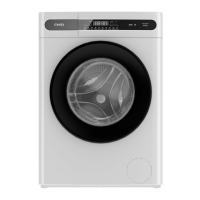
ChiQ WFL8T48W2 Specifications

General IconGeneral
Capacity8 kg
Spin Speed1400 RPM
TypeFront Load
Weight68 kg
Wash ProgramsCotton, Synthetics, Delicate, Quick

Related product manuals